Loading
Form preview
  • US Legal Forms
  • Form Library
  • More Forms
  • More Multi-State Forms
  • Turnitin Anglia Ruskin

Get Turnitin Anglia Ruskin

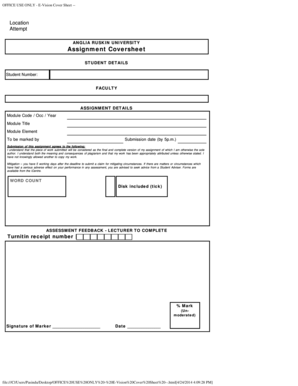
Ule Title Module Element To be marked by Submission date (by 5p.m.) Submission of this assignment agrees to the following: I understand that the piece of work submitted will be considered as the final and complete version of my assignment of which I am otherwise the sole author. I understand both the meaning and consequences of plagiarism and that my work has been appropriately attributed unless otherwise stated. I have not knowingly allowed another to copy my work. Mitigation you have 5 w.

How it works

  1. Open form

    Open form follow the instructions

  2. Easily sign form

    Easily sign the form with your finger

  3. Share form

    Send filled & signed form or save

How to fill out the Turnitin Anglia Ruskin online

Filling out the Turnitin Anglia Ruskin form is an essential step in submitting your academic assignments. This guide provides comprehensive instructions to help you complete the document accurately and efficiently.

Follow the steps to fill out your assignment coversheet online

  1. Press the ‘Get Form’ button to obtain the Turnitin Anglia Ruskin form. This will allow you to access and edit your assignment coversheet.
  2. In the 'Student Details' section, provide your student number and select your faculty from the dropdown menu. This information is crucial for proper identification.
  3. Next, move to the 'Assignment Details' section. Fill in the module code, occurrence (occ), and the year for the course you are enrolled in. Then, add the module title and module element, followed by the name of the person responsible for marking your assignment.
  4. Indicate the submission date, ensuring it is by 5 p.m. on the deadline date. Make sure this date aligns with your faculty’s submission requirements.
  5. Read the statement regarding plagiarism and check the box to acknowledge your understanding of submission policies. This signifies that the submitted work is your own and you are aware of the consequences of academic dishonesty.
  6. Provide any relevant information about word count in the designated space, ensuring it meets the assignment requirements.
  7. If applicable, tick the box for included disks to confirm you have enclosed any relevant materials with your submission.
  8. Finally, after filling out all necessary sections, save your changes. You can choose to download, print, or share the completed form for submission as required.

Complete your Turnitin Anglia Ruskin form online now to ensure timely submission of your assignment.

Get form

Experience a faster way to fill out and sign forms on the web. Access the most extensive library of templates available.
Get form

Related content

Why do University Students in the UK Buy...
by M Naughton · 2020 · Cited by 7 — This article considers the growing crisis on a...
Learn more
Citing - Public Management - Subject Guides at...
Anglia Ruskin University guide. How to Cite Sources in Harvard Citation Format - Mendeley...
Learn more

Related links form

Nypd Apd 6 Applicant Pedigree Sheet Dispute Notification Form - ATM - NetSpend Ups Signature Release Pdf Sponsorship Reply Form

Questions & Answers

Get answers to your most pressing questions about US Legal Forms API.

Contact support

To achieve a 0% similarity score on Turnitin Anglia Ruskin, prioritize writing your own unique content. Be aware of how you integrate external sources into your work; thorough citation and paraphrasing your thoughts are crucial. If you need guidance on writing practices, consider utilizing services available through US Legal Forms to develop effective academic strategies.

To aim for a 0% similarity score on Turnitin Anglia Ruskin, focus on creating original content that reflects your ideas. Ensure you properly cite any external sources you reference and avoid paraphrasing too closely. Using resources within US Legal Forms can help you understand appropriate citation practices and improve originality.

To submit a Turnitin similarity report through Turnitin Anglia Ruskin, complete the review process of your document first. Download the similarity report once it is generated. Make sure to follow any specific submission guidelines from your instructor for sharing this report.

A 0% similarity score on Turnitin Anglia Ruskin does not necessarily mean that your work was generated by AI. It simply indicates that there are no matches found in the Turnitin database. Nonetheless, always be mindful of your academic integrity and create authentic work to avoid potential misunderstandings.

To submit your work on Turnitin Anglia Ruskin, first, log in to your student account. Then, navigate to the assignment portal where your instructor has provided the submission link. Once you find the assignment, upload your document and confirm the submission. After submission, you will receive a confirmation receipt.

A 27% similarity score on Turnitin Anglia Ruskin may be viewed as somewhat problematic. Although the score alone does not guarantee plagiarism, it suggests a significant overlap with existing works. Take the opportunity to analyze the flagged content closely. Making modifications can improve the uniqueness of your submission.

A 32% similarity score on Turnitin Anglia Ruskin typically raises concerns. This percentage suggests that a substantial amount of your work overlaps with existing sources. It's essential to review the report to understand which parts are flagged. Consider revising your paper to reduce this percentage and enhance originality.

A similarity score of 25 on Turnitin Anglia Ruskin is often regarded as high. This score suggests that a significant portion of your work may overlap with existing sources. It’s advisable to review the matched content carefully and revise your work to lower this score, ensuring you maintain academic integrity.

As an Anglia Ruskin student, you can gain access to Turnitin through your course modules. Instructors typically provide a link or section dedicated to Turnitin. If you're having trouble accessing it, reach out to your course coordinator for assistance.

To access your Turnitin score through Anglia Ruskin, log into your student account and navigate to the Turnitin section. Your scores and similarity reports will be displayed there. Reviewing these scores regularly can help you monitor your progress and improve your writing.

Get This Form Now!

Use professional pre-built templates to fill in and sign documents online faster. Get access to thousands of forms.
Get form
If you believe that this page should be taken down, please follow our DMCA take down processhere.
Get Turnitin Anglia Ruskin
Get form
  • Adoption
  • Bankruptcy
  • Contractors
  • Divorce
  • Home Sales
  • Employment
  • Identity Theft
  • Incorporation
  • Landlord Tenant
  • Living Trust
  • Name Change
  • Personal Planning
  • Small Business
  • Wills & Estates
  • Packages A-Z
  • Affidavits
  • Bankruptcy
  • Bill of Sale
  • Corporate - LLC
  • Divorce
  • Employment
  • Identity Theft
  • Internet Technology
  • Landlord Tenant
  • Living Wills
  • Name Change
  • Power of Attorney
  • Real Estate
  • Small Estates
  • Wills
  • All Forms
  • Forms A-Z
  • Form Library
  • Legal Hub
  • About Us
  • Help Portal
  • Legal Resources
  • Blog
  • Affiliates
  • Contact Us
  • Delete My Account
  • Site Map
  • Industries
  • Forms in Spanish
  • Localized Forms
  • State-specific Forms
  • Forms Kit
  • Real Estate Handbook
  • All Guides
  • Notarize
  • Incorporation services
  • For Consumers
  • For Small Business
  • For Attorneys
  • USLegal
  • FormsPass
  • pdfFiller
  • signNow
  • altaFlow
  • DocHub
  • Instapage
Form Packages
  • Adoption
  • Bankruptcy
  • Contractors
  • Divorce
  • Home Sales
  • Employment
  • Identity Theft
  • Incorporation
  • Landlord Tenant
  • Living Trust
  • Name Change
  • Personal Planning
  • Small Business
  • Wills & Estates
  • Packages A-Z
Form Categories
  • Affidavits
  • Bankruptcy
  • Bill of Sale
  • Corporate - LLC
  • Divorce
  • Employment
  • Identity Theft
  • Internet Technology
  • Landlord Tenant
  • Living Wills
  • Name Change
  • Power of Attorney
  • Real Estate
  • Small Estates
  • Wills
  • All Forms
  • Forms A-Z
  • Form Library
Customer Service
  • Legal Hub
  • About Us
  • Help Portal
  • Legal Resources
  • Blog
  • Affiliates
  • Contact Us
  • Delete My Account
  • Site Map
  • Industries
  • Forms in Spanish
  • Localized Forms
  • State-specific Forms
  • Forms Kit
Legal Guides
  • Real Estate Handbook
  • All Guides
Prepared for you
  • Notarize
  • Incorporation services
Our Customers
  • For Consumers
  • For Small Business
  • For Attorneys
Our Sites
  • USLegal
  • FormsPass
  • pdfFiller
  • signNow
  • altaFlow
  • DocHub
  • Instapage
Social Media
Call us now toll free:
+1 833 426 79 33
As seen in:
© Copyright 1999-2026 airSlate Legal Forms, Inc. 3720 Flowood Dr, Flowood, Mississippi 39232
  • Your Privacy Choices
  • Terms of Service
  • Privacy Notice
  • Content Takedown Policy
  • Bug Bounty Program