Loading
Form preview
  • US Legal Forms
  • Other Templates
  • More Forms
  • More Uncategorized Forms
  • Pneumonia Physician Query Form - Career Step

Get Pneumonia Physician Query Form - Career Step

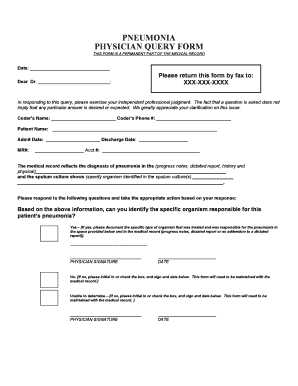
PNEUMONIA PHYSICIAN QUERY FORM THIS FORM IS A PERMANENT PART OF THE MEDICAL RECORD Date: Dear Dr. : Please return this form by fax to: XXX-XXX-XXXX In responding to this query, please exercise your.

How it works

  1. Open form

    Open form follow the instructions

  2. Easily sign form

    Easily sign the form with your finger

  3. Share form

    Send filled & signed form or save

How to fill out the PNEUMONIA PHYSICIAN QUERY FORM - Career Step online

The PNEUMONIA PHYSICIAN QUERY FORM is a vital document used to clarify details regarding a pneumonia diagnosis. This guide will provide step-by-step instructions to assist you in accurately completing the form online.

Follow the steps to effectively complete the form.

  1. Click ‘Get Form’ button to obtain the form and open it in the editor.
  2. Begin by entering the 'Date' at the top of the form, which is essential for record-keeping.
  3. Next, fill in the 'Dear Dr.' section with the physician's name who will be reviewing the query.
  4. Specify the fax number where the completed form should be sent in the 'Please return this form by fax to:' field.
  5. Provide the coder's name and phone number to ensure clear communication if further clarification is needed.
  6. Enter the patient’s name, admit date, discharge date, medical record number, and account number to identify the individual case being referenced.
  7. In the designated area, summarize the medical record's reflection of the pneumonia diagnosis and include any relevant progress notes or reports.
  8. If a sputum culture has been performed, indicate the organism identified in the space provided.
  9. Respond to the question about the specific organism responsible for the patient's pneumonia by indicating 'Yes,' 'No,' or 'Unable to determine,' and complete the required fields based on your response.
  10. If you answered 'Yes,' document the specific type of organism in the provided space and ensure it is noted in the medical record.
  11. For 'No' or 'Unable to determine' responses, initial or check the appropriate box, and ensure to sign and date the form.
  12. Once all sections are completed, save your changes, and prepare to download, print, or share the form as necessary.

Complete your paperwork online now to ensure timely and accurate record-keeping.

Get form

Experience a faster way to fill out and sign forms on the web. Access the most extensive library of templates available.
Get form

Related content

A comparison of pneumonia care quality between...
by T Kenzaka · 2018 · Cited by 3 — The questionnaire assessed participants'...
Learn more
Researchers Develop Approach to Accurately Predict...
Oct 28, 2024 — Using a machine-learning approach to health records, Professor Luís...
Learn more
PATIENT-FOCUSED DRUG DEVELOPMENT September ...
Sep 11, 2017 — know, it is a form of topical immunotherapy. It causes severe itching. I...
Learn more

Related links form

Military Leave Of Absence Idec Slc 40 Form Vat51 Insurance Format Templates For Clients - Jebel Ali Free Zone - Jafza

Questions & Answers

Get answers to your most pressing questions about US Legal Forms API.

Contact support

You would not query a physician if the documentation is clear and contains all the required details supporting the diagnosis and coding. For instance, if the medical records provide comprehensive information about pneumonia, including the type, causes, and treatment plan, a query may be unnecessary. Relying on the PNEUMONIA PHYSICIAN QUERY FORM - Career Step becomes more relevant when ambiguity exists.

A common example of when it may be necessary to query a physician is when the documentation mentions pneumonia but does not specify if it is acute or chronic. This lack of detail can lead to incorrect coding, which in turn can affect reimbursement. Using the PNEUMONIA PHYSICIAN QUERY FORM - Career Step can help gather the necessary information to resolve such discrepancies promptly.

To create a physician query, begin by identifying the specific issue within the medical documentation that needs clarification. The PNEUMONIA PHYSICIAN QUERY FORM - Career Step facilitates this process with its structured format, guiding you in articulating your question clearly and concisely. Ensure to highlight the relevant information so that the physician can provide an informed response quickly.

A coder should query a physician when the documentation does not clearly support the codes that a coder intends to assign. For example, if a diagnosis lacks sufficient supporting details or if there is a potential for misunderstanding, this poses a perfect opportunity for a query. Leveraging the PNEUMONIA PHYSICIAN QUERY FORM - Career Step allows coders to obtain definitive answers, ensuring compliance and accuracy.

A coder should query the physician when there are discrepancies or uncertainties in the medical documentation regarding a patient's condition. For instance, if the records indicate pneumonia but lack specific details such as the type or severity, a query can provide clarity. By utilizing the PNEUMONIA PHYSICIAN QUERY FORM - Career Step, coders can effectively communicate their questions to ensure accurate coding and billing.

'Query pneumonia' refers to the process of seeking clarification on documentation regarding a patient's pneumonia diagnosis. It helps in capturing the correct clinical data necessary for accurate coding and billing. To support this process, the PNEUMONIA PHYSICIAN QUERY FORM - Career Step is designed to assist healthcare professionals in creating effective queries that improve patient record accuracy.

An example of an appropriate query for a physician might be, 'Could you clarify whether this patient has a confirmed diagnosis of pneumonia based on the current imaging results?' This question seeks to clarify vital information that supports accurate coding and billing. The PNEUMONIA PHYSICIAN QUERY FORM - Career Step can provide examples and best practices to ensure your queries meet health documentation standards.

Writing a physician query involves articulating questions that address specific documentation needs. Always ensure that your language is clear and professional, focusing on patient care and the relevance of the information requested. Using the PNEUMONIA PHYSICIAN QUERY FORM - Career Step enhances your ability to formulate precise queries that resonate with physicians.

To write an effective physician query, start by identifying the specific information that is unclear or incomplete in the patient's chart. Clearly state your question and provide context about why the information is necessary. The PNEUMONIA PHYSICIAN QUERY FORM - Career Step offers structured templates to guide you through this process, making it easier to generate clear and concise queries.

Typically, a physician query is generated by a healthcare professional who identifies gaps in the patient's clinical documentation. This could include nurses, coding specialists, or the attending physician. Utilizing the PNEUMONIA PHYSICIAN QUERY FORM - Career Step can facilitate proper communication and lead to more comprehensive clinical documentation.

Get This Form Now!

Use professional pre-built templates to fill in and sign documents online faster. Get access to thousands of forms.
Get form
If you believe that this page should be taken down, please follow our DMCA take down processhere.
Get PNEUMONIA PHYSICIAN QUERY FORM - Career Step
Get form
  • Adoption
  • Bankruptcy
  • Contractors
  • Divorce
  • Home Sales
  • Employment
  • Identity Theft
  • Incorporation
  • Landlord Tenant
  • Living Trust
  • Name Change
  • Personal Planning
  • Small Business
  • Wills & Estates
  • Packages A-Z
  • Affidavits
  • Bankruptcy
  • Bill of Sale
  • Corporate - LLC
  • Divorce
  • Employment
  • Identity Theft
  • Internet Technology
  • Landlord Tenant
  • Living Wills
  • Name Change
  • Power of Attorney
  • Real Estate
  • Small Estates
  • Wills
  • All Forms
  • Forms A-Z
  • Other Templates
  • Legal Hub
  • About Us
  • Help Portal
  • Legal Resources
  • Blog
  • Affiliates
  • Contact Us
  • Delete My Account
  • Site Map
  • Industries
  • Forms in Spanish
  • Localized Forms
  • State-specific Forms
  • Forms Kit
  • Real Estate Handbook
  • All Guides
  • Notarize
  • Incorporation services
  • For Consumers
  • For Small Business
  • For Attorneys
  • USLegal
  • FormsPass
  • pdfFiller
  • signNow
  • altaFlow
  • DocHub
  • Instapage
Form Packages
  • Adoption
  • Bankruptcy
  • Contractors
  • Divorce
  • Home Sales
  • Employment
  • Identity Theft
  • Incorporation
  • Landlord Tenant
  • Living Trust
  • Name Change
  • Personal Planning
  • Small Business
  • Wills & Estates
  • Packages A-Z
Form Categories
  • Affidavits
  • Bankruptcy
  • Bill of Sale
  • Corporate - LLC
  • Divorce
  • Employment
  • Identity Theft
  • Internet Technology
  • Landlord Tenant
  • Living Wills
  • Name Change
  • Power of Attorney
  • Real Estate
  • Small Estates
  • Wills
  • All Forms
  • Forms A-Z
  • Other Templates
Customer Service
  • Legal Hub
  • About Us
  • Help Portal
  • Legal Resources
  • Blog
  • Affiliates
  • Contact Us
  • Delete My Account
  • Site Map
  • Industries
  • Forms in Spanish
  • Localized Forms
  • State-specific Forms
  • Forms Kit
Legal Guides
  • Real Estate Handbook
  • All Guides
Prepared for you
  • Notarize
  • Incorporation services
Our Customers
  • For Consumers
  • For Small Business
  • For Attorneys
Our Sites
  • USLegal
  • FormsPass
  • pdfFiller
  • signNow
  • altaFlow
  • DocHub
  • Instapage
Social Media
Call us now toll free:
+1 833 426 79 33
As seen in:
© Copyright 1999-2026 airSlate Legal Forms, Inc. 17 Station Street, Ste. 203, Brookline, MA 02445
  • Your Privacy Choices
  • Terms of Service
  • Privacy Notice
  • Content Takedown Policy
  • Bug Bounty Program