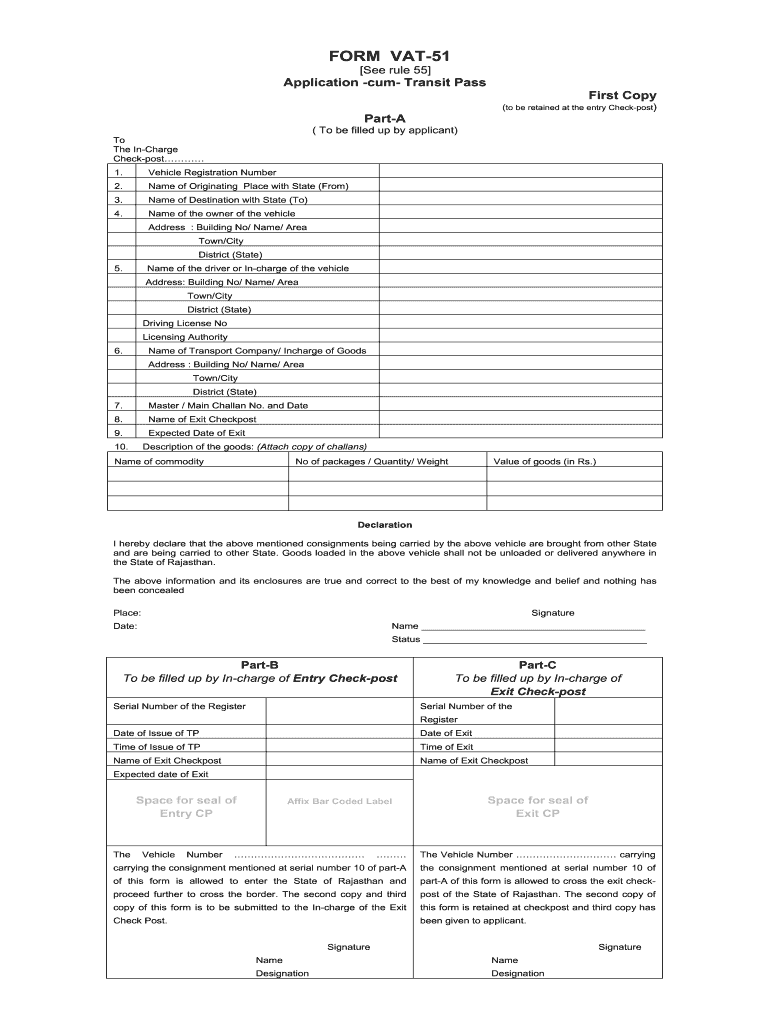
FORM VAT-51 See rule 55 Application -cum- Transit Pass First Copy (to be retained at the entry Check-post) Part-A ( To be filled up by applicant) To The In-Charge Check-post???? 1. Vehicle Registration.
Loading

Open form follow the instructions

Easily sign the form with your finger

Send filled & signed form or save
How to fill out the Vat51 online
The Vat51 form is essential for obtaining an application-cum-transit pass when transporting goods across state borders. This guide will provide you with clear, step-by-step instructions on how to complete the form correctly and efficiently online.
Follow the steps to successfully fill out your Vat51 form online.
- Click the ‘Get Form’ button to obtain the Vat51 form and open it in the editor.
- In Part A, enter the vehicle registration number in the designated field.
- Provide the name of the originating place along with the state from which the goods are being transported.
- Indicate the name of the destination along with the state to which the goods are being transported.
- Fill in the name and address of the vehicle owner, including the building number, area, town or city, district, and state.
- Enter the name and address of the driver or person in charge of the vehicle, along with their driving license number and licensing authority.
- Detail the name of the transport company or person in charge of the goods and provide their address.
- Input the master or main challan number and date associated with the shipment.
- Specify the name of the exit check-post where the vehicle will pass through.
- Indicate the expected date of exit for the vehicle.
- Describe the goods being transported, including the name of the commodity, the number of packages, quantity or weight, and the value of goods in rupees.
- Review the declaration section and confirm that the information provided is accurate. Sign and date the form.
- Once all fields are completed, you can save changes, download, print, or share the completed Vat51 form as needed.
Complete your Vat51 form online today for a smooth transit process.
Experience a faster way to fill out and sign forms on the web. Access the most extensive library of templates available.
Related content
by M Hürtgen · 1999 · Cited by 4 — ... empyemas from 1986 to 1997 were...
ER=CE; APPENDIXES A: Background Papers B: Biographical Sketches of Committee Members and...
Vat 69 is a blended Scotch whisky created by William Sanderson & Son Limited of South...
Get answers to your most pressing questions about US Legal Forms API.
How does a VAT group work?
VAT grouping is a facilitation measure by which two or more bodies corporate can be treated as a single taxable person (a single VAT registration) for VAT purposes. Bodies Corporate includes; companies of all types and limited liability partnerships.
Do I have to form a VAT group?
You will need HMRC approval for them to apply to the VAT group. ... For example, if one of the entities makes exempt supplies, you may need a partial exemption calculation to cover the VAT group as a whole. These exempt supplies may affect the input tax that the whole VAT group can reclaim.
How do I remove a company from VAT group?
You can disband your VAT group online, but for all other changes you must send forms to HMRC by post. You should use: form VAT 56 to change the representative member of a VAT group. form VAT 50 to change or disband the group.
What is a VAT group?
A VAT group is a group of related companies registering to submit a VAT return together so that the process is simplified. Debitoor is Making Tax Digital compliant so you can now submit your VAT return directly to HMRC.
How do I register my company for VAT UK?
Overview. You must register your business for VAT with HM Revenue and Customs ( HMRC ) if its VAT taxable turnover is more than £85,000. When you register, you'll be sent a VAT registration certificate.
What is VAT group treatment?
A VAT group is treated in the same way as a single taxable person registered for VAT on its own. ... The representative member is responsible for completing and submitting a single VAT Return and making VAT payments or receiving VAT refunds on behalf of the group.
What is a VAT 51?
Use form VAT51 to provide details of companies that you're adding or removing from an existing VAT group. If you're using form VAT 50 to apply for VAT group treatment, also use form VAT 51 to provide details of each company or other corporate body in the group. Email HMRC to ask for this form in Welsh (Cymraeg).
Who can be part of a VAT group?
5. VAT grouping is a facilitation measure by which two or more eligible persons can be treated as a single taxable person for VAT purposes. Eligible persons are generally bodies corporate but can include individuals, partnerships and Scottish partnerships provided that certain conditions are satisfied.
What is VAT grouping?
What is a VAT Group Registration? ... A tax group is a group of two or more persons registered with the FTA as a single taxable person subject to fulfilment of conditions under UAE VAT Law. This group registration is only for the purpose of tax.
What is VAT 1614a?
VAT Notice 742A: opting to tax land and buildings. This notice explains the effect of an option to tax and will help you to decide whether to exercise that option. VAT1614A - notification of an option to tax land and buildings. Use form VAT1614A to notify an option to tax land or buildings for VAT purposes.
Use professional pre-built templates to fill in and sign documents online faster. Get access to thousands of forms.
If you believe that this page should be taken down, please follow our DMCA take down process here.