Get Scar Report
How it works
-

Open form follow the instructions
-

Easily sign the form with your finger
-

Send filled & signed form or save
How to fill out the Scar Report online
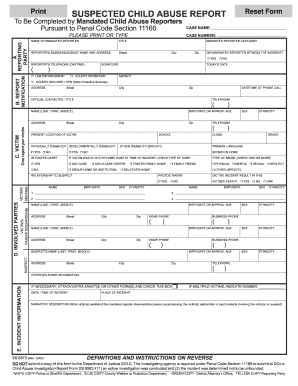
Completing the Scar Report online is a crucial step for mandated reporters to ensure that suspected child abuse cases are documented and reported appropriately. This guide will provide you with clear instructions on how to accurately fill out each section of the report to facilitate the reporting process.
Follow the steps to complete the Scar Report correctly.
- Press the ‘Get Form’ button to access the Scar Report. This will allow you to obtain the necessary form and open it for editing.
- In section A, Reporting Party, clearly enter your name as the mandated reporter, your title, and your business or agency’s name and address. Ensure to provide your daytime telephone number and today’s date. Indicate if you witnessed the incident by checking the appropriate yes or no box.
- Move to section B, Report Notification. Fill in the name and address of the designated agency you notified, the date and time of your call, and the name, title, and telephone number of the official you spoke with.
- In section C, Victim, provide detailed information for the victim, such as their name, address, birthdate or approximate age, sex, ethnicity, present location, school, class, and grade if applicable. Indicate if the victim has any disabilities and whether they are in foster care or received care at the time of the incident. Also, check the box that describes the type of abuse.
- For section D, Involved Parties, enter the information for the victim’s siblings, parents or guardians, and the suspect. Be thorough in collecting any additional information and attach extra sheets if necessary.
- In section E, Incident Information, specify the date and time of the incident and its location. Provide a narrative description of the incident based on what was observed or reported to you. If there are multiple victims, indicate their number and submit a separate report for each.
- After completing the report, review all sections for accuracy and clarity. You can then save the changes, print the report, or share it according to your agency's procedures.
Take action now by completing the Scar Report online to ensure proper reporting of suspected child abuse.
In quality assurance (QA), 'SCAR' stands for Supplier Corrective Action Request. This term describes a request made to a supplier to address defects or non-conformities in their products or services. If you’re involved in a process requiring a SCAR or similar documentation, the resources on the US Legal Forms platform can ensure you are equipped with the right forms.