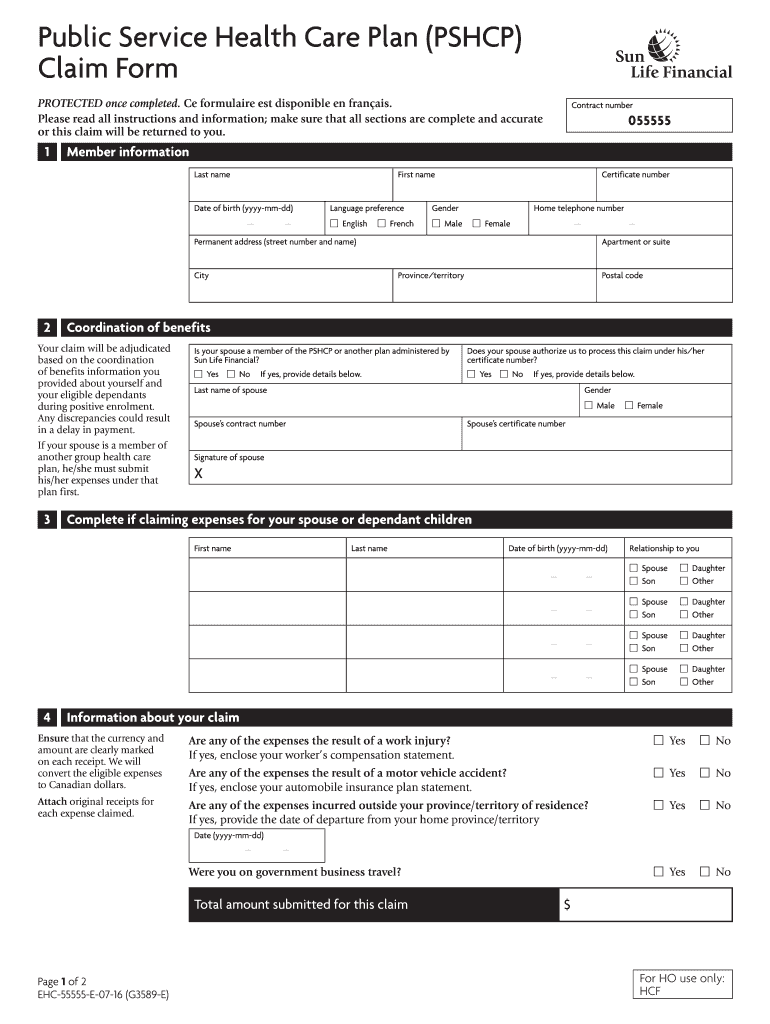
Information; make sure that all sections are complete and accurate or this claim will be returned to you. Contract number 055555 I 1 Member information Last name First name Date of birth (yyyy-mm-dd) Language preference Gender English Male French Certificate number Home telephone number Female Permanent address (street number and name) City Apartment or suite Province/territory Postal code I 2 Coordination of benefits Your.
Loading

Open form follow the instructions

Easily sign the form with your finger

Send filled & signed form or save
How to fill out the Gsmip online
Filling out the Gsmip claim form online can streamline the process of submitting your health care expenses. This guide provides a clear, step-by-step approach to ensure you complete each section accurately and efficiently.
Follow the steps to successfully complete the Gsmip claim form.
- Click ‘Get Form’ button to obtain the form and open it in the editor.
- Enter your member information. Fill in your last name, first name, date of birth (in the format yyyy-mm-dd), language preference, and gender. Provide your certificate number, home telephone number, and permanent address, including the street number, city, province/territory, and postal code.
- In the coordination of benefits section, indicate if your spouse is a member of the PSHCP or another plan administered by Sun Life Financial. Select ‘Yes’ or ‘No’ and provide their last name, gender, contract number, and certificate number if applicable.
- If claiming expenses for your spouse or dependent children, fill in their first name, last name, date of birth, and relationship to you. Repeat this for each dependent you are claiming.
- Provide information about your claim. Indicate if any expenses are the result of a work injury or a motor vehicle accident. Attach original receipts for each expense claimed, and note if any expenses were incurred outside your province/territory of residence.
- In the authorization and signature section, read the definition of spouse, and then sign and date the form. Ensure you certify that the information is true and complete to the best of your knowledge.
- After completing the form, save your changes and use the options available to download, print, or share the form. Ensure you keep a copy for your records before mailing the completed form and receipts to Sun Life.
Complete your documents online today to ensure timely processing of your health care claims.
Experience a faster way to fill out and sign forms on the web. Access the most extensive library of templates available.
Related content
Under the GSMIP revenue sharing model, which is approved by the BCUC, FortisBC Energy can...
Search Result Categories · Recent Additions · 222,296 records found. · Advanced Search...
Get answers to your most pressing questions about US Legal Forms API.
How to submit a claim to Canada Life?
To submit a claim to Canada Life, first gather all necessary documentation, including claim forms and receipts. Complete the claim form accurately, paying attention to the requirements set forth by Canada Life. You can then submit your claim online, by mail, or through an authorized representative. Utilizing Gsmip enhances this process by providing clear guidance and minimizing submission errors.
How to fill out an expense claim form?
Filling out an expense claim form requires you to provide detailed information regarding each expense. List the date of the expense, its nature, and the amount claimed, while attaching supporting documents. Ensure accuracy in your totals to facilitate a smooth approval process. For added convenience, consider using Gsmip’s user-friendly platform to manage and submit your claims efficiently.
Are Canada Life and Sunlife the same?
Canada Life and Sunlife are not the same entity; they are different insurance providers operating in Canada. Both offer various insurance products, but they each have unique features and policy options. It's advisable to compare their offerings to determine which best suits your needs. Gsmip can assist you in understanding the benefits and differences between these companies.
How to fill out a reimbursement form?
To fill out a reimbursement form, start by gathering all relevant receipts and documents. Clearly state the purpose of the reimbursement, whether it relates to travel, supplies, or other expenses. Be sure to include your contact information and any necessary account details. Using the Gsmip system can streamline this process by providing templates and quick submission options.
Are Sun Life and Canada Life the same company?
Sun Life and Canada Life operate as distinct entities, although they share similar functionalities in the insurance market. Both companies offer a range of insurance products and services but are managed separately. If you're considering a policy, using Gsmip can help you compare the offerings of both companies and choose the best option for your needs.
How to file dir6?
Filing dir6 involves submitting the required information concerning your insurance policy and claim. You will need access to specific forms and a thorough understanding of the requirements set by your insurance provider. Gsmip offers resources and guides to help you navigate these requirements and complete your filing efficiently.
How to submit a life insurance claim?
Submitting a life insurance claim involves several steps, including obtaining the claim form and providing necessary documentation, like the death certificate. Ensure you follow the specific instructions from your insurer, which may vary by provider. Using tools available through Gsmip can simplify the process and provide clarity on what documents you need to submit.
How to submit a claim to Canada Life insurance?
To submit a claim to Canada Life insurance, you need to gather relevant documentation, such as the policy number and any supporting forms. Your submission can often be completed online, or you can opt to send it via mail. Platforms like Gsmip may offer useful templates to streamline your submission and ensure that you meet all necessary requirements.
How long do I have to submit a claim to Canada Life?
You typically have a defined period, often within two years, to submit your claim to Canada Life. It's crucial to act promptly, as delayed submissions may lead to complications. Utilizing resources like Gsmip can guide you through the claim process effectively and help ensure that all necessary documents are submitted on time.
How soon can you make a claim on life insurance?
You can typically make a claim on life insurance as soon as you have the necessary documentation, which often includes a death certificate. It is wise to start the process immediately to avoid any complications later. Resources like Gsmip can help guide you through your claims process effectively, ensuring you comply with the required steps.
Use professional pre-built templates to fill in and sign documents online faster. Get access to thousands of forms.
If you believe that this page should be taken down, please follow our DMCA take down process here.