Loading
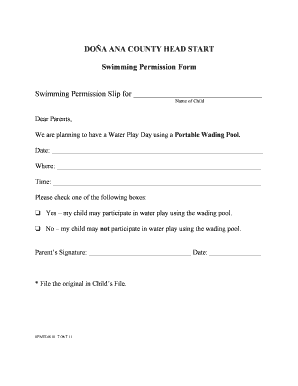
Get Do A Ana County Head Start Swimming Permission Form ... - Nmsu
How it works
-

Open form follow the instructions
-

Easily sign the form with your finger
-

Send filled & signed form or save
How to fill out the DO A ANA COUNTY HEAD START Swimming Permission Form online
Filling out the DO A ANA COUNTY HEAD START Swimming Permission Form is essential for ensuring your child's participation in the upcoming Water Play Day. This guide will provide clear, step-by-step instructions to assist you in completing the form accurately.
Follow the steps to fill out the swimming permission form.
- Click the ‘Get Form’ button to access the swimming permission form and open it in your preferred editing tool.
- In the first blank field, enter the name of your child as it should appear on the permission slip.
- Next, fill in the date of the Water Play Day in the designated space provided.
- In the 'Where' section, specify the location where the event will take place.
- Fill in the 'Time' field with the start time for the Water Play Day.
- Check the appropriate box to indicate whether your child may participate in water play. Choose ‘Yes’ to grant permission or ‘No’ to decline.
- Finally, sign the form in the space provided and include the date of your signature.
- Once all fields are completed, save the changes you have made to the form. You can then download a copy, print it, or share it as needed.
Complete your documents online today to ensure smooth participation in all activities!