Loading
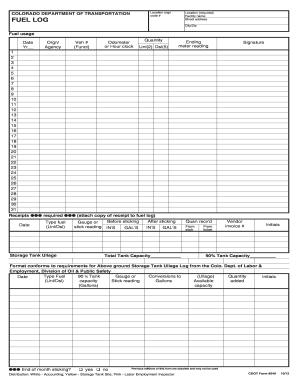
Get Fuel Log Template
How it works
-

Open form follow the instructions
-

Easily sign the form with your finger
-

Send filled & signed form or save
How to fill out the Fuel Log Template online
Filling out the Fuel Log Template online is a straightforward process designed to help users accurately track fuel usage and maintain compliance with relevant regulations. This guide provides step-by-step instructions to assist anyone in completing the form efficiently, ensuring all necessary information is captured accurately.
Follow the steps to successfully complete the Fuel Log Template online:
- Press the ‘Get Form’ button to access the Fuel Log Template and open it in your preferred editor.
- Enter the location information in the required fields, including the facility name, street address, city, and ZIP code.
- Record the fuel usage details such as the date, year, organizational or agency name, vehicle number (function), and either the odometer or hour clock reading.
- Indicate the quantity of fuel used, specifying whether it is unleaded (Unl) or diesel (Dsl). Fill in the ending meter reading for accurate tracking.
- Provide your signature to confirm the information provided in the log. This validates the entries and ensures accountability.
- For each instance of fuel receipt, attach a copy of the receipt to the log and fill in the date and type of fuel used.
- Document the storage tank ullage readings before and after checking the tank level, including both inches (IN'S) and gallons (GAL'S). Ensure you also note the total tank capacity.
- Include any relevant metrics from the vendor invoice, such as the vendor invoice number and initials of the person verifying the entry.
- Indicate whether an end-of-month sticking occurred, selecting 'yes' or 'no' as appropriate.
- Once you have filled out all the necessary sections, save your changes, and choose to download, print, or share the completed Fuel Log Template.
Complete your Fuel Log Template online today to ensure accurate tracking of fuel usage.
Related links form
To create a fuel gauge in Excel, first input your fuel data into a Fuel Log Template. Use Excel's chart features to visualize your fuel consumption trends over time. This graphical representation provides quick insights into your fuel usage, enabling better planning for future trips.