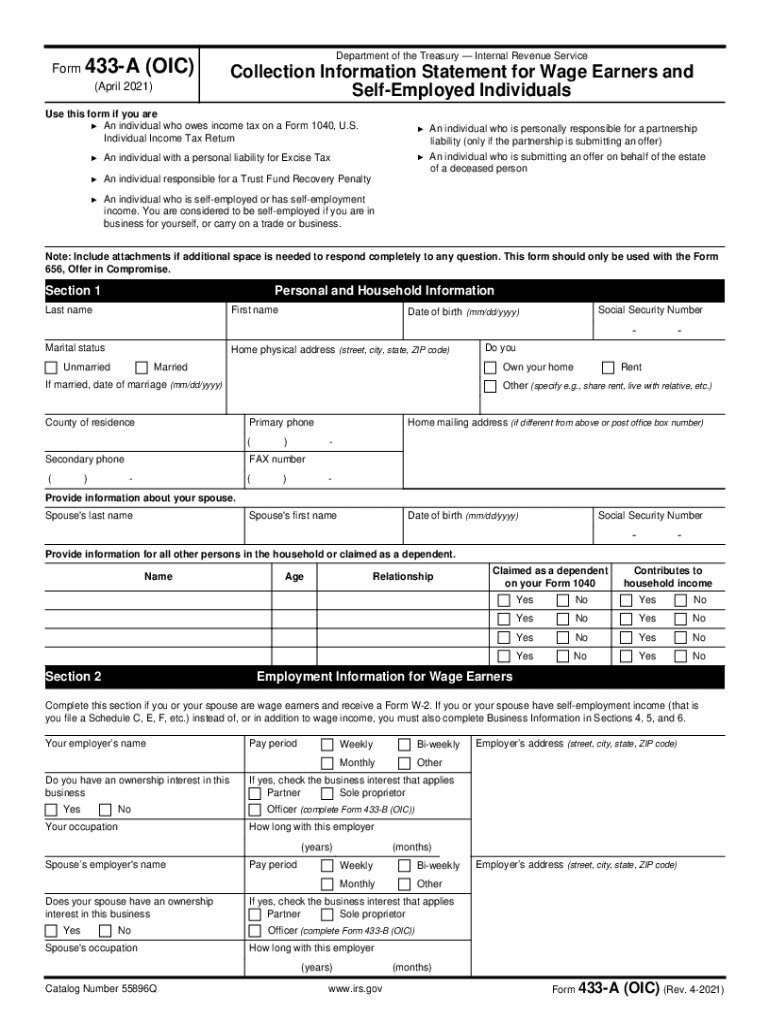
Form 433-A OIC Rev. January 2014 Department of the Treasury Internal Revenue Service Collection Information Statement for Wage Earners and Self-Employed Individuals Use this form if you are An individual who owes income tax on a Form 1040 U.S. Individual Income Tax Return partnership liability income. Employer s Address street city state zip code Your Employer s Name Do you have an interest in this business Your Occupation How long with this employer years months Spouse s Employer s Name Does your spouse have an interest in this business Spouse s Occupation Catalog Number 55896Q www.irs.gov Form 433-A OIC Rev. 1-2014 Page 2 of 8 Personal Asset Information Cash and Investments domestic and foreign Use the most current statement for each type of account such as checking savings money market and online accounts stored value cards such as a payroll card from an employer investment and retirement accounts IRAs Keogh 401 k plans stocks bonds mutual funds certificates of deposit life insuranc....
Loading

Open form follow the instructions

Easily sign the form with your finger

Send filled & signed form or save
How to fill out the IRS 433-A (OIC) online
Filling out the IRS 433-A (OIC) form can aid in settling your tax debt through an offer in compromise. This guide provides step-by-step instructions to help you complete the form accurately and efficiently, ensuring you include all necessary information.
Follow the steps to fill out the form effectively.
- Use the ‘Get Form’ button to access the IRS 433-A (OIC) form. This will allow you to open the document in the editor.
- Begin with Section 1 by providing your personal and household information. Fill in your last name, first name, Social Security number, date of birth, marital status, and home physical address.
- Continue to provide contact information including your primary and secondary phone numbers. If applicable, fill in your home mailing address.
- Complete the spouse’s information if you are married, including their personal details, and any dependents or additional household members required.
- In Section 2, document employment information for all wage earners in the household, including employer names, pay periods, and occupation details.
- Proceed to Section 3 to provide details about your personal assets, including cash, checking and savings accounts, real property, vehicles, and other valuable items.
- For self-employed individuals, fill out Section 4 with business information, including business name, employer identification number, and business assets.
- In Section 6, enter business income and expenses. You may use a current profit and loss statement for accuracy.
- In Section 7, fill in the monthly household income and expenses, calculating totals to determine your financial standing.
- Finally, in Section 8, calculate your minimum offer amount based on your available assets, remaining monthly income, and total household expenses. Ensure all calculations are accurate.
- Review all entries for completeness and accuracy before signing the document in Section 10. Attach any necessary documentation as indicated.
Take action now and fill out your IRS 433-A (OIC) online to work towards settling your tax responsibilities.
Experience a faster way to fill out and sign forms on the web. Access the most extensive library of templates available.
Related content
Form 433-A (OIC) (Rev. 4-2020). Form 433-A (OIC). (April 2020). Department of the Treasury...
Form 433-A (Rev. 5-2020). Form 433-A. (May 2020). Department of the Treasury. Internal...
5 Form 433-A (OIC) (Rev. March 2017) Department of the Treasury — Internal Revenue...
Get answers to your most pressing questions about US Legal Forms API.
What is the difference between Form 433 A and 433 F?
For these three forms, the difference is that the IRS Forms 433A and 433B are both six pages while the IRS Form 433F is two pages long. Also, the IRS Form 433A is for self-employed or wage earners while the IRS Form 433B is for businesses and the IRS Form 433F makes work easier since it includes both.
What does the IRS allow for living expenses?
Allowable living expenses include those expenses that meet the necessary expense test. The necessary expense test is defined as expenses that are necessary to provide for a taxpayer's (and his or her family's) health and welfare and/or production of income.
What is a collection information statement?
The IRS uses Collection Information Statements (Forms 433-F and 433-A) to gather financial information from taxpayers, including people who are self-employed. These forms ask for your monthly income and expenses and the value of any assets you have, such as bank accounts, real estate, stocks, etc.
What is the difference between 433 A and 433 F?
For these three forms, the difference is that the IRS Forms 433A and 433B are both six pages while the IRS Form 433F is two pages long. Also, the IRS Form 433A is for self-employed or wage earners while the IRS Form 433B is for businesses and the IRS Form 433F makes work easier since it includes both.
What is a Form 433 F?
Form 433-F is used to obtain current financial information necessary for determining how a wage earner or self-employed individual can satisfy an outstanding tax liability. Note: You may be able to establish an Online Payment Agreement on the IRS web site.
What are the IRS allowable expenses?
Allowable living expenses include those expenses that meet the necessary expense test. The necessary expense test is defined as expenses that are necessary to provide for a taxpayer's (and his or her family's) health and welfare and/or production of income.
What is IRS Form 433 a used for?
Form 433-A is used to obtain current financial information necessary for determining how a wage earner or self-employed individual can satisfy an outstanding tax liability. If you are an individual who is self-employed or has self- employment income.
How do I fill out a 433?
1:10 28:40 Suggested clip How to complete IRS form 433-A - Collection Information Stmt for ...YouTubeStart of suggested clipEnd of suggested clip How to complete IRS form 433-A - Collection Information Stmt for ...
How much will the IRS usually settle for?
The average amount the IRS settles for in an offer in compromise is $6,629.
How do I fill out IRS Form 433 A?
1:10 28:40 Suggested clip How to complete IRS form 433-A - Collection Information Stmt for ...YouTubeStart of suggested clipEnd of suggested clip How to complete IRS form 433-A - Collection Information Stmt for ...
Use professional pre-built templates to fill in and sign documents online faster. Get access to thousands of forms.
If you believe that this page should be taken down, please follow our DMCA take down process here.
This form is available in several versions. Select the version you need from the drop-down list below.