Loading
Form preview
  • US Legal Forms
  • Form Library
  • More Forms
  • More Uncategorized Forms
  • Safety Performance History Records Request

Get Safety Performance History Records Request

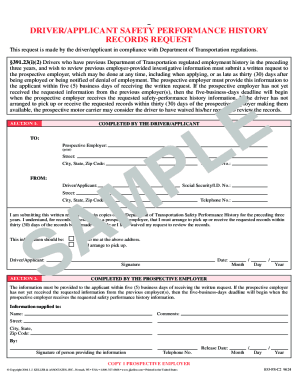
DRIVER/APPLICANT SAFETY PERFORMANCE HISTORY RECORDS REQUEST This request is made by the driver/applicant in compliance with Department of Transportation regulations. 391.23(i)(2) Drivers who have.

How it works

  1. Open form

    Open form follow the instructions

  2. Easily sign form

    Easily sign the form with your finger

  3. Share form

    Send filled & signed form or save

How to fill out the Safety Performance History Records Request online

The Safety Performance History Records Request is a crucial document for drivers and applicants looking to obtain their safety performance records. This guide provides step-by-step instructions on how to complete this form efficiently and accurately online.

Follow the steps to fill out the Safety Performance History Records Request online.

  1. Click ‘Get Form’ button to access the document and open it for editing.
  2. In Section 1, enter the name of the prospective employer in the 'Prospective Employer' field. Be sure to print clearly to avoid any processing delays.
  3. Fill out the street address, city, state, and zip code of the prospective employer accurately in the designated fields.
  4. Provide the telephone number of the prospective employer to facilitate communication.
  5. In the 'FROM' section, enter your details as the driver/applicant. Include your name, Social Security or ID number, street address, city, state, zip code, and telephone number.
  6. In the body of the request, affirm your intention to obtain copies of your Department of Transportation Safety Performance History for the past three years.
  7. Acknowledge that you understand your responsibility to receive the records within thirty (30) days to prevent waiving your request.
  8. Indicate your preference for receiving the information by checking either 'sent to me at the above address' or 'I will arrange to pick up.'
  9. Sign and date the form in the appropriate fields to validate your request.
  10. In Section 2, ensure the prospective employer provides their information, comments, and signature of the person supplying the requested information.
  11. Once completed, you can save changes, download, print, or share the form as needed.

Complete your Safety Performance History Records Request online today!

Get form

Experience a faster way to fill out and sign forms on the web. Access the most extensive library of templates available.
Get form

Related content

safety performance history records request part 1...
I am submitting this written request to obtain copies of my Department of Transportation...
Learn more
SAFETY PERFORMANCE HISTORY RECORDS REQUEST
INSTRUCTIONS FOR COMPLETING THE SAFETY PERFORMANCE HISTORY RECORDS REQUEST. SIDE 1 SECTION...
Learn more
FAA Form 8710-1, Airman Certificate and/or Rating...
The information collected on this form is necessary to determine applicant eligibility for...
Learn more

Related links form

Idt Meeting Template Cooling Log.pdf Sicko Film Discussion Questions New Adult Patient Questionnaire - Northshore

Questions & Answers

Get answers to your most pressing questions about US Legal Forms API.

Contact support

To check a company’s safety record, you can access various public databases and safety performance reports, including those provided by the FMCSA. Reviewing this information helps you assess a company's compliance with safety regulations. Performing a thorough Safety Performance History Records Request will also provide a more detailed view of a company’s safety practices and overall performance.

A DQ checklist is a helpful tool for employers to ensure they have all necessary documents for driver qualifications. This checklist typically includes items like the driver’s application, medical certificates, and previous employment records. Using a checklist can streamline compliance with safety standards. To assist in this process, consider incorporating a Safety Performance History Records Request to verify driver histories.

DOT DQ refers to the Department of Transportation Driver Qualification requirements that employers must meet. These regulations ensure that drivers meet certain standards for safety and competency. Compliance with DOT DQ is essential for maintaining a safe driving workforce. If you need assistance, a Safety Performance History Records Request can be beneficial.

A DQ file must include various documents substantiating a driver's qualifications. Key elements include the driver’s employment application, a copy of their CDL, and any background check results. This information is vital for ensuring compliance with safety regulations. A timely Safety Performance History Records Request can help streamline the process of gathering these files.

A DOT file should contain all relevant information about a driver's qualifications and performance. This includes their driving history, any training completed, and medical examination results. Maintaining an accurate DOT file is crucial for employers, especially in relation to safety performance. When filing a Safety Performance History Records Request, ensure these elements are up to date.

To obtain a Commercial Driver's License Information System (CDLIS) report, you can contact your state’s Department of Motor Vehicles (DMV). They can provide you with the necessary steps to request your report, which will show your driving history. A CDLIS report is particularly useful for employers reviewing a driver’s qualifications. Consider making a Safety Performance History Records Request to enhance this process.

A DQ document, or Driver Qualification document, is essential for employers who need to verify a driver’s experience and qualifications. It typically includes the driver’s employment history, training records, and any certifications. Companies must maintain these documents to comply with safety regulations. Making a Safety Performance History Records Request can help you gather necessary DQ documents.

Yes, you can check your own CSA score. The CSA score provides important insights into your driving history and safety performance. By visiting the Federal Motor Carrier Safety Administration (FMCSA) website, you can access your score. This is a crucial step if you plan to make a Safety Performance History Records Request to ensure all your information is accurate.

A DQ file typically contains a comprehensive collection of information about a driver's qualifications, including their application, licenses, medical certifications, and performance evaluations. It may also include documentation of safety training, incident reports, and drug and alcohol testing results. Keeping this file organized and up to date is essential for supporting Safety Performance History Records Requests and ensuring regulatory compliance.

Previous employment verification for DOT involves collecting information about a driver's work history, specifically the former employers and their evaluations of the individual's performance. Employers must document this information to confirm the driver's qualifications and safety record. This verification process is key in addressing any Safety Performance History Records Requests, ensuring that hiring practices are safe and compliant.

Get This Form Now!

Use professional pre-built templates to fill in and sign documents online faster. Get access to thousands of forms.
Get form
If you believe that this page should be taken down, please follow our DMCA take down processhere.

Industry-leading security and compliance

US Legal Forms protects your data by complying with industry-specific security standards.
  • In businnes since 1997
    25+ years providing professional legal documents.
  • Accredited business
    Guarantees that a business meets BBB accreditation standards in the US and Canada.
  • Secured by Braintree
    Validated Level 1 PCI DSS compliant payment gateway that accepts most major credit and debit card brands from across the globe.
Get Safety Performance History Records Request
Get form
  • Adoption
  • Bankruptcy
  • Contractors
  • Divorce
  • Home Sales
  • Employment
  • Identity Theft
  • Incorporation
  • Landlord Tenant
  • Living Trust
  • Name Change
  • Personal Planning
  • Small Business
  • Wills & Estates
  • Packages A-Z
  • Affidavits
  • Bankruptcy
  • Bill of Sale
  • Corporate - LLC
  • Divorce
  • Employment
  • Identity Theft
  • Internet Technology
  • Landlord Tenant
  • Living Wills
  • Name Change
  • Power of Attorney
  • Real Estate
  • Small Estates
  • Wills
  • All Forms
  • Forms A-Z
  • Form Library
  • Legal Hub
  • About Us
  • Help Portal
  • Legal Resources
  • Blog
  • Affiliates
  • Contact Us
  • Delete My Account
  • Site Map
  • Industries
  • Forms in Spanish
  • Localized Forms
  • State-specific Forms
  • Forms Kit
  • Real Estate Handbook
  • All Guides
  • Notarize
  • Incorporation services
  • For Consumers
  • For Small Business
  • For Attorneys
  • USLegal
  • FormsPass
  • pdfFiller
  • signNow
  • altaFlow
  • DocHub
  • Instapage
Form Packages
  • Adoption
  • Bankruptcy
  • Contractors
  • Divorce
  • Home Sales
  • Employment
  • Identity Theft
  • Incorporation
  • Landlord Tenant
  • Living Trust
  • Name Change
  • Personal Planning
  • Small Business
  • Wills & Estates
  • Packages A-Z
Form Categories
  • Affidavits
  • Bankruptcy
  • Bill of Sale
  • Corporate - LLC
  • Divorce
  • Employment
  • Identity Theft
  • Internet Technology
  • Landlord Tenant
  • Living Wills
  • Name Change
  • Power of Attorney
  • Real Estate
  • Small Estates
  • Wills
  • All Forms
  • Forms A-Z
  • Form Library
Customer Service
  • Legal Hub
  • About Us
  • Help Portal
  • Legal Resources
  • Blog
  • Affiliates
  • Contact Us
  • Delete My Account
  • Site Map
  • Industries
  • Forms in Spanish
  • Localized Forms
  • State-specific Forms
  • Forms Kit
Legal Guides
  • Real Estate Handbook
  • All Guides
Prepared for you
  • Notarize
  • Incorporation services
Our Customers
  • For Consumers
  • For Small Business
  • For Attorneys
Our Sites
  • USLegal
  • FormsPass
  • pdfFiller
  • signNow
  • altaFlow
  • DocHub
  • Instapage
Social Media
Call us now toll free:
+1 833 426 79 33
As seen in:
© Copyright 1999-2026 airSlate Legal Forms, Inc. 3720 Flowood Dr, Flowood, Mississippi 39232
  • Your Privacy Choices
  • Terms of Service
  • Privacy Notice
  • Content Takedown Policy
  • Bug Bounty Program