Loading
Get Charles Schwab Charitable Gift Transfer
How it works
-

Open form follow the instructions
-

Easily sign the form with your finger
-

Send filled & signed form or save
How to fill out the Charles Schwab Charitable Gift Transfer online
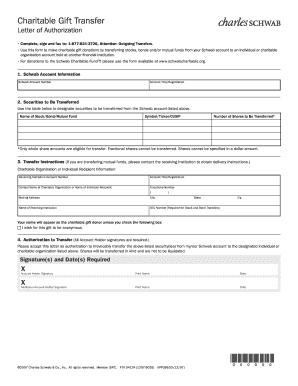
This guide provides step-by-step instructions for completing the Charles Schwab Charitable Gift Transfer form online. You will learn how to fill out each section accurately to ensure successful charitable donations.
Follow the steps to complete your charitable gift transfer form effectively.
- Press the ‘Get Form’ button to access the Charles Schwab Charitable Gift Transfer form and open it in your chosen online editor.
- Begin by filling in your Schwab account information. Input your Schwab account number and the account title or registration associated with it.
- Move on to the section for securities to be transferred. In the provided table, list the name of each stock, bond, or mutual fund you wish to transfer, along with its corresponding symbol, ticker, or CUSIP. Specify the number of whole shares you wish to transfer, noting that fractional shares cannot be accepted.
- For transfer instructions, provide detailed recipient information. Enter the receiving institution’s account number, account title, and the name and contact number of the individual at the charitable organization or the individual recipient. Don’t forget to fill in the mailing address, including the city, state, and zip code.
- If applicable, indicate whether you wish to remain anonymous by checking the designated box.
- In the authorization to transfer section, all account holders must provide their signatures and dates. Ensure that each holder signs, prints their name, and dates the authorization.
- Once all sections are completed, review all information for accuracy. Save your changes, and proceed to print or share the completed form as needed.
Complete your Charles Schwab Charitable Gift Transfer online today to make your charitable contributions seamless.
Recently, Schwab rebranded its charitable division to enhance its offering and align better with its mission. Now known as Charles Schwab Charitable, it continues to provide a reliable platform for charitable giving. Through the Charles Schwab Charitable Gift Transfer, donors can navigate their charitable journeys with ease and confidence.