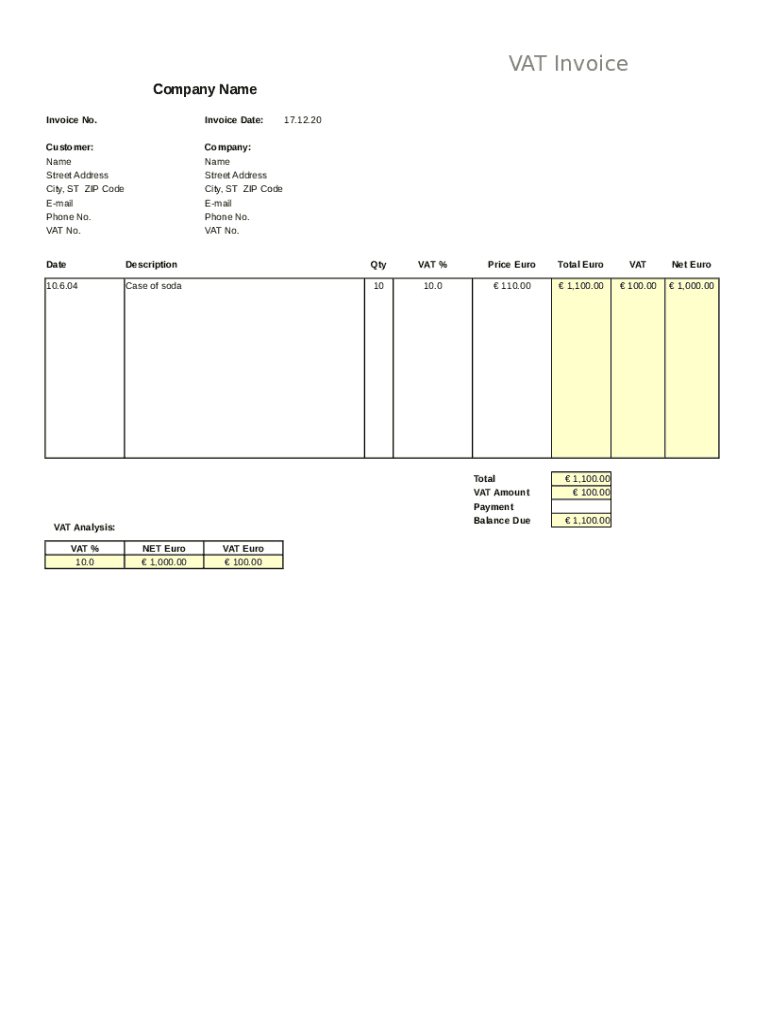
VAT Invoice Company Name Invoice No.Invoice Date:Customer: Name Street Address City, ST ZIP Code Email Phone No. VAT No.Company: Name Street Address City, ST ZIP Code Email Phone No. VAT No.17.12.20DateDescriptionQtyVAT.
Loading

Open form follow the instructions

Easily sign the form with your finger

Send filled & signed form or save
How to fill out the VAT Invoice online
Filling out a VAT Invoice accurately is essential for efficient billing and compliance. This guide will provide you with step-by-step instructions to complete the VAT Invoice form online, ensuring that you understand each component and its purpose.
Follow the steps to fill out the VAT Invoice form correctly.
- Click ‘Get Form’ button to obtain the VAT Invoice and open it for editing.
- Input the company name at the top of the invoice. This should be the name of the business issuing the invoice.
- Fill in the invoice number. This unique identifier helps keep track of your invoices and payments.
- Enter the invoice date. This should reflect the date the goods or services were provided.
- For the customer section, enter the customer's name, street address, city, state, ZIP code, email, phone number, and VAT number.
- In the company section, provide your company’s name, street address, city, state, ZIP code, email, phone number, and VAT number.
- Fill in the date of the transaction in the specified field.
- In the description area, specify the products or services provided.
- Input the quantity of items sold in the designated field.
- Indicate the applicable VAT percentage for the transaction.
- Fill in the price in Euros for the items listed.
- The total amount in Euros will auto-calculate. Ensure it reflects the sum of the items before VAT.
- Indicate the VAT amount in Euros separately.
- Fill in the net amount in Euros, which is the total minus the VAT amount.
- Finally, summarize the total, VAT amount, and balance due at the bottom of the invoice.
- Once all fields are completed accurately, save your changes, and download or print the VAT Invoice for your records or sharing.
Complete your VAT Invoice online today to streamline your billing process.
Experience a faster way to fill out and sign forms on the web. Access the most extensive library of templates available.
Related content
Feb 17, 2017 — Resources for Implementing Partners. What information needs to be...
- Express Check Out invoices/receipts may not be the Final Tax Invoice/Receipt. - Adequate...
Jump to Tax Law — The value added tax (VAT) must be shown on the invoices - if there is...
Get answers to your most pressing questions about US Legal Forms API.
How do I get a VAT invoice?
A unique, sequential invoice number. Your name or trading name and address. Your VAT registration number. The invoice date. The time of supply, also referred to as tax point , if this is different from the date above. The customer's name or trading name and address.
What is the difference between an invoice and a VAT invoice?
While a commercial invoice is simply the standard type of payment demand issued after the delivery of goods and services, VAT invoices have a much more specific purpose. In short, you must issue a valid VAT invoice to charge VAT on sales or reclaim VAT that you're charged for goods and services.
Do I have to provide a VAT invoice?
If you sell a customer a product or a service, you need to give them an invoice (bill) by law if both you and the customer are registered for VAT (a business to business transaction). An invoice is not the same as a receipt, which is an acknowledgement of payment. ... when the customer must pay you.
What does this is not a VAT invoice mean?
16,815 3,571. No it means that you cannot use them to reclaim any VAT charged. Often used when you want to encourage someone to pay quickly as a proper VAT invoice will be issued at that date.
What is a VAT invoice?
A VAT invoice is a specific type of invoice that's issued when a sale is subject to sales tax. ... Businesses that aren't registered for VAT should never charge sales tax and should always issue standard invoices instead of VAT invoices.
What needs to be on a VAT invoice?
A full VAT invoice needs to show: the supplier's name, address and VAT registration number. the name and address of the person to whom the goods are supplied. a unique identification number (see below for more information)
Should I include VAT on an invoice?
If you are not registered for VAT, then VAT is irrelevant... you do not add it to your invoice - although this does mean you cannot reclaim any VAT you are charged on your purchases. So your invoice value is (as you say) hours x rate .
Is a VAT receipt the same as an invoice?
To reclaim VAT on the purchases that you've acquired for your business you need to have a valid VAT receipt (or VAT invoice) as proof of the purchase and that you've paid VAT on that purchase. If you don't have a valid VAT receipt you cannot reclaim the VAT.
Do I need to include VAT on invoice?
If you're registered for VAT you must include your VAT number on your invoices, and comply with HMRC's rules about VAT invoices. These rules include that an invoice must show: ... the time of supply (also known as the tax point) if this is different from the invoice date. the customer's name (or trading name) and address.
Use professional pre-built templates to fill in and sign documents online faster. Get access to thousands of forms.
If you believe that this page should be taken down, please follow our DMCA take down process here.