Get Uic Application Fee Waiver
How it works
-

Open form follow the instructions
-

Easily sign the form with your finger
-

Send filled & signed form or save
How to fill out the Uic Application Fee Waiver online
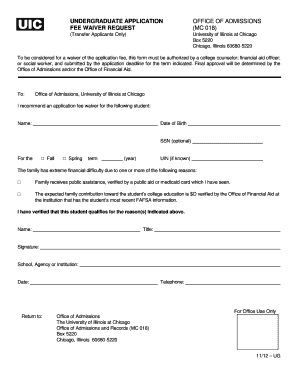
Completing the Uic Application Fee Waiver online is an essential step for students seeking financial support for their application fees. This comprehensive guide will walk you through each section of the form, ensuring a smooth and successful completion.
Follow the steps to submit your application fee waiver request online.
- Click ‘Get Form’ button to obtain the form and open it in the editor.
- Begin by entering the student's name in the designated field. Ensure you provide the full legal name as it appears on official documents.
- Next, input the student's date of birth to verify their identity. This field is crucial for processing the request.
- If the student chooses to provide their Social Security Number (SSN), please enter it in the optional field. If not, you may leave this blank.
- Select the appropriate term for the application by checking either 'Fall' or 'Spring,' and include the year of enrollment.
- If known, enter the University Identification Number (UIN) in the specified area.
- Indicate the financial circumstances by checking the appropriate reasons for the fee waiver request, including public assistance or an expected family contribution of $0.
- The form must be signed by a college counselor, financial aid officer, or social worker. Ensure that the signatory's name, title, and contact information are included.
- Finally, review all the information for accuracy and completeness. Save your changes, and then proceed to download, print, or share the completed form as needed.
Take the next step towards your education by completing the Uic Application Fee Waiver online today.
You should send your I-912 form, which is essential for applying for the Uic Application Fee Waiver, to the designated address specified in the instructions on the form. Typically, this address will be somewhere within the USCIS or the respective institution's office handling application fees. Ensure you double-check that you are using the most recent directions to avoid confusion. If you need further guidance, Uslegalforms can help clarify the submission process.