Loading
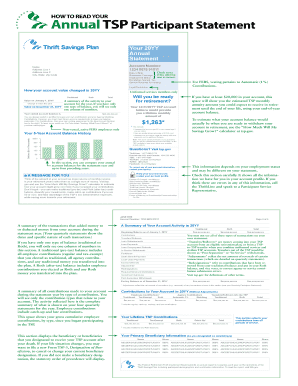
Get How To Read 2012 Tsp Statement Form
How it works
-

Open form follow the instructions
-

Easily sign the form with your finger
-

Send filled & signed form or save
How to fill out the How To Read 2012 Tsp Statement Form online
Understanding your TSP statement can help you prepare for retirement effectively. This guide provides clear, step-by-step instructions on how to fill out the How To Read 2012 Tsp Statement Form online, ensuring you have all the details you need at hand.
Follow the steps to fill out your TSP statement form easily.
- Press the ‘Get Form’ button to obtain the form and open it in your online tool or editor.
- Review your personal information section, including your name, address, date of birth, and employment status. Ensure all details are current and correct.
- Examine the account value section. This includes the total value of your account on January 1, the change in value throughout the year, and the ending balance on December 31.
- Check the contributions made during the year. This section shows all contributions to your account broken down by type, such as employee and agency contributions.
- Look at your investment allocation section. This will indicate how your balance is distributed among the different TSP funds as well as any changes you’ve made regarding future contributions.
- Review your beneficiary information. Make sure the names and shares designated to your beneficiaries are up to date.
- If applicable, check your loan summary section to see details of any loans taken from your TSP account throughout the year.
- Finally, after confirming all details are accurate and complete, save your changes, download the document, or print it if you need a hard copy for your records.
Start filling out your TSP statement form online today for a better understanding of your retirement savings!
The TSP account number is a 13-digit number that participants use to identify their accounts. You can use the account number or the username you create to access your account on the TSP website. If you want to log into your TSP account, go to tsp.gov and click on the “sign in” link.
Industry-leading security and compliance
US Legal Forms protects your data by complying with industry-specific security standards.
-
In businnes since 199725+ years providing professional legal documents.
-
Accredited businessGuarantees that a business meets BBB accreditation standards in the US and Canada.
-
Secured by BraintreeValidated Level 1 PCI DSS compliant payment gateway that accepts most major credit and debit card brands from across the globe.