Loading
Form preview
  • US Legal Forms
  • Form Library
  • More Forms
  • More Multi-State Forms
  • Spot Award Template

Get Spot Award Template

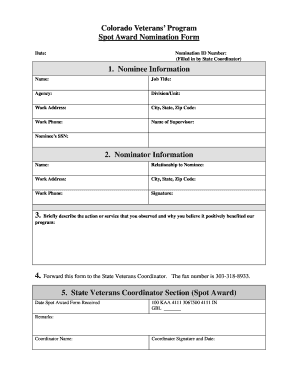
Ss: City, State, Zip Code: Work Phone: Name of Supervisor: Nominee s SSN: 2. Nominator Information Name: Relationship to Nominee: Work Address: City, State, Zip Code: Work Phone: Signature: 3. Briefly describe the action or service that you observed and why you believe it positively benefited our program: 4. Forward this form to the State Veterans Coordinator. The fax number is 303-318-8933. 5. State Veterans Coordinator Section (Spot Award) Date Spot Award Form Received 100 KA.

How it works

  1. Open form

    Open form follow the instructions

  2. Easily sign form

    Easily sign the form with your finger

  3. Share form

    Send filled & signed form or save

How to fill out the Spot Award Template online

This guide provides clear instructions on filling out the Spot Award Template online. By following these steps, you will ensure that your nomination is submitted correctly and efficiently.

Follow the steps to complete your nomination form.

  1. Click ‘Get Form’ button to obtain the Spot Award Template and open it in the editor.
  2. In the 'Nominee Information' section, enter the nominee's name, job title, agency, division/unit, work address, city, state, zip code, work phone, name of supervisor, and nominee’s social security number. Ensure all details are accurate.
  3. In the 'Nominator Information' section, input your name, relationship to the nominee, your work address, city, state, zip code, work phone, and provide your signature to validate your nomination.
  4. In the space provided, briefly describe the action or service that you observed from the nominee. Explain how it positively benefited the program, highlighting specific details and outcomes.
  5. Forward this completed form to the State Veterans Coordinator. Include the fax number 303-318-8933 for efficient submission.
  6. In the 'State Veterans Coordinator Section', complete the date the Spot Award Form is received, and input any necessary remarks. The coordinator should provide their name, signature, and the date.
  7. Once all sections of the form are filled out correctly, save your changes. You may download, print, or share the form as required.

Complete your Spot Award Template online today and recognize outstanding contributions!

Get form

Experience a faster way to fill out and sign forms on the web. Access the most extensive library of templates available.
Get form

Related content

Awards and Recognition Program
Feb 6, 2007 — Select the “Mass Award” button under the Manager's Tab. Select the...
Learn more
Spot Awards | People & Culture
A Spot Award lets employees know that someone has noticed their noteworthy contribution...
Learn more
Overlays
Plex has three available spots in the Plex DB to store ratings and thus Kometa can be used...
Learn more

Related links form

IDA REGISTERED DIETITIAN EXAMINATION - Indian Dietetic ... BARGAINING COUNCIL FOR THE CIVIL ENGINEERING INDUSTRY - Bccei Co Chemistry Form Ws5 5 1a Answers Funeral For:

Questions & Answers

Get answers to your most pressing questions about US Legal Forms API.

Contact support

A spot award refers to an immediate form of recognition given to employees for their outstanding performance. It serves as a prompt acknowledgment of an employee’s efforts, reinforcing a culture of appreciation within the organization. With a thoughtful Spot Award Template, you can provide consistent and clear messaging about the significance of these awards.

To receive a spot award, employees generally need to demonstrate extraordinary performance or achieve specific goals. Many organizations encourage employees to communicate their accomplishments to supervisors, who then evaluate the contributions. Creating a Spot Award Template can help streamline this process by establishing clear guidelines for what qualifies for an award.

The criteria for spot awards usually include specific accomplishments that exceed job expectations. These can involve exceptional teamwork, innovative problem-solving, or delivering results under tight deadlines. By using a Spot Award Template, you can clearly communicate these criteria to employees, ensuring transparency and fairness in the recognition process.

A spot reward is an immediate recognition or incentive provided to employees for their exceptional performance at work. Unlike traditional performance bonuses, spot rewards are typically given spontaneously to acknowledge specific actions or achievements. Companies often leverage a Spot Award Template to streamline this process, ensuring that rewards are consistent and aligned with organizational goals. This practice fosters a culture of appreciation and motivates employees to maintain high standards.

Setting up an award involves identifying the criteria that will be used to recognize exemplary employee performance. Start by creating a clear Spot Award Template that outlines the guidelines for eligibility and the type of recognition offered. Next, communicate these specifics to all employees to ensure transparency. By following these steps, you can create a well-structured award program that encourages employees to strive for excellence.

Spot awards are immediate rewards given to acknowledge and encourage exceptional employee performance. They often come in the form of bonuses, gift cards, or other incentives, and serve to boost morale and motivation. By using a Spot Award Template, organizations can ensure these recognitions are consistent and impactful.

Criteria for a spot award can vary by organization but often include exceptional performance, innovation, or teamwork. Companies usually look for noticeable contributions that positively impact their goals. To ensure clarity, many organizations use a Spot Award Template to define these criteria, making it easier for employees to understand what qualifies.

A spot award on your paycheck is a bonus given for exceptional work, typically outside of your regular salary. It serves as recognition for your contributions to the company, such as completing a critical project. This monetary appreciation can be detailed on your paycheck with a description referencing the specific achievement, making the reward clear and tangible.

To add a spot award to your resume, find a suitable section like 'Awards' or 'Achievements.' You can format it as follows: 'Spot Award for Outstanding Performance, Company Name, Date.' This concise entry highlights your accomplishments while reinforcing your skills, making it easier for employers to recognize your value.

Award wording should be clear and impactful. For example, you might say, 'In recognition of Jane's outstanding performance in exceeding sales targets, this spot award acknowledges her dedication and hard work.' Using a Spot Award Template can help you choose concise and meaningful phrases that effectively convey appreciation.

Get This Form Now!

Use professional pre-built templates to fill in and sign documents online faster. Get access to thousands of forms.
Get form
If you believe that this page should be taken down, please follow our DMCA take down processhere.

Industry-leading security and compliance

US Legal Forms protects your data by complying with industry-specific security standards.
  • In businnes since 1997
    25+ years providing professional legal documents.
  • Accredited business
    Guarantees that a business meets BBB accreditation standards in the US and Canada.
  • Secured by Braintree
    Validated Level 1 PCI DSS compliant payment gateway that accepts most major credit and debit card brands from across the globe.
Get Spot Award Template
Get form
  • Adoption
  • Bankruptcy
  • Contractors
  • Divorce
  • Home Sales
  • Employment
  • Identity Theft
  • Incorporation
  • Landlord Tenant
  • Living Trust
  • Name Change
  • Personal Planning
  • Small Business
  • Wills & Estates
  • Packages A-Z
  • Affidavits
  • Bankruptcy
  • Bill of Sale
  • Corporate - LLC
  • Divorce
  • Employment
  • Identity Theft
  • Internet Technology
  • Landlord Tenant
  • Living Wills
  • Name Change
  • Power of Attorney
  • Real Estate
  • Small Estates
  • Wills
  • All Forms
  • Forms A-Z
  • Form Library
  • Legal Hub
  • About Us
  • Help Portal
  • Legal Resources
  • Blog
  • Affiliates
  • Contact Us
  • Delete My Account
  • Site Map
  • Industries
  • Forms in Spanish
  • Localized Forms
  • State-specific Forms
  • Forms Kit
  • Real Estate Handbook
  • All Guides
  • Notarize
  • Incorporation services
  • For Consumers
  • For Small Business
  • For Attorneys
  • USLegal
  • FormsPass
  • pdfFiller
  • signNow
  • altaFlow
  • DocHub
  • Instapage
Form Packages
  • Adoption
  • Bankruptcy
  • Contractors
  • Divorce
  • Home Sales
  • Employment
  • Identity Theft
  • Incorporation
  • Landlord Tenant
  • Living Trust
  • Name Change
  • Personal Planning
  • Small Business
  • Wills & Estates
  • Packages A-Z
Form Categories
  • Affidavits
  • Bankruptcy
  • Bill of Sale
  • Corporate - LLC
  • Divorce
  • Employment
  • Identity Theft
  • Internet Technology
  • Landlord Tenant
  • Living Wills
  • Name Change
  • Power of Attorney
  • Real Estate
  • Small Estates
  • Wills
  • All Forms
  • Forms A-Z
  • Form Library
Customer Service
  • Legal Hub
  • About Us
  • Help Portal
  • Legal Resources
  • Blog
  • Affiliates
  • Contact Us
  • Delete My Account
  • Site Map
  • Industries
  • Forms in Spanish
  • Localized Forms
  • State-specific Forms
  • Forms Kit
Legal Guides
  • Real Estate Handbook
  • All Guides
Prepared for you
  • Notarize
  • Incorporation services
Our Customers
  • For Consumers
  • For Small Business
  • For Attorneys
Our Sites
  • USLegal
  • FormsPass
  • pdfFiller
  • signNow
  • altaFlow
  • DocHub
  • Instapage
Social Media
Call us now toll free:
+1 833 426 79 33
As seen in:
© Copyright 1999-2026 airSlate Legal Forms, Inc. 3720 Flowood Dr, Flowood, Mississippi 39232
  • Your Privacy Choices
  • Terms of Service
  • Privacy Notice
  • Content Takedown Policy
  • Bug Bounty Program