Loading
Get Funeral For:
How it works
-

Open form follow the instructions
-

Easily sign the form with your finger
-

Send filled & signed form or save
How to fill out the Funeral For: online
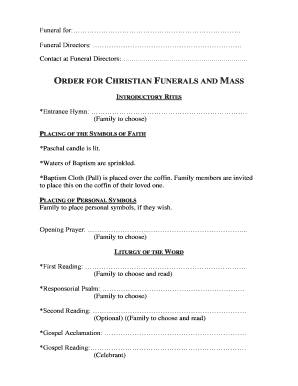
This guide provides a clear and supportive overview for filling out the Funeral For: document. It aims to assist users in navigating the form with ease and sensitivity during a challenging time.
Follow the steps to complete your Funeral For: form effectively.
- Press the ‘Get Form’ button to access the Funeral For: document and open it in your preferred online editor.
- Fill in the name of the deceased in the 'Funeral For:' field, ensuring that the name is spelled correctly and includes any necessary titles.
- In the 'Funeral Directors' section, enter the name of the funeral home or director handling the arrangements.
- Provide the contact information for the funeral directors, including a phone number and email address for easy communication.
- For the 'Entrance Hymn,' select a hymn that the family prefers and jot it down in the space provided.
- Complete the 'Placing of Personal Symbols' section with any special items or memories the family wishes to include.
- For the 'Opening Prayer,' choose and write down a prayer that resonates with the family’s beliefs.
- In the 'Liturgy of the Word' section, fill out the selections for first and second readings from the scriptures, making sure to consult family preferences.
- Fill in the details for the 'Eulogy,' indicating who will present it, be it a family member or friend.
- Complete the 'Final Commendation' section by filling in the details of the final service location, including cemetery or crematorium.
- Indicate whether an organist or cantor is required for the service and provide consent for arrangements if needed.
- If desired, complete the section for the obituary notice, including the 10-line detail and a photo, ensuring to follow the space guidelines.
- Once all sections are filled out, review the document for accuracy and completeness before saving your changes.
- Download or print the completed form for your records, or share it as required with necessary parties.
Complete your Funeral For: document online today and ensure all necessary arrangements are made with ease.
'Candle In The Wind': Elton John And The Best-Selling Single Of All Time.