Loading
Get Mercy College Drivers Ed
How it works
-

Open form follow the instructions
-

Easily sign the form with your finger
-

Send filled & signed form or save
How to fill out the Mercy College Drivers Ed online
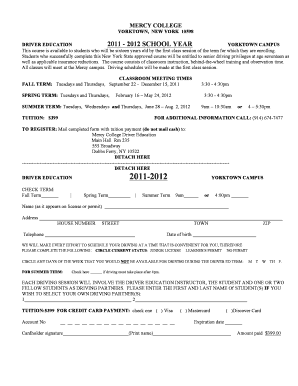
Filling out the Mercy College Drivers Ed form online is a straightforward process that helps students prepare for their driving education. This guide provides users with a detailed, step-by-step approach to complete the form accurately and efficiently.
Follow the steps to complete your Drivers Ed registration
- Click ‘Get Form’ button to initiate the form acquisition process and access it in the provided interface.
- Select the term for which you are registering by checking the appropriate box next to Fall Term, Spring Term, or Summer Term.
- Indicate your preferred class time by marking either 9 am or 4:00 pm beside the selected term.
- Provide your name exactly as it appears on your driver's license or learner's permit in the designated field.
- Fill in your complete address, including house number, street, town, and ZIP code.
- Enter your telephone number in the specified section.
- Fill in your date of birth in the required format to confirm eligibility for the program.
- Circle your current status—Junior License, Learner's Permit, or No Permit—to help with scheduling.
- Indicate any days of the week you are unavailable for driving lessons by circling them as applicable during the driving term.
- If driving must take place after 4 pm, make sure to check the corresponding box.
- List the names of any preferred driving partners if you wish to select them for your sessions.
- For credit card payments, select your card type, fill out the account number, expiration date, and cardholder signature. Ensure the total tuition amount of $399 is mentioned.
- Review all entered information for accuracy and completeness before submitting the form.
- Once finalized, you can save changes, download, print, or share the completed form as needed.
Start your registration for the Mercy College Drivers Ed online today!
If you need to drop a class at Mercy College, you can start by visiting the student portal. From there, locate the registration section, where you will find options to manage your courses. Be sure to check the deadlines for dropping classes to avoid academic penalties. If you have further questions or need assistance, the Mercy College Drivers Ed staff can guide you through the process.
Industry-leading security and compliance
US Legal Forms protects your data by complying with industry-specific security standards.
-
In businnes since 199725+ years providing professional legal documents.
-
Accredited businessGuarantees that a business meets BBB accreditation standards in the US and Canada.
-
Secured by BraintreeValidated Level 1 PCI DSS compliant payment gateway that accepts most major credit and debit card brands from across the globe.