Loading
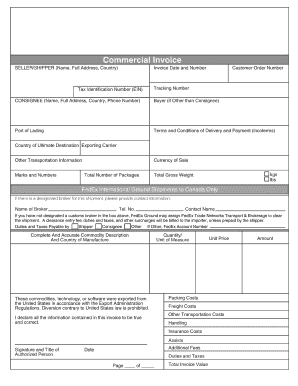
Get Fedex Commercial Invoice Canada Pdf Fillable Form
How it works
-

Open form follow the instructions
-

Easily sign the form with your finger
-

Send filled & signed form or save
How to fill out the Fedex Commercial Invoice Canada PDF Fillable Form online
The Fedex Commercial Invoice Canada PDF Fillable Form is essential for shipping goods internationally. This guide provides comprehensive instructions on how to complete the form accurately while ensuring a smooth shipping process.
Follow the steps to fill out the Fedex Commercial Invoice Canada PDF Fillable Form.
- Click ‘Get Form’ button to obtain the form and open it in the editor.
- Begin filling out the 'Exporter Information' section. Include your name, company name, address, and contact information. Make sure all details are accurate to avoid any shipping delays.
- Proceed to the 'Consignee Information' section. Enter the recipient's name and address in Canada. Double-check the accuracy to ensure timely delivery.
- In the 'Description of Goods' field, describe each item being shipped. Include details such as the quantity, value, and specific nature of the goods for customs clearance.
- Move on to the 'Value' section. Clearly state the total value of the items and the currency used. Ensure that this aligns with the invoices or purchase records.
- Complete the 'Shipping Charges' section. Indicate whether the freight charges are prepaid or collect based on your shipping arrangement.
- Fill in the 'Signature' and 'Date' section. This is necessary to certify the accuracy of the information provided and to authorize the shipment.
- Review all sections of the form for completeness and accuracy. It is crucial to ensure that all required information is filled out.
- Finally, save your changes. You can download a copy of the filled form, print it, or share it as required.
Start filling out the Fedex Commercial Invoice Canada PDF Fillable Form online today to enhance your shipping experience.
You can choose from three ways to complete and submit your Commercial Invoice: Select to create the document with FedEx Ship Manager® at fedex.com while creating your shipping label online. Then print the Commercial Invoice and attach to your package along with the shipping label.