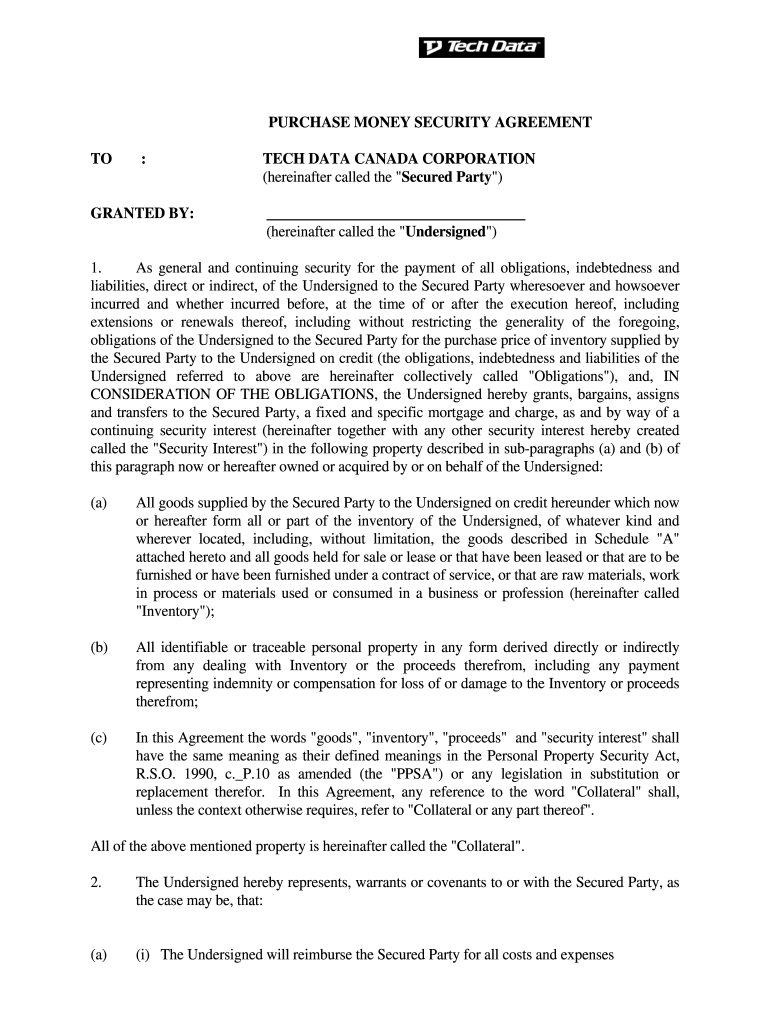
PURCHASE MONEY SECURITY AGREEMENT TO TECH DATA CANADA CORPORATION hereinafter called the Secured Party GRANTED BY As general and continuing security for the payment of all obligations indebtedness and liabilities direct or indirect of the Undersigned to the Secured Party wheresoever and howsoever incurred and whether incurred before at the time of or after the execution hereof including extensions or renewals thereof including without restricting.
Loading

Open form follow the instructions

Easily sign the form with your finger

Send filled & signed form or save
How to fill out the Form Purchase Money Security Agreement online
Filling out the Form Purchase Money Security Agreement online can be an essential step in securing financial transactions. This guide provides clear steps to help you navigate the form smoothly and effectively, ensuring you complete it accurately.
Follow the steps to complete your Form Purchase Money Security Agreement.
- Click ‘Get Form’ button to access the form and open it in the editor.
- In the first section, enter the full and exact name of the person or corporation who is granting the security interest. This will be referred to as 'Undersigned' in the document.
- Next, identify the 'Secured Party,' which in this case is Tech Data Canada Corporation. Ensure this is correctly spelled and accurately reflects the entity.
- Under paragraph 1, carefully review the definitions, and provide details about the property that will be used as collateral, categorized as 'Inventory' and ensure all items are accurately listed.
- In subsection 2(a), confirm your representations regarding the collateral, ensuring you understand your obligations related to reimbursement for expenses, and include any necessary details.
- Continue through section 2, providing required details about collateral ownership and maintenance, including risks of loss and insurance requirements.
- Fill out the section regarding the principal place of business and the location of the collateral, ensuring all addresses are complete and up-to-date.
- Carefully review each clause of the agreement to understand your obligations, including defaults and conditions under which the secured party can enforce their rights. Ensure clarity on methods of notice as well.
- Complete the signature section by signing and dating the agreement, also including the title if applicable. Ensure this is filled out by the appropriate individual authorized to execute the agreement.
- Finally, save your changes, and download, print, or share the completed form as needed for your records or for submission.
Complete your documents securely online and ensure all essential agreements are in place.
Experience a faster way to fill out and sign forms on the web. Access the most extensive library of templates available.
Related content
EXHIBIT 10.2. PURCHASE-MONEY SECURITY AGREEMENT. THIS PURCHASE-MONEY SECURITY AGREEMENT...
The Debtor represents, warrants and covenants to the Secured Party that: (a) the Debtor...
Buyer hereby grants to Seller a security interest (which is deemed a purchase money...
Get answers to your most pressing questions about US Legal Forms API.
How to spot a PMSI?
Spotting a Form Purchase Money Security Agreement involves looking for key elements such as an explicit statement identifying it as a PMSI, details about the collateral, and the names of the secured party and debtor. Additionally, check for the filing status to ensure that the agreement is properly registered. Understanding these components can make it easier for you to identify valid PMSIs.
How to fill out a security agreement?
Filling out a security agreement, such as a Form Purchase Money Security Agreement, involves clearly providing details about all parties involved, the collateral, and the terms of the agreement. Be specific about the obligations of the debtor to prevent any misunderstandings. Using a reputable service like uslegalforms helps ensure that you cover all necessary components accurately.
How to file a PMSI?
Filing a Form Purchase Money Security Agreement requires you to complete the necessary forms and submit them to your state’s filing office. You'll need to include information about the debtor, the secured party, and the collateral involved in the agreement. Platforms like uslegalforms can assist you with templates and filing instructions to streamline the process.
How to file a security interest?
Filing a security interest involves submitting your Form Purchase Money Security Agreement to the appropriate government office, typically the Secretary of State. Ensure you have the necessary information prepared, including details about the debtor and collateral. This step formalizes your interest in the collateral and protects your rights as a secured party.
How to create a PMSI?
To create a Form Purchase Money Security Agreement, you need to identify the borrower, the secured party, and specify the collateral. Start by drafting the agreement with clear terms related to repayment and default. Using online platforms like uslegalforms can simplify the process by offering templates that guide you through each step, ensuring all necessary components are included.
Who needs a PMSI?
A Form Purchase Money Security Agreement is essential for businesses that provide loans for the purchase of goods. Lenders typically need a PMSI when they want added protection over their financing. This agreement helps both businesses and consumers by establishing clear ownership rights and ensures that the lender's interest in collateral is legally recognized.
What are common PMSI mistakes?
Common mistakes when dealing with a Form Purchase Money Security Agreement include improperly identifying the collateral, failing to include all necessary parties in the agreement, and neglecting to properly disclose terms. These errors can impact the enforcement of the agreement in case of default. Therefore, it’s crucial to ensure accuracy and clarity in all details used in the Form Purchase Money Security Agreement.
Does a security agreement need to be notarized?
Generally, a Form Purchase Money Security Agreement does not need to be notarized to be valid. However, notarization can add an extra layer of authenticity and may be required in some states or for specific purposes. It is wise to check your local laws and regulations regarding notarization requirements. If in doubt, consulting legal resources can help you make the right choice.
How do you write a security agreement?
Writing a Form Purchase Money Security Agreement involves several key steps. Start by identifying the parties involved, such as the creditor and debtor, clearly stating their roles. Next, describe the collateral in detail and outline the payment terms. It is also important to include default consequences to protect the creditor’s interests in case of non-payment.
What are the requirements for a security agreement?
To create a proper Form Purchase Money Security Agreement, you need to include essential elements like a clear description of the collateral and the debtor's agreement. Additionally, ensure the document is signed by both parties. The agreement must outline the obligations of each party, including payment terms and conditions. It is vital to follow these requirements to establish legal validity.
Use professional pre-built templates to fill in and sign documents online faster. Get access to thousands of forms.
If you believe that this page should be taken down, please follow our DMCA take down process here.