Loading
Form preview
  • US Legal Forms
  • Other Templates
  • More Forms
  • More Uncategorized Forms
  • Penndot Form Mv-16t - Dmv State Pa

Get Penndot Form Mv-16t - Dmv State Pa

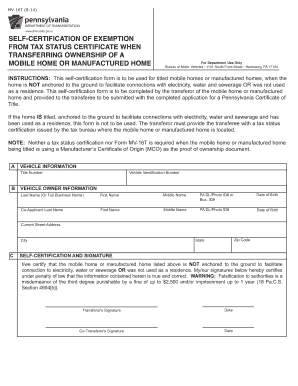
MV-16T (8-14) SELF-CERTIFICATION OF EXEMPTION FROM TAX STATUS CERTIFICATE WHEN TRANSFERRING OWNERSHIP OF A MOBILE HOME OR MANUFACTURED HOME www.dmv.state.pa.us For Department Use Only Bureau of Motor.

How it works

  1. Open form

    Open form follow the instructions

  2. Easily sign form

    Easily sign the form with your finger

  3. Share form

    Send filled & signed form or save

How to fill out the PennDOT Form MV-16T - Dmv State Pa online

Filling out the PennDOT Form MV-16T is an essential step when transferring ownership of a mobile home or manufactured home in Pennsylvania. This guide provides clear instructions to help you complete the form accurately and efficiently.

Follow the steps to complete the form online.

  1. Click ‘Get Form’ button to obtain the form and open it in the editor.
  2. In the vehicle information section, enter the title number and vehicle identification number (VIN) of the mobile home or manufactured home you are transferring.
  3. Move to the vehicle owner information section. Provide the last name, first name, and middle name of the owner of the mobile home, along with the required details for any co-applicant.
  4. Fill in the date of birth for both the primary owner and the co-applicant, along with their Pennsylvania driver's license or photo ID number.
  5. Next, input the current street address, city, state, and zip code of the owner.
  6. In the self-certification and signature section, read the certification statement carefully. By signing the form, you certify that the mobile home is not anchored to the ground and was not used as a residence.
  7. Sign and date the form. If there is a co-transferor, they should also sign and date the form.
  8. Once all required fields are completed and reviewed for accuracy, save your changes. You can then download, print, or share the completed form as necessary.

Complete your PennDOT Form MV-16T online today for an efficient transfer process.

Get form

Experience a faster way to fill out and sign forms on the web. Access the most extensive library of templates available.
Get form

Related content

mv-16t.pdf
INSTRUCTIONS: This self-certification form is to be used for titled mobile homes or...
Learn more
Sponsorship Program Directive
Registration (Form MV-4ST) at a Penn DOT Office with an authorized agent,. • Current...
Learn more
PennDOT Fact Sheet - Buying and Selling Your...
If you are going to title your vehicle in another state, you will be responsible for...
Learn more

Related links form

CQI IRCA CPD Record Form Example.docx Phase 3 Study Of 10-valent Pneumococcal Conjugate Vaccine ... Deerwood Country Club Estates Homeowners Association Download Service Forms Required For Our Most ... - Nassau Re

Questions & Answers

Get answers to your most pressing questions about US Legal Forms API.

Contact support

The MV-120 form in Pennsylvania is utilized to report a vehicle's odometer reading at the time of sale. This is important for providing accurate information about the vehicle's history and maintaining transparency. Submitting the MV-120 form helps prevent fraud related to vehicle mileage. For a smooth submission, you might want to explore options through US Legal Forms.

The MV-4 form in Pennsylvania is used for the application of a duplicate Certificate of Title. If you lose or damage your original title, this form allows you to easily request a new one from PennDOT. Completing the MV-4 form ensures you maintain clear ownership of your vehicle. For added convenience, US Legal Forms can help you fill out the MV-4 form accurately.

Yes, when applying for a Pennsylvania certificate of title, the MV-1 form must be submitted along with the PennDOT Form MV-16T. The MV-1 is essential for detailing the vehicle information and the owner’s details. It also helps expedite your title application process. Be sure to double-check that you include all required forms to avoid delays.

To obtain an MV-1 form in Pennsylvania, you can visit the PennDOT website or go to your local Pennsylvania Department of Transportation office. This form is crucial for applying for a title for your vehicle. You can also request it through the mail if you prefer. Additionally, consider using US Legal Forms to streamline this process and ensure you have all necessary documents completed correctly.

To fill out a PA car title properly, begin with the information on the front side regarding the vehicle’s details. Make sure to list the names and addresses of both the seller and buyer accurately. When completing the form, remember to include the PennDOT Form MV-16T - Dmv State Pa for a smooth title transfer. Take your time to ensure each section is completed clearly.

Filling out a PA vehicle title involves providing accurate information about the vehicle and its ownership. Start by entering details like the Vehicle Identification Number (VIN), the current owner's information, and the new owner's information. Don't forget to complete the PennDOT Form MV-16T - Dmv State Pa if required. Always double-check your entries to ensure correctness.

To transfer a car title in Pennsylvania, you will need several key documents, including the current title, a completed PennDOT Form MV-16T - Dmv State Pa, and a bill of sale. Additionally, both the seller and buyer must provide valid identification. If applicable, a lien release is also needed. Always refer to the PennDOT website for the most current requirements.

The PennDOT Form MV-1 is indeed necessary to apply for a Pennsylvania certificate of title. This form must be submitted alongside the PennDOT Form MV-16T - Dmv State Pa, as it gathers essential information about the vehicle and its owner. Ensure that all required signatures and documentation are included to avoid delays. Proper completion of these forms speeds up the processing time.

Yes, when transferring a title in Pennsylvania, both parties usually need to be present. This ensures that the current owner can sign the title and the new owner can complete the PennDOT Form MV-16T - Dmv State Pa. If a party cannot attend, they may need to provide a notarized affidavit. Always check with your local PennDOT office for specific requirements.

To title and register a car in Pennsylvania, you need to complete the PennDOT Form MV-16T - Dmv State Pa. Start by gathering essential documents such as proof of identity, the bill of sale, and previous title. Visit your local PennDOT office or use online services for convenience. Once you submit the required forms and payment, you will receive your license plates and registration.

Get This Form Now!

Use professional pre-built templates to fill in and sign documents online faster. Get access to thousands of forms.
Get form
If you believe that this page should be taken down, please follow our DMCA take down processhere.
Get PennDOT Form MV-16T - Dmv State Pa
Get form
  • Adoption
  • Bankruptcy
  • Contractors
  • Divorce
  • Home Sales
  • Employment
  • Identity Theft
  • Incorporation
  • Landlord Tenant
  • Living Trust
  • Name Change
  • Personal Planning
  • Small Business
  • Wills & Estates
  • Packages A-Z
  • Affidavits
  • Bankruptcy
  • Bill of Sale
  • Corporate - LLC
  • Divorce
  • Employment
  • Identity Theft
  • Internet Technology
  • Landlord Tenant
  • Living Wills
  • Name Change
  • Power of Attorney
  • Real Estate
  • Small Estates
  • Wills
  • All Forms
  • Forms A-Z
  • Other Templates
  • Legal Hub
  • About Us
  • Help Portal
  • Legal Resources
  • Blog
  • Affiliates
  • Contact Us
  • Delete My Account
  • Site Map
  • Industries
  • Forms in Spanish
  • Localized Forms
  • State-specific Forms
  • Forms Kit
  • Real Estate Handbook
  • All Guides
  • Notarize
  • Incorporation services
  • For Consumers
  • For Small Business
  • For Attorneys
  • USLegal
  • FormsPass
  • pdfFiller
  • signNow
  • altaFlow
  • DocHub
  • Instapage
Form Packages
  • Adoption
  • Bankruptcy
  • Contractors
  • Divorce
  • Home Sales
  • Employment
  • Identity Theft
  • Incorporation
  • Landlord Tenant
  • Living Trust
  • Name Change
  • Personal Planning
  • Small Business
  • Wills & Estates
  • Packages A-Z
Form Categories
  • Affidavits
  • Bankruptcy
  • Bill of Sale
  • Corporate - LLC
  • Divorce
  • Employment
  • Identity Theft
  • Internet Technology
  • Landlord Tenant
  • Living Wills
  • Name Change
  • Power of Attorney
  • Real Estate
  • Small Estates
  • Wills
  • All Forms
  • Forms A-Z
  • Other Templates
Customer Service
  • Legal Hub
  • About Us
  • Help Portal
  • Legal Resources
  • Blog
  • Affiliates
  • Contact Us
  • Delete My Account
  • Site Map
  • Industries
  • Forms in Spanish
  • Localized Forms
  • State-specific Forms
  • Forms Kit
Legal Guides
  • Real Estate Handbook
  • All Guides
Prepared for you
  • Notarize
  • Incorporation services
Our Customers
  • For Consumers
  • For Small Business
  • For Attorneys
Our Sites
  • USLegal
  • FormsPass
  • pdfFiller
  • signNow
  • altaFlow
  • DocHub
  • Instapage
Social Media
Call us now toll free:
+1 833 426 79 33
As seen in:
© Copyright 1999-2026 airSlate Legal Forms, Inc. 17 Station Street, Ste. 203, Brookline, MA 02445
  • Your Privacy Choices
  • Terms of Service
  • Privacy Notice
  • Content Takedown Policy
  • Bug Bounty Program