Loading
Get Co Gws-31 2012-2026
How it works
-

Open form follow the instructions
-

Easily sign the form with your finger
-

Send filled & signed form or save
How to fill out the CO GWS-31 online
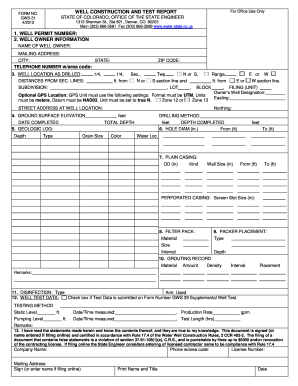
The CO GWS-31 form, also known as the well construction and test report, is essential for submitting information regarding well drilling in Colorado. This guide provides clear, step-by-step instructions on properly completing this form online.
Follow the steps to successfully complete the CO GWS-31 form.
- Click ‘Get Form’ button to obtain the form and open it in the editor.
- Enter the well permit number in full. Ensure that this information is accurate, as it is critical for the processing of your report.
- Fill in the well owner information, including the name, mailing address, city, state, and telephone number with area code.
- Complete the section detailing the well location. Include subdivision, section line distances, and if applicable, provide an optional GPS location following the specified settings.
- Report the ground surface elevation in feet above sea level and describe the drilling method employed along with the date of completion.
- Provide a geologic log detailing the type of materials encountered during drilling, their grain size, color, and the depth at which water was located.
- Indicate the diameter of the drilled hole to ensure proper sizing information is reported.
- Complete the plain casing section, specifying the outside diameter and kind, as well as the wall thickness and intervals.
- If applicable, fill in information for perforated casing, including the screen slot size.
- Describe the filter pack materials, size, and the interval of placement.
- Indicate the type and placement depth of any packers used during the drilling process.
- Complete the grouting record by detailing the material, amount, density, and placement method of the grout slurry.
- Record information on disinfection, including type and amount used, as well as when it was applied.
- Enter well test data, including testing method, static and pumping levels, along with relevant notes and measurements.
- Ensure you review the entire form for accuracy. Finally, save your changes, and download, print, or share the completed document as needed.
Complete your forms online to streamline your well reporting process.
To file inc 3, gather all required documents and details relevant to your filing. Utilize online resources that specifically address CO GWS-31 forms to aid you in completing the process correctly. Once completed, submit your inc 3 filing through the designated portal or local agency. Ensuring accuracy will help in achieving compliance without delays.