Loading
Get Il Bca 5.10/5.20 2003-2026
How it works
-

Open form follow the instructions
-

Easily sign the form with your finger
-

Send filled & signed form or save
How to fill out the IL BCA 5.10/5.20 online
Filling out the IL BCA 5.10/5.20 form is an essential step for businesses looking to update their registered agent or office address. This guide provides clear, step-by-step instructions to help you complete the form efficiently and accurately.
Follow the steps to complete the IL BCA 5.10/5.20 form online
- Press the ‘Get Form’ button to access the form and open it in your editor.
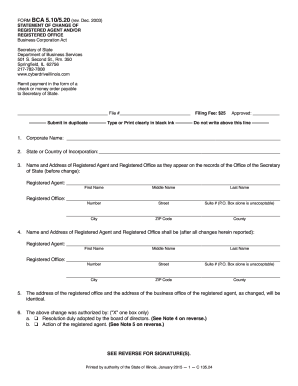
- In the first section, enter your corporate name as it officially appears in the records.
- Next, indicate the state or country where your corporation is incorporated.
- Provide the name and address of your current registered agent and registered office as listed previously: include first name, middle name, last name, street address (no P.O. Boxes), city, ZIP code, and county.
- Now, fill in the name and address of the new registered agent and registered office after the changes. Make sure to input all required fields similarly.
- Confirm that the addresses for the registered office and the registered agent’s office have been updated and are identical.
- Indicate how the changes were authorized by selecting one of the provided options: either a board resolution or action of the registered agent.
- If authorized by the board, an authorized officer must sign the form, including the name of the corporation and the date.
- If the change is made by a registered agent, that agent must sign and print their name on the form.
- Finally, review all entered information carefully. You can save your changes, download the completed form, print it, or share it as needed.
Complete your documents online today for a hassle-free experience.
To file your annual report in IL, follow the guidelines set by IL BCA 5.10/5.20. Gather all necessary business details and fill out the official report form. You have the option to submit it online or by mail, along with paying the applicable fees to ensure processing.