Loading
Get Children's Place Application
How it works
-

Open form follow the instructions
-

Easily sign the form with your finger
-

Send filled & signed form or save
How to fill out the Children's Place Application online
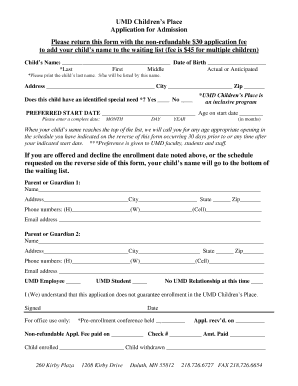
Completing the Children's Place Application online is a straightforward process that allows you to secure a place for your child at this inclusive program. This guide provides step-by-step instructions to ensure that you fill out the application accurately and effectively.
Follow the steps to successfully complete the application.
- Click ‘Get Form’ button to obtain the form and open it in the editing environment.
- Enter your child's name in the designated fields, including the last, first, and middle name. Ensure that you clearly print the child’s last name as it will be used for their enrollment.
- Fill in your child's date of birth and address. It is essential to provide the complete address and to indicate the city and zip code accurately.
- Indicate whether your child has an identified special need. Select 'Yes' or 'No' as appropriate. Remember that UMD Children’s Place is an inclusive program.
- Specify your preferred start date and your child's age on that start date. Make sure to include the complete date in the format of month, day, and year, and indicate the age in months.
- Complete the parent or guardian information by filling in the names, addresses, phone numbers, and email addresses for each parent or guardian. Ensure that all information is accurate and up to date.
- Select the appropriate relationship status regarding UMD (e.g., UMD Employee, UMD Student, or No UMD Relationship at this time).
- Read the acknowledgment statement regarding the application and signature requirement. Sign the form to indicate understanding that submission does not guarantee enrollment.
- After filling out all required fields, review the form for accuracy. Once verified, you can save changes, download, print, or share the completed application.
Take the next step for your child's future—complete the Children's Place Application online today.
Can you use your employee discount online- if so how? Yes you can....go to .express.com/associate then log on with your associate number and password as if clocking in or out....
Industry-leading security and compliance
US Legal Forms protects your data by complying with industry-specific security standards.
-
In businnes since 199725+ years providing professional legal documents.
-
Accredited businessGuarantees that a business meets BBB accreditation standards in the US and Canada.
-
Secured by BraintreeValidated Level 1 PCI DSS compliant payment gateway that accepts most major credit and debit card brands from across the globe.