Loading
Get Canada Pptc 153 2020
How it works
-

Open form follow the instructions
-

Easily sign the form with your finger
-

Send filled & signed form or save
How to fill out the Canada PPTC 153 online
Filling out the Canada PPTC 153 application form for an adult passport can seem daunting. This guide provides user-friendly, step-by-step instructions to help you complete the form accurately and efficiently.
Follow the steps to successfully fill out your application.
- Click ‘Get Form’ button to obtain the form and open it in the editor.
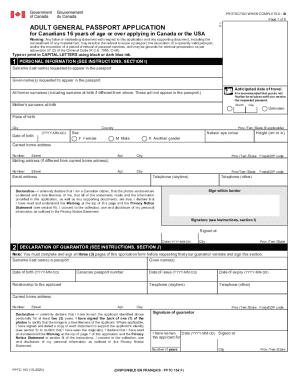
- Begin with Section 1, where you will enter your personal information such as your surname, given names, anticipated date of travel, and all former surnames. Ensure that all entries are made in capital letters.
- Provide details on your place of birth, date of birth, sex, and natural eye color. You will also need to state your current home address and mailing address if different.
- In the Declaration section, affirm your citizenship and the accuracy of the information provided. You must sign and date this section.
- Locate the Declaration of Guarantor section. This requires the signature of an eligible guarantor who has known you for at least two years. They will also need to validate one of your passport photos.
- In Section 3, indicate whether you have been issued a Canadian travel document previously. If applicable, provide details regarding the document.
- In Section 4, submit the proof of Canadian citizenship. Attach the original document that proves your citizenship, which will be returned to you after processing.
- Section 5 requires you to provide documents that support your identity. At least one must be government-issued and include your name and date of birth.
- Select the desired passport validity period in Section 6, either 5 years or 10 years.
- Fill out any additional personal information, including addresses for the last two years and your occupation history in Section 7.
- Provide references in Section 8. List two persons who can verify your identity, ensuring they are not related to you.
- If you wish, you may include emergency contact information in Section 9.
- After reviewing all entered information for accuracy, save changes. You can download, print, or share the completed form as needed.
Complete your Canada PPTC 153 application online now!
Get form
Experience a faster way to fill out and sign forms on the web. Access the most extensive library of templates available.
If you are looking for the quickest way to get a Canadian passport, consider applying through the urgent processing service. You can significantly reduce the waiting time, especially for your Canada PPTC 153 application. Make sure you come prepared with all necessary documents and meet all requirements for a seamless experience.
Get This Form Now!
Use professional pre-built templates to fill in and sign documents online faster. Get access to thousands of forms.