Loading
Form preview
  • US Legal Forms
  • Other Templates
  • More Forms
  • More Uncategorized Forms
  • Td Ameritrade Beneficiary Change Form

Get Td Ameritrade Beneficiary Change Form

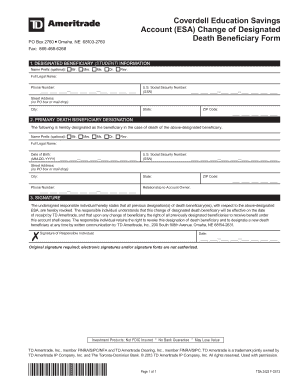
PRIMARY DEATH BENEFICIARY DESIGNATION The following is hereby designated as the beneiciary in the case of death of the above-designated beneiciary Date of Birth MM-DD-YYYY Relationship to Account Owner 3. SIGNATURE The undersigned responsible individual hereby states that all previous designation s of death beneiciary ies with respect to the above-designated ESA are hereby revoked. The responsible individual understands that this change of designated death beneiciary will be efective on the date of receipt by TD Ameritrade and that upon any change of beneiciary the right of all previously designated beneiciaries to receive beneit under this account shall cease. PO Box 2760 Omaha NE 68103-2760 Coverdell Education Savings Account ESA Change of Designated Death Bene ciary Form Fax 866-468-6268 1. DESIGNATED BENEFICIARY STUDENT INFORMATION Name Preix optional M Mr. M Mrs. M Ms. M Dr. M Rev* Full Legal Name Phone Number U*S* Social Security Number SSN Street Address no PO box or mail drop C....

How it works

  1. Open form

    Open form follow the instructions

  2. Easily sign form

    Easily sign the form with your finger

  3. Share form

    Send filled & signed form or save

How to fill out the Td Ameritrade Beneficiary Change Form online

Completing the Td Ameritrade Beneficiary Change Form is an essential step in ensuring your education savings account is designated to the appropriate beneficiaries. This guide will walk you through each section of the form, providing clear and user-friendly instructions for filling it out online.

Follow the steps to complete the Td Ameritrade Beneficiary Change Form online.

  1. Press the 'Get Form' button to obtain the Td Ameritrade Beneficiary Change Form and open it for editing.
  2. In the first section, labeled 'Designated Beneficiary (Student) Information', fill in your full legal name, phone number, and U.S. social security number. Ensure to provide a physical street address, not a P.O. Box, followed by your city, state, and ZIP code.
  3. Moving to the 'Primary Death Beneficiary Designation' section, enter the full legal name of the designated beneficiary, their date of birth, and U.S. social security number. Again, provide their street address, city, state, and phone number, followed by their ZIP code. Make sure to indicate your relationship to the account owner in the specified field.
  4. In the final section, titled 'Signature', the responsible individual must certify the accuracy of the information. This section requires the original signature of the responsible individual, as electronic signatures are not authorized. Also, indicate the date of signing.
  5. After completing all sections, review the form for accuracy. Once confirmed, save the changes to your document. You can then download, print, or share the completed form as necessary.

Take action today and complete your Td Ameritrade Beneficiary Change Form online.

Get form

Experience a faster way to fill out and sign forms on the web. Access the most extensive library of templates available.
Get form

Related content

TD Ameritrade Holding Corporation
We are a leading provider of securities brokerage services and related technology-based...
Learn more
HSA Bank
If your name has changed, please complete the Name Change Request Form located within the...
Learn more
Annual Report
Apr 25, 2007 — The Charles Schwab Corporation (NYSE: SCHW) is an investing services firm...
Learn more

Related links form

Cms 116 Myphone Guardian Formsbossweb Hud 92541

Questions & Answers

Get answers to your most pressing questions about US Legal Forms API.

Contact support

Changing your beneficiary designation is a simple process with the Td Ameritrade Beneficiary Change Form. Fill out the necessary information regarding your current beneficiary and the new designation you want. Once completed, you can submit the form either online or via mail, and ensure that you follow up to confirm that your request has been processed.

To change your beneficiary on your account, you need to complete the Td Ameritrade Beneficiary Change Form. This form allows you to designate a new beneficiary or modify existing ones. After completing the form, submit it to Td Ameritrade through the appropriate channels, and ensure that you keep a copy for your records.

Filling out the Td Ameritrade Beneficiary Change Form is straightforward. Start by providing your personal information, including your account number and details of your beneficiaries such as their names and contact information. Make sure you review the form for accuracy before submission, as errors could delay the processing of your request.

Certain types of beneficiary designations, such as those assigned under a divorce decree or court order, cannot be changed using the Td Ameritrade Beneficiary Change Form. If your designation is a result of legal stipulations, it's essential to consult with a legal advisor before attempting to make changes. Always ensure compliance with any legal requirements that apply to your situation.

Changing the beneficiary on your bank account often requires completing a specific form provided by your bank. Contact your bank for the Td Ameritrade Beneficiary Change Form, or check their website to download it. Fill in the necessary details and submit the form directly to your bank for an updated beneficiary designation.

To change the beneficiary on your TD Direct Investing account, locate the Td Ameritrade Beneficiary Change Form on their website. Complete the form with accurate information regarding your new beneficiary. After signing the form, submit it as instructed to update your account records efficiently.

To complete the Td Ameritrade Beneficiary Change Form, begin by downloading the form from the Td Ameritrade website. Fill in your account details and provide the required information about your beneficiaries, such as their names and relationships to you. Review the form for accuracy, then sign and submit it to ensure the changes are processed promptly.

An example of a beneficiary designation could be naming your spouse as the primary beneficiary, while designating your children as secondary beneficiaries on the Td Ameritrade Beneficiary Change Form. This illustrates how you can allocate your assets according to your preferences. Such designations ensure that assets are distributed according to your wishes.

The best way to designate beneficiaries is by using the Td Ameritrade Beneficiary Change Form accurately. It is advisable to list each beneficiary's full name and relationship to you while specifying the percentage of the account every individual will receive. This clarity helps ensure your wishes are honored.

Filling up a beneficiary form requires you to first obtain the Td Ameritrade Beneficiary Change Form. Proceed by entering your details at the top, followed by providing the beneficiaries' information, such as their names, contact details, and relationship to you. Make sure to allocate the correct percentages for each beneficiary.

Get This Form Now!

Use professional pre-built templates to fill in and sign documents online faster. Get access to thousands of forms.
Get form
If you believe that this page should be taken down, please follow our DMCA take down processhere.
Get Td Ameritrade Beneficiary Change Form
Get form
  • Adoption
  • Bankruptcy
  • Contractors
  • Divorce
  • Home Sales
  • Employment
  • Identity Theft
  • Incorporation
  • Landlord Tenant
  • Living Trust
  • Name Change
  • Personal Planning
  • Small Business
  • Wills & Estates
  • Packages A-Z
  • Affidavits
  • Bankruptcy
  • Bill of Sale
  • Corporate - LLC
  • Divorce
  • Employment
  • Identity Theft
  • Internet Technology
  • Landlord Tenant
  • Living Wills
  • Name Change
  • Power of Attorney
  • Real Estate
  • Small Estates
  • Wills
  • All Forms
  • Forms A-Z
  • Other Templates
  • Legal Hub
  • About Us
  • Help Portal
  • Legal Resources
  • Blog
  • Affiliates
  • Contact Us
  • Delete My Account
  • Site Map
  • Industries
  • Forms in Spanish
  • Localized Forms
  • State-specific Forms
  • Forms Kit
  • Real Estate Handbook
  • All Guides
  • Notarize
  • Incorporation services
  • For Consumers
  • For Small Business
  • For Attorneys
  • USLegal
  • FormsPass
  • pdfFiller
  • signNow
  • altaFlow
  • DocHub
  • Instapage
Form Packages
  • Adoption
  • Bankruptcy
  • Contractors
  • Divorce
  • Home Sales
  • Employment
  • Identity Theft
  • Incorporation
  • Landlord Tenant
  • Living Trust
  • Name Change
  • Personal Planning
  • Small Business
  • Wills & Estates
  • Packages A-Z
Form Categories
  • Affidavits
  • Bankruptcy
  • Bill of Sale
  • Corporate - LLC
  • Divorce
  • Employment
  • Identity Theft
  • Internet Technology
  • Landlord Tenant
  • Living Wills
  • Name Change
  • Power of Attorney
  • Real Estate
  • Small Estates
  • Wills
  • All Forms
  • Forms A-Z
  • Other Templates
Customer Service
  • Legal Hub
  • About Us
  • Help Portal
  • Legal Resources
  • Blog
  • Affiliates
  • Contact Us
  • Delete My Account
  • Site Map
  • Industries
  • Forms in Spanish
  • Localized Forms
  • State-specific Forms
  • Forms Kit
Legal Guides
  • Real Estate Handbook
  • All Guides
Prepared for you
  • Notarize
  • Incorporation services
Our Customers
  • For Consumers
  • For Small Business
  • For Attorneys
Our Sites
  • USLegal
  • FormsPass
  • pdfFiller
  • signNow
  • altaFlow
  • DocHub
  • Instapage
Social Media
Call us now toll free:
+1 833 426 79 33
As seen in:
© Copyright 1999-2026 airSlate Legal Forms, Inc. 17 Station Street, Ste. 203, Brookline, MA 02445
  • Your Privacy Choices
  • Terms of Service
  • Privacy Notice
  • Content Takedown Policy
  • Bug Bounty Program