Loading
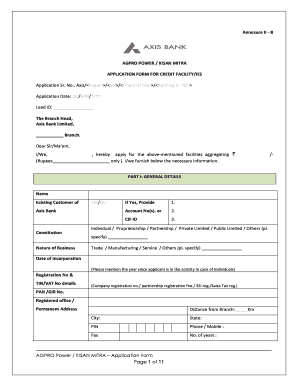
Get Kisan Mitra Yojana Online Form
How it works
-

Open form follow the instructions
-

Easily sign the form with your finger
-

Send filled & signed form or save
How to fill out the Kisan Mitra Yojana Online Form online
Filling out the Kisan Mitra Yojana Online Form is a crucial step for users seeking credit facilities. This guide provides a systematic approach to ensure that users can navigate through the form efficiently and accurately.
Follow the steps to successfully complete the online form.
- Click the 'Get Form' button to access the Kisan Mitra Yojana Online Form and open it in the form editor.
- In the section labeled 'General Details', fill in your name, status as an existing customer of Axis Bank, and the type of business you operate. If applicable, provide your account number or CIF ID.
- Indicate the date of incorporation and provide your registration number and TIN/VAT details as necessary.
- Complete the PAN/GIR number section and enter your registered office and permanent address, ensuring you include the distance from the nearest branch.
- In the 'Ownership' section, specify whether the property is self-owned, leased, or rented, and provide details on your correspondence address if it differs.
- Move to 'Existing Banking Relationship' and disclose accounts held with other banks, detailing the types of facilities you currently enjoy, including limits and outstanding amounts.
- Provide information in the 'Ownership, Management & Personal Guarantee Details' section, including personal guarantors, their occupation, age, and other pertinent personal information.
- Complete the 'Proposal Details' by indicating the nature of the facility requested, the amount, tenure, and purpose, along with details of any collateral if applicable.
- Review all entered information for accuracy before signing the declaration, where you certify that the information provided is true.
- After filling out all sections, save changes, and proceed to download or print the form for distribution or personal records.
Begin filling out the Kisan Mitra Yojana Online Form online now to access the credit facilities available.
To check your PM-Kisan status online, head to the official PM-Kisan portal and navigate to the status section. You will need to enter your Aadhaar number or bank account number. Upon submission, you will receive your application status, ensuring you stay updated on your benefits processed through the Kisan Mitra Yojana Online Form.