Loading
Get Ok Kempton Group Hippa/protected Health Information Release Form 2019-2025
How it works
-

Open form follow the instructions
-

Easily sign the form with your finger
-

Send filled & signed form or save
How to fill out the OK Kempton Group HIPAA/Protected Health Information Release Form online
Completing the OK Kempton Group HIPAA/Protected Health Information Release Form online is an essential process for individuals who wish to authorize the release of their protected health information. This guide offers clear, step-by-step instructions to help users navigate the form with confidence and ease.
Follow the steps to fill out the form accurately and efficiently.
- Press the ‘Get Form’ button to access the form and open it in your selected viewer.
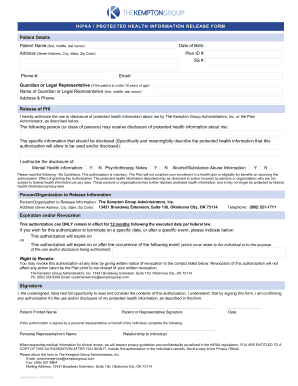
- Begin by entering the patient details. Fill in the patient's full name, date of birth, address, plan ID number, social security number, phone number, and email address in the respective fields.
- If the patient is under 18 years of age, provide the details of the guardian or legal representative. Enter their full name, address, and phone number accurately.
- In the release of PHI section, affirm your authorization for the use or disclosure of protected health information by checking the appropriate boxes next to the types of information you wish to release, including mental health information and substance abuse information.
- Specify the individuals or organizations permitted to receive the patient’s information by clearly indicating the names or classes of persons in the designated area.
- Indicate the specific information that should be disclosed by providing a detailed description in the corresponding field to avoid ambiguity and ensure clarity.
- Review the conditions regarding authorization. Understand that you may revoke this authorization at any time and note the expiration terms, stating either a specific date or event after which the authorization will expire.
- Fill in your name for the printed name section and provide your signature confirming authorization. Input the date of your signature.
- If applicable, provide information for a personal representative by filling in their name and relationship to the individual being represented.
- Once all fields are completed, save your changes using the options available to you, and prepare for submission via email, fax, or mail to the appropriate address provided in the guidelines.
Complete your HIPAA release form online today for efficient management of your health information.
Industry-leading security and compliance
US Legal Forms protects your data by complying with industry-specific security standards.
-
In businnes since 199725+ years providing professional legal documents.
-
Accredited businessGuarantees that a business meets BBB accreditation standards in the US and Canada.
-
Secured by BraintreeValidated Level 1 PCI DSS compliant payment gateway that accepts most major credit and debit card brands from across the globe.