Loading
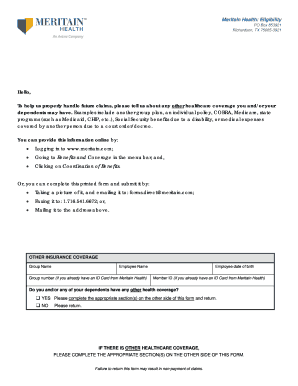
Get Meritain Health Other Insurance Coverage Information 2019-2026
How it works
-

Open form follow the instructions
-

Easily sign the form with your finger
-

Send filled & signed form or save
How to fill out the Meritain Health Other Insurance Coverage Information online
Completing the Meritain Health Other Insurance Coverage Information form is essential for ensuring your claims are processed accurately. This guide provides step-by-step instructions to help you effectively fill out the form online, whether for yourself or your dependents.
Follow the steps to complete the form seamlessly.
- Click ‘Get Form’ button to download the form and open it in your preferred document editor.
- Enter the group name at the top of the form. This is typically provided by your employer or health plan.
- Indicate whether you and/or any of your dependents have other health coverage by checking 'YES' or 'NO'.
- For each other insurance coverage, specify the type (medical, dental, or vision) and provide the name of the insurance company or program.
- If providing Medicare information, indicate the name of the person covered and their Medicare ID number.
- Before submitting, review all entries for accuracy and completeness, then save your changes.
Complete your Meritain Health Other Insurance Coverage Information form online today for efficient claims processing.