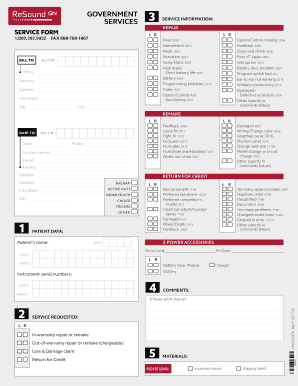
Drain/ Short battery life 3060 Battery 3059 Programming problems 3075 Fades 3071 Option/Control not functioning 3057 Acc t #: Office: Address: Address: City/State: Zip: Option/Control missing 3056 Feedback 3068 Clean and check 3046 Poor VC taper 4899 Add option 3033 Battery door problem 3024 Program switch bad 3057 Ear-to-ear not working 3076 Wireless connectivity 3073 Damaged/ Defective accessory 3028 Other (specify in comments below) P.O. REMAKE L R SHIP TO Acc t #:.
Open form follow the instructions
Easily sign the form with your finger
Send filled & signed form or save
How to fill out the DN ReSound MK602379 Form online
This guide provides a comprehensive overview of filling out the DN ReSound MK602379 Form online. It includes detailed instructions for each section of the form to ensure users accurately complete their request.
Follow the steps to successfully fill out the DN ReSound MK602379 Form.
- Press the ‘Get Form’ button to access the DN ReSound MK602379 Form and open it in your preferred editor.
- Begin by filling in the 'Bill To' section. Enter your account number, office address, city/state, and zip code in the appropriate fields.
- In the 'Service Information' section, select the type of repair needed. Options include choices like ‘dead’, ‘intermittent’, ‘weak’, and others. Be sure to indicate the relevant issue by marking the corresponding box.
- Complete the 'Service Requested' area by specifying whether the repair is in-warranty or out-of-warranty. Also, indicate if the request is a loss & damage claim or a return for credit.
- Fill out the 'Patient Data' section, providing the patient's first and last name, serial or lot number, and fit date. Include the patient's SSN if necessary.
- Provide your contact details in the 'Ship To' section. Enter the account number, date, phone number, contact name, and email address.
- If applicable, write additional comments in the comments section, ensuring to print clearly.
- After reviewing the completed form for accuracy, save your changes. You can then download, print, or share the form according to your needs.
Get started on submitting your documents online today!
Experience a faster way to fill out and sign forms on the web. Access the most extensive library of templates available.
Related content
All of the DEEOIC online forms are available to print and then manually fill and submit...
Insert contact information here: The name, address and telephone number of the provider or...
RETURN COMPLETED FORM TO REQUESTING MILITARY TREATMENT FACILITY. PRIVACY ACT STATEMENT...
Get answers to your most pressing questions about US Legal Forms API.
How to find lost ReSound hearing aid?
To find a lost ReSound hearing aid, begin by using the ReSound Smart app if your device is Bluetooth-enabled. This app can provide a signal to help locate it nearby. If the app is not an option, conduct a thorough search in likely areas. Detailed recovery steps are available in the DN ReSound MK602379 Form to assist you.
What is the strongest ReSound hearing aid?
The strongest ReSound hearing aid varies per individual needs, but many consider the Oticon More models to be among the most powerful. These devices can provide advanced sound processing for various environments and hearing loss levels. For a comprehensive overview of their features, explore the DN ReSound MK602379 Form on our site.
What is the software for ReSound hearing aid?
The software for ReSound hearing aids often includes the ReSound Smart app, which allows you to adjust settings and track your device. This application enhances your overall experience by providing easy control over hearing profiles. For specific functionalities or software updates, refer to the DN ReSound MK602379 Form available on our platform.
Is there a way to locate a missing hearing aid?
Yes, locating a missing hearing aid is possible with the help of technology. Many ReSound hearing aids come with tracking features accessible through a smartphone app. If you suspect your hearing aid may be out of range, checking common areas can also be effective. Look into the DN ReSound MK602379 Form for detailed steps to enhance your search.
How to find a lost ReSound hearing aid?
To find a lost ReSound hearing aid, use the associated app on your smartphone. This feature will help you track the device if it’s within Bluetooth range. Additionally, be sure to search the places where you typically use or remove the hearing aid, as they are likely to be found in familiar spots. Consult the DN ReSound MK602379 Form for more tips.
What do I do if I've lost my hearing aid?
If you have lost your hearing aid, first retrace your steps to the last place you remember wearing it. Check common areas like your home or car. If your hearing aid is a ReSound model, utilize the corresponding app to assist in locating it. For additional advice, reference the DN ReSound MK602379 Form.
Can I use my phone to find my hearing aid?
Yes, you can use your phone to find your ReSound hearing aid if it's connected via Bluetooth. Many ReSound models come with a dedicated app that helps you locate the device when it's misplaced. Simply use your smartphone to access the app and follow the instructions. For more details, consult the DN ReSound MK602379 Form on our platform.
What is the average life of a ReSound hearing aid?
The average lifespan of a ReSound hearing aid typically ranges from 5 to 7 years, depending on usage and care. Factors such as moisture exposure and battery maintenance can influence longevity. To prolong the life of your device, follow the recommended guidelines and consider regular check-ups with a hearing specialist. For further information, you can refer to the DN ReSound MK602379 Form.
How to set up a ReSound hearing aid?
Setting up your ReSound hearing aid involves inserting the battery, fitting the device, and connecting to your smartphone through the DN ReSound MK602379 Form app. Follow the detailed instructions provided in the app for a smooth setup. This ensures that your hearing aid is properly calibrated for your hearing needs.
How do I pair my ReSound phone?
To pair your ReSound hearing aid with your phone, first, navigate to the Bluetooth settings on your device. Then, select your hearing aid from the available devices list. Follow the instructions in the DN ReSound MK602379 Form manual for successful pairing. This connection enables greater control and convenience.
Use professional pre-built templates to fill in and sign documents online faster. Get access to thousands of forms.
If you believe that this page should be taken down, please follow our DMCA take down process here.