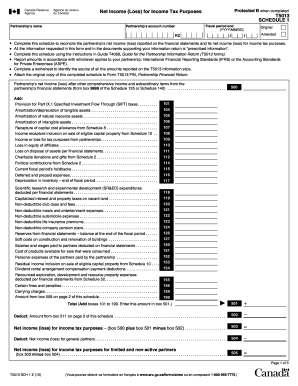
Protected B when completedNet Income (Loss) for Income Tax Purposes Partnership 's namePartnership 's account numberT5013 SCHEDULE 1 Fiscal period end (YYYY/MM/DD)Original AmendedRZ Complete this.
Open form follow the instructions
Easily sign the form with your finger
Send filled & signed form or save
How to fill out the Canada T5013 SCH 1 E online
Completing the Canada T5013 SCH 1 E is an essential part of filing a partnership's tax return. This guide will help you navigate the form easily, providing clear steps to ensure accurate and complete submission.
Follow the steps to fill out the Canada T5013 SCH 1 E online.
- Click ‘Get Form’ button to access the Canada T5013 SCH 1 E online and open it in your browser.
- Start by entering the partnership's name at the top of the form to identify the entity.
- Input the partnership's account number, which is necessary for tax identification purposes.
- Fill in the fiscal period end date in the format YYYY/MM/DD to specify the partnership's financial reporting period.
- Select whether this is the original or amended schedule by marking the appropriate box.
- Complete the reconciliation of net income (loss) by following the instructions for each line item, ensuring that all figures align with the financial statements.
- Add any applicable provisions, such as the amount for Part IX.1 Specified Investment Flow Through (SIFT) taxes, by entering the correct amounts in the designated fields.
- Continue filling out subsequent sections for each relevant addition or deduction as outlined on the form. Carefully review each requirement to ensure compliance with tax regulations.
- Once all fields are filled out, review all entries for accuracy.
- After confirming that the form is complete, save changes, and download or print the document for submission.
- Consider sharing the completed form with relevant parties, such as partners or accountants, as needed.
Start completing your Canada T5013 SCH 1 E online today to ensure a smooth filing process.
Experience a faster way to fill out and sign forms on the web. Access the most extensive library of templates available.
Related content
Terms which are capitalized in this Schedule [A] and not otherwise defined shall have the...
Then, you must submit the 2023 Canadian T5013(s) and T2125(s) for each business/farm via...
Get answers to your most pressing questions about US Legal Forms API.
How do I get a copy of my tax return online in Canada?
To get a copy of your tax return online in Canada, log in to your account on the Canada Revenue Agency website. You can view and download your filed tax returns there. Keeping your records updated is important for your financial health. If you need assistance, uslegalforms offers support to help you retrieve your documents.
Are T1 and T4 the same?
No, T1 and T4 forms serve different purposes in the Canadian tax system. The T1 form is used for filing personal income tax, while the T4 form is issued by employers to report annual income and deductions for employees. Understanding the distinction between these forms is key for accurate tax filing. Resources available on uslegalforms can clarify these differences.
How to get T1 tax form in Canada?
The T1 tax form can be downloaded from the Canada Revenue Agency's website or obtained through tax software. This form is crucial for individuals filing their personal income taxes. You can also reach out to tax professionals for assistance. Uslegalforms provides resources to simplify this process.
How to get a proof of income statement in Canada?
To obtain a proof of income statement in Canada, you can request a copy of your T1 or T4 tax forms from your employer or the Canada Revenue Agency. These documents serve as official records of your earnings. For a streamlined process, consider using uslegalforms to acquire the necessary paperwork efficiently.
What does Schedule 1 mean in Canada?
In Canada, Schedule 1 refers to the federal tax form that is essential for determining the amount of income tax you owe. It includes necessary calculations for personal credits and makes filing your taxes easier. By understanding Schedule 1, you can ensure compliance and potentially maximize your returns. Refer to uslegalforms for additional guidance.
What is the Schedule 1 tax form in Canada?
The Schedule 1 tax form in Canada is used to calculate your federal income tax. It outlines your taxable income and allows for deductions and credits applicable to your situation. Understanding this form helps in accurately assessing your tax obligations. You can find help navigating through it at uslegalforms.
Do I need to submit Schedule 1?
If you are required to file a tax return in Canada, you generally need to submit Schedule 1. This form helps you calculate your federal tax and determine any credits you can claim. Not submitting it could result in delays or issues with your tax return. For further assistance, consider using uslegalforms to simplify the process.
How do you report foreign partnership income?
To report foreign partnership income, include this income on your Canadian tax return in the same manner as domestic partnership income. You may need to convert the amounts from foreign currency to Canadian dollars. Additionally, remember to provide details as required by the Canada Revenue Agency. Using the Canada T5013 SCH 1 E as a guide can help clarify your reporting obligations.
How to file self-employment income in Canada?
To file self-employment income in Canada, you need to report this income on your T1 tax return using the T2125 form. Include all income earned and any business expenses incurred during the year. Record your net income on your T1 return, ensuring proper calculations. If you're also navigating partnership income like T5013, refer to resources like the Canada T5013 SCH 1 E for comprehensive guidance.
How to report T5008 on Canadian tax return?
To report T5008 on your Canadian tax return, locate the amounts provided on your T5008 slip, which details your securities transactions. Enter these amounts on the appropriate sections of your T1 form. Ensure accuracy to avoid potential tax issues. If you're also dealing with T5013 income, the Canada T5013 SCH 1 E can streamline reporting both types of income.
Use professional pre-built templates to fill in and sign documents online faster. Get access to thousands of forms.
If you believe that this page should be taken down, please follow our DMCA take down process here.
This form is available in several versions. Select the version you need from the drop-down list below.