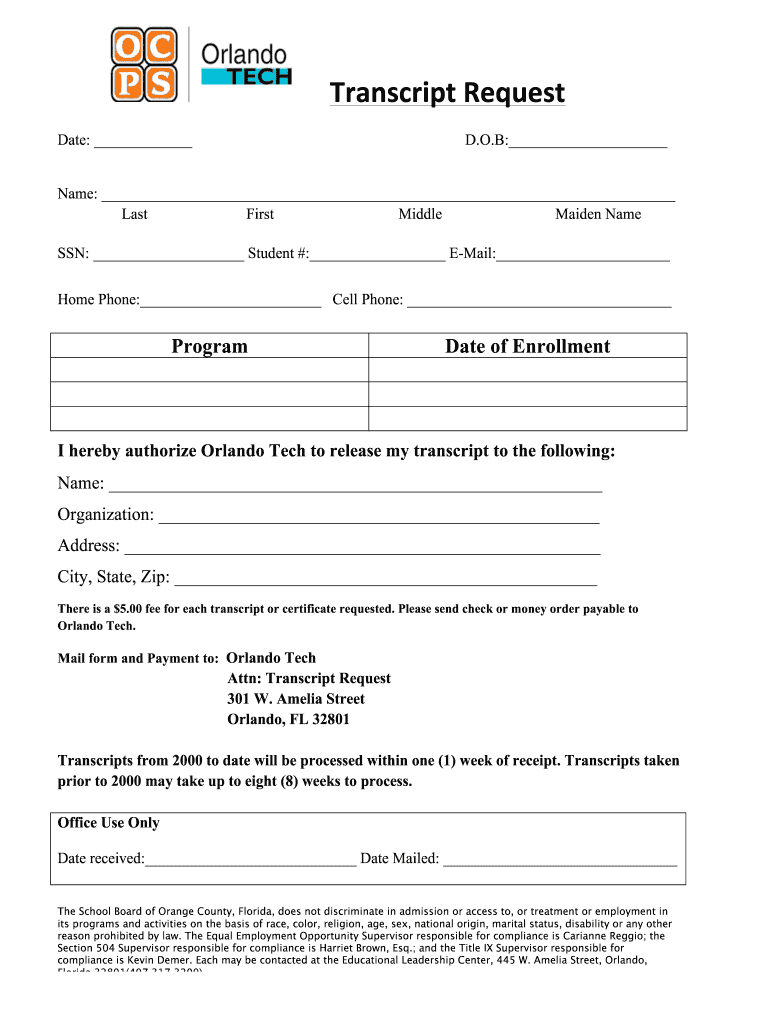
Ddle Maiden Name SSN: Student #: E-Mail: Home Phone: Cell Phone: Program Date of Enrollment I hereby authorize Orlando Tech to release my transcript to the following: Name: Organization: Address: City, State, Zip.
Loading

Open form follow the instructions

Easily sign the form with your finger

Send filled & signed form or save
How to fill out the OCPS Orlando Tech Transcript Request online
This guide provides a clear and supportive walkthrough for completing the OCPS Orlando Tech Transcript Request online. By following the steps outlined below, users can ensure their transcript requests are submitted accurately and efficiently.
Follow the steps to complete your transcript request form online.
- Press the ‘Get Form’ button to access the transcript request form and open it in your document editor.
- Fill in the date of your request in the designated field at the top of the form.
- Provide your date of birth (D.O.B) in the appropriate space to verify your identity.
- Enter your full name, including last name, first name, middle name, and maiden name, in the specified fields.
- Input your Social Security Number (SSN) and Student Number in the respective sections for identification.
- Include your email address, home phone, and cell phone number to facilitate communication regarding your request.
- Indicate the specific program you were enrolled in and the date of enrollment to provide context for your transcript request.
- Authorize the release of your transcript by providing the name and address of the recipient, including the organization name and complete address (city, state, and zip).
- Note that there is a $5.00 fee for each requested transcript. Prepare a check or money order payable to Orlando Tech for the appropriate amount.
- Mail the completed form along with your payment to the designated address provided in the document.
- Keep in mind that processing times may vary based on the date of your transcripts, with more recent requests being processed in one week and older requests potentially taking up to eight weeks.
- Once your form is filled out, ensure to save your changes, and if needed, download, print, or share the document as required.
Take the first step towards obtaining your official transcript by completing the OCPS Orlando Tech Transcript Request online today.
Experience a faster way to fill out and sign forms on the web. Access the most extensive library of templates available.
Related content
If you require a paper copy of the Code, please notify your OCPS school. The Code applies...
Orlando Technical College - Orlando Campus ... Click here to complete the short request...
Refusal or failure to comply with a direction or an order from an OCPS employee...
Get answers to your most pressing questions about US Legal Forms API.
How do I get my transcript from a closed college in Florida?
Institutions that are open are required to maintain and service transcript requests. Transcript requests for CLOSED for-profit institutions: Please call 1-888-224-6684 (Toll Free) or visit https://app2.fldoe.org/publicapps/cie/request.asp to complete a transcript request form.
How do I get my school records in Florida?
For information about obtaining public records, please call 850-245-9759 or send an email to PRR@fldoe.org.
How do I get my transcripts from a closed high school in Florida?
Transcript requests for CLOSED for-profit institutions: Please call 1-888-224-6684 (Toll Free) or visit https://app2.fldoe.org/publicapps/cie/request.asp to complete a transcript request form.
How do I send my transcripts to College of Central Florida?
Sending Transcripts to CF You can also have your transcripts sent electronically via a secured service to transcripts@cf.edu. Transcripts sent as an attachment from you are not acceptable as they are considered unofficial.
How do I get my high school transcripts from 20 years ago California?
To obtain a transcript from a California public school, you will need to contact the school directly. If the school is closed, we suggest contacting the local school district or the County Office of Education for assistance. Contact information for these entities may be obtained from the California School Directory.
Where do I send my transcripts to Orange Coast College?
Or if the sending institution sends official transcripts electronically via PDF, electronic transcripts can be emailed to occtranscripts@occ.cccd.edu. The transcripts must be sent directly from the sending institutions authorized agent. OCC will not accept forwarded transcripts from the student.
How do I get my high school transcripts from Orange County Florida?
If you are interested in obtaining your official transcript or student records you can do so by faxing or mailing a request to your school. If the school you attended is no longer open you may request your educational records from the nearest high school.
How do I get my high school transcripts from Brevard County Florida?
For transcripts/student records please call the Customer Service Center at (321) 633-1000, ext. 11584 or email csc@brevardschools.org. Pupils and students and their parents or guardians have rights of access, rights of challenge, and rights of privacy with respect to student cumulative records.
Use professional pre-built templates to fill in and sign documents online faster. Get access to thousands of forms.
If you believe that this page should be taken down, please follow our DMCA take down process here.