Loading
Get Sg General Hospital Hims-rep 2018
How it works
-

Open form follow the instructions
-

Easily sign the form with your finger
-

Send filled & signed form or save
How to fill out the SG General Hospital HIMS-REP online
This guide provides clear instructions for filling out the SG General Hospital HIMS-REP online form. Understanding each component will ensure a smooth application process for the release of medical information.
Follow the steps to complete the form seamlessly.
- Press the ‘Get Form’ button to access the application and consent form for release of medical information online. This will allow you to open the form and begin filling it out.
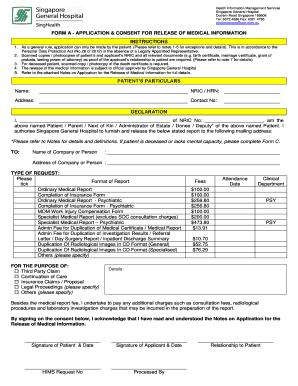
- Provide your particulars in the 'Patient’s Particulars' section, including your name, NRIC or HRN, address, and contact number. Ensure all the information is accurate and up-to-date.
- In the 'Declaration' section, enter your name and NRIC. Select your relationship to the patient from the given options. Ensure you indicate whether you are the patient, parent, next of kin, or another designated representative.
- Specify the mailing address where the medical report should be sent. This can be a company or an individual. Complete the required fields with clear and correct details.
- Indicate the type of request by ticking the appropriate box for the report format needed. Options include ordinary medical reports, specialist medical reports, and more. Select the purpose of your request from the options provided.
- Review and acknowledge the fees associated with the report. Clearly state your understanding of any additional charges that may apply during processing.
- Sign and date the consent section at the end of the form. If applicable, ensure the applicant's signature is provided along with the date to authorize the release of information.
- Once you have completed the form, save any changes made. You may download, print, or share the completed form as needed.
Begin filling out your documents online today to ensure a timely and efficient processing experience.
Get form
Experience a faster way to fill out and sign forms on the web. Access the most extensive library of templates available.
To arrange an appointment via email at SG General Hospital HIMS-REP, you should send your request to the hospital's designated email address, specifying the appointment type and your personal details. Keeping your message clear and concise will help facilitate a prompt response. If you require further assistance, consider checking the hospital’s official website for specific instructions.
Get This Form Now!
Use professional pre-built templates to fill in and sign documents online faster. Get access to thousands of forms.