Loading
Form preview
  • US Legal Forms
  • Other Templates
  • Industry Forms
  • Industry Academic Forms
  • Augusta University Employment Verification Request Form

Get Augusta University Employment Verification Request Form

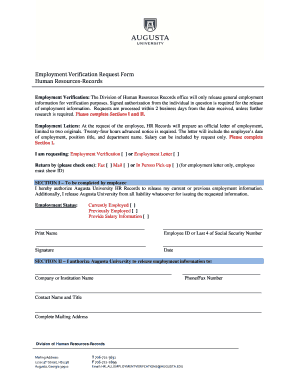
Ffice will only release general employment information for verification purposes. Signed authorization from the individual in question is required for the release of employment information. Requests are processed within 2 business days from the date received, unless further research is required. Please complete Sections I and II. Employment Letters: At the request of the employee, HR Records will prepare an official letter of employment, limited to two originals. Twenty-four hours advanced notic.

How it works

  1. Open form

    Open form follow the instructions

  2. Easily sign form

    Easily sign the form with your finger

  3. Share form

    Send filled & signed form or save

How to fill out the Augusta University Employment Verification Request Form online

This guide provides detailed instructions on completing the Augusta University Employment Verification Request Form online. Follow these steps to ensure that your request is processed efficiently and correctly.

Follow the steps to complete the form accurately.

  1. Click ‘Get Form’ button to access the form and open it in your chosen editor.
  2. In Section I, indicate whether you are currently or previously employed by selecting the appropriate option. You may also choose to provide salary information by checking the corresponding box.
  3. Print your name, employee ID, or the last four digits of your Social Security number in the designated fields. This information is essential for identification purposes.
  4. Sign and date the form to authorize Augusta University to release your employment information. Your signature confirms that you release the university from any liability associated with this information.
  5. Complete Section II by providing the name of the company or institution that will receive the employment information. Ensure all contact details, including the phone/fax number and complete mailing address, are accurately filled out.
  6. Once all sections are complete, review your entries for accuracy. After confirming that all information is correct, save the form and explore options to download, print, or share your request.

Start filling out your Augusta University Employment Verification Request Form online today for a smooth processing experience.

Get form

Experience a faster way to fill out and sign forms on the web. Access the most extensive library of templates available.
Get form

Related content

My WebLink - IIS Windows Server - Augusta, GA
... Request for Temporary Employment Service form to the Human Resources Department....
Learn more
Instructions for Employment Eligibility...
Employers are responsible for retaining completed forms. Do not mail completed forms to...
Learn more
Operational Templates and Guidance for EMS Mass...
Applicant is fingerprinted and completes the Personal Identity Verification (PIV) Form...
Learn more

Related links form

Commonwealth Of Massachusetts Standard Contract Form Student Visa South Korea Sudan Visa: Application, Requirements. Apply For ... - VisaHQ NGN Request Form - Hawaii.gov

Questions & Answers

Get answers to your most pressing questions about US Legal Forms API.

Contact support

To write a request letter for verification, start with a clear subject line and a polite greeting. State your request by providing specific details about the employment in question, including your name and job title at Augusta University. Mention the Augusta University Employment Verification Request Form, if applicable, to help facilitate your request and ensure clarity.

Creating a verification of employment involves gathering details such as the employee's name, position, and employment dates. You may want to use the Augusta University Employment Verification Request Form for consistency and professionalism. Ensure all information is accurate and provide relevant contact details for any follow-up inquiries from the requester.

To request records from Augusta University, visit their official website or contact the registrar's office directly. Provide your personal details, including your full name, student ID, and the specific records needed. When referring to your employment verification, you may mention the Augusta University Employment Verification Request Form to clarify your request and expedite the handling of your records.

To request a letter of employment verification, draft a concise email or letter addressed to your employer or HR department. Clearly state your request and include your name, job title, and employment dates at Augusta University. If applicable, refer to the Augusta University Employment Verification Request Form you can submit to ensure your request is processed efficiently.

When emailing to verify employment, start with a clear subject line, such as 'Employment Verification Request.' Address the HR representative directly, provide your full name, and detail your request for verification including your employment dates and position at Augusta University. Mention that you can provide the Augusta University Employment Verification Request Form upon request to streamline the process.

To request a confirmation letter from HR, send a formal email or letter specifying that you need verification of your employment. Include your full name, position, and the dates of your employment at Augusta University. It may also help to mention the Augusta University Employment Verification Request Form to clarify your needs and expedite the response.

When requesting an employment reference letter, start by reaching out to your previous employer or supervisor. Politely explain your reason for needing the letter and highlight any specific qualities or contributions you would like them to mention. If relevant, you may also include a completed Augusta University Employment Verification Request Form to facilitate the process.

To create an effective authorization letter for employment verification, include your full name, position, and the dates you worked at Augusta University. Clearly state that you authorize the verification of your employment and provide relevant contact information. Additionally, mention the specific purpose of the verification and any deadlines, especially if you are using the Augusta University Employment Verification Request Form.

When writing an email for employment verification, start by addressing the appropriate HR contact or department. Clearly state your request and include the details needed to complete the verification process, such as the Augusta University Employment Verification Request Form. Conclude with your contact information for any follow-up.

Information regarding the president's salary at Augusta University can usually be found in public records or the university's official reports. However, for the most detailed and specific information, you might need to submit a formal request using the Augusta University Employment Verification Request Form to gain access to that data.

Get This Form Now!

Use professional pre-built templates to fill in and sign documents online faster. Get access to thousands of forms.
Get form
If you believe that this page should be taken down, please follow our DMCA take down processhere.
Get Augusta University Employment Verification Request Form
Get form
  • Adoption
  • Bankruptcy
  • Contractors
  • Divorce
  • Home Sales
  • Employment
  • Identity Theft
  • Incorporation
  • Landlord Tenant
  • Living Trust
  • Name Change
  • Personal Planning
  • Small Business
  • Wills & Estates
  • Packages A-Z
  • Affidavits
  • Bankruptcy
  • Bill of Sale
  • Corporate - LLC
  • Divorce
  • Employment
  • Identity Theft
  • Internet Technology
  • Landlord Tenant
  • Living Wills
  • Name Change
  • Power of Attorney
  • Real Estate
  • Small Estates
  • Wills
  • All Forms
  • Forms A-Z
  • Other Templates
  • Legal Hub
  • About Us
  • Help Portal
  • Legal Resources
  • Blog
  • Affiliates
  • Contact Us
  • Delete My Account
  • Site Map
  • Industries
  • Forms in Spanish
  • Localized Forms
  • State-specific Forms
  • Forms Kit
  • Real Estate Handbook
  • All Guides
  • Notarize
  • Incorporation services
  • For Consumers
  • For Small Business
  • For Attorneys
  • USLegal
  • FormsPass
  • pdfFiller
  • signNow
  • altaFlow
  • DocHub
  • Instapage
Form Packages
  • Adoption
  • Bankruptcy
  • Contractors
  • Divorce
  • Home Sales
  • Employment
  • Identity Theft
  • Incorporation
  • Landlord Tenant
  • Living Trust
  • Name Change
  • Personal Planning
  • Small Business
  • Wills & Estates
  • Packages A-Z
Form Categories
  • Affidavits
  • Bankruptcy
  • Bill of Sale
  • Corporate - LLC
  • Divorce
  • Employment
  • Identity Theft
  • Internet Technology
  • Landlord Tenant
  • Living Wills
  • Name Change
  • Power of Attorney
  • Real Estate
  • Small Estates
  • Wills
  • All Forms
  • Forms A-Z
  • Other Templates
Customer Service
  • Legal Hub
  • About Us
  • Help Portal
  • Legal Resources
  • Blog
  • Affiliates
  • Contact Us
  • Delete My Account
  • Site Map
  • Industries
  • Forms in Spanish
  • Localized Forms
  • State-specific Forms
  • Forms Kit
Legal Guides
  • Real Estate Handbook
  • All Guides
Prepared for you
  • Notarize
  • Incorporation services
Our Customers
  • For Consumers
  • For Small Business
  • For Attorneys
Our Sites
  • USLegal
  • FormsPass
  • pdfFiller
  • signNow
  • altaFlow
  • DocHub
  • Instapage
Social Media
Call us now toll free:
+1 833 426 79 33
As seen in:
© Copyright 1999-2026 airSlate Legal Forms, Inc. 17 Station Street, Ste. 203, Brookline, MA 02445
  • Your Privacy Choices
  • Terms of Service
  • Privacy Notice
  • Content Takedown Policy
  • Bug Bounty Program