Loading
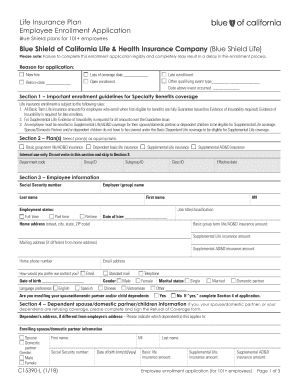
Get Ca Blue Shield C15390-l 2018
How it works
-

Open form follow the instructions
-

Easily sign the form with your finger
-

Send filled & signed form or save
How to fill out the CA Blue Shield C15390-L online
Filling out the CA Blue Shield C15390-L, the employee enrollment application for life insurance plans, is an important step in securing coverage. This guide provides clear, step-by-step instructions to help you navigate the online form efficiently.
Follow the steps to complete your application successfully.
- Press the ‘Get Form’ button to access the enrollment application in your editing interface. Make sure the form is fully loaded before proceeding.
- Select the reason for your application in the designated area. Options include new hire, rehire, loss of coverage, open enrollment, late enrollment, or other qualifying events. Provide the applicable date for the selected reason.
- Carefully read Section 1, which outlines important enrollment guidelines for Specialty Benefits coverage. Ensure you understand what is required, especially regarding Evidence of Insurability for late enrollees.
- In Section 2, select the plans that are appropriate for you. Mark the boxes for Basic group term life/AD&D insurance, Dependent basic life insurance, Supplemental Life insurance, and Supplemental AD&D insurance as applicable.
- Fill in your personal information in Section 3, which includes your Social Security number, home address, email address, and other necessary details. Make sure all entries are legible.
- Indicate your employment status (full time/part time) along with your job title/classification and date of hire. If you are a retiree, mark that option.
- Complete the section about enrolling your spouse/domestic partner and/or child dependents by marking 'Yes' or 'No' and providing their details if applicable.
- In Section 5, identify your primary and contingent beneficiaries by providing their names, Social Security numbers, relationships, and percentages of benefits.
- Sign and date the authorization in Section 6, confirming that all information is correct and authorizing your employer to deduct any necessary contributions.
- Once all sections are completed, you can save your changes, download the form, print it, or share it as needed.
Complete your enrollment application online today to secure your life insurance coverage.
Get form
Experience a faster way to fill out and sign forms on the web. Access the most extensive library of templates available.
The headquarters for Blue Cross Blue Shield California is located in San Francisco, California. You can find all of their contact details and specific office locations on their official website. If you have questions about your CA Blue Shield C15390-L coverage, it might be useful to know this information ahead of time. Direct contact with the headquarters can often lead to quicker answers and solutions.
Get This Form Now!
Use professional pre-built templates to fill in and sign documents online faster. Get access to thousands of forms.