Loading
Form preview
  • US Legal Forms
  • Form Library
  • Industry Forms
  • Industry Legal Forms
  • Wcb C-040 2018

Get Wcb C-040 2018

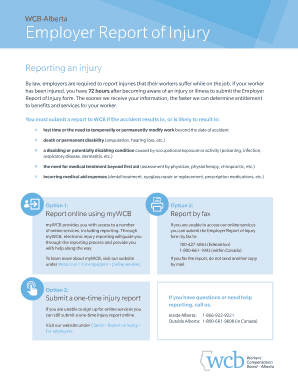
Urs after becoming aware of an injury or illness to submit the Employer Report of Injury form. The sooner we receive your information, the faster we can determine entitlement to benefits and services for your worker. You must submit a report to WCB if the accident results in, or is likely to result in: lost time or the need to temporarily or permanently modify work beyond the date of accident death or permanent disability (amputation, hearing loss, etc.) a disabling or.

How it works

  1. Open form

    Open form follow the instructions

  2. Easily sign form

    Easily sign the form with your finger

  3. Share form

    Send filled & signed form or save

How to fill out the WCB C-040 online

This guide provides a clear and supportive approach to completing the WCB C-040 form online, ensuring that employers can efficiently report workplace injuries. By following these steps, users will be able to navigate the form with confidence and accuracy.

Follow the steps to complete the WCB C-040 form accurately.

  1. Click the ‘Get Form’ button to obtain the form and open it in the online editor.
  2. Identify the claim type by checking the appropriate box for Time Lost, Modified Work, or No Time Lost. Ensure you complete the necessary pages based on your selection.
  3. Fill out the worker details section. Include the worker's last name, first name, Social Insurance Number, date of birth, and job description.
  4. In the accident details section, provide the date and time of the accident and describe how the injury occurred. Make sure to include specific actions, tools used, and any relevant conditions.
  5. Complete the employer details section. This includes the business name, contact information, and the details of the supervisor handling the claim.
  6. In the health benefits section, indicate whether the worker was receiving health benefits at the time of the accident and whether these will continue.
  7. Detail the return to work information, including if modified work has been offered or if the worker has missed work.
  8. Complete the earnings details section by selecting gross earnings or hourly rate, and provide relevant financial information for the year preceding the injury.
  9. Ensure to fill out the hours of work details, outlining the regular hours worked per week, and provide a schedule if applicable.
  10. Review the entire form for accuracy. After confirming that all sections are complete, save your changes, and download or print the form as needed.

Complete your WCB documents online today for a streamlined reporting experience.

Get form

Experience a faster way to fill out and sign forms on the web. Access the most extensive library of templates available.

Related content

eClaims FAQs - Workers' Compensation Board
The employer and/or payer should retain the C-2F form as required and produce the C-2F...
Learn more
STATE OF ALABAMA WORKERS' COMPENSATION ...
Dec 27, 2023 — Class C Felonies are punishable by imprisonment for as much as 10 years...
Learn more
rs9116w-wi-fi-at-command-programming-reference...
Feb 10, 2021 — About this Document. This document provides information on the RS9116...
Learn more

Related links form

(FAVOR DILIGENCIAR A COMPUTADOR Y AUTENTICAR ANTE NOTARIO) A635 Closing Account Request - WCB Alberta Download Membership Form - Society Of Fetal Medicine V1 Online Medical Questionnaire - Gov.uk

Questions & Answers

Get answers to your most pressing questions about US Legal Forms API.

Contact support

Filing a WCB C-040 claim in Alberta starts with notifying your employer about your injury. After that, you can complete the online claim form via the WCB Alberta website. If you prefer, you can also call their office for assistance. Using the US Legal Forms platform can simplify this process by providing templates and guidance tailored to your specific needs.

In Alberta, you should file a WCB C-040 claim within 24 hours of your workplace incident. Following this timeline is crucial, as it helps prevent complications and ensures you receive timely support for your recovery. Remember, the sooner you file, the better your chances are of securing your benefits.

To make a WCB C-040 claim in Alberta, start by reporting your workplace injury to your employer as soon as possible. Next, gather necessary documents such as medical reports and your employer's incident report. Then, visit the WCB Alberta website to complete the online claim form. This streamlined approach helps ensure you receive the benefits you deserve efficiently.

The new WCB C-040 rules in Alberta focus on improving workplace safety and ensuring fair compensation for injured workers. These regulations emphasize timely reporting and claims processing to benefit both employers and employees. By aligning with these new rules, businesses can enhance their understanding of claims and foster safer work environments.

Get This Form Now!

Use professional pre-built templates to fill in and sign documents online faster. Get access to thousands of forms.
If you believe that this page should be taken down, please follow our DMCA take down processhere.

Industry-leading security and compliance

US Legal Forms protects your data by complying with industry-specific security standards.
  • In businnes since 1997
    25+ years providing professional legal documents.
  • Accredited business
    Guarantees that a business meets BBB accreditation standards in the US and Canada.
  • Secured by Braintree
    Validated Level 1 PCI DSS compliant payment gateway that accepts most major credit and debit card brands from across the globe.
Get WCB C-040
  • Adoption
  • Bankruptcy
  • Contractors
  • Divorce
  • Home Sales
  • Employment
  • Identity Theft
  • Incorporation
  • Landlord Tenant
  • Living Trust
  • Name Change
  • Personal Planning
  • Small Business
  • Wills & Estates
  • Packages A-Z
  • Affidavits
  • Bankruptcy
  • Bill of Sale
  • Corporate - LLC
  • Divorce
  • Employment
  • Identity Theft
  • Internet Technology
  • Landlord Tenant
  • Living Wills
  • Name Change
  • Power of Attorney
  • Real Estate
  • Small Estates
  • Wills
  • All Forms
  • Forms A-Z
  • Form Library
  • Legal Hub
  • About Us
  • Help Portal
  • Legal Resources
  • Blog
  • Affiliates
  • Contact Us
  • Delete My Account
  • Site Map
  • Industries
  • Forms in Spanish
  • Localized Forms
  • State-specific Forms
  • Forms Kit
  • Real Estate Handbook
  • All Guides
  • Notarize
  • Incorporation services
  • For Consumers
  • For Small Business
  • For Attorneys
  • USLegal
  • FormsPass
  • pdfFiller
  • signNow
  • altaFlow
  • DocHub
  • Instapage
Form Packages
  • Adoption
  • Bankruptcy
  • Contractors
  • Divorce
  • Home Sales
  • Employment
  • Identity Theft
  • Incorporation
  • Landlord Tenant
  • Living Trust
  • Name Change
  • Personal Planning
  • Small Business
  • Wills & Estates
  • Packages A-Z
Form Categories
  • Affidavits
  • Bankruptcy
  • Bill of Sale
  • Corporate - LLC
  • Divorce
  • Employment
  • Identity Theft
  • Internet Technology
  • Landlord Tenant
  • Living Wills
  • Name Change
  • Power of Attorney
  • Real Estate
  • Small Estates
  • Wills
  • All Forms
  • Forms A-Z
  • Form Library
Customer Service
  • Legal Hub
  • About Us
  • Help Portal
  • Legal Resources
  • Blog
  • Affiliates
  • Contact Us
  • Delete My Account
  • Site Map
  • Industries
  • Forms in Spanish
  • Localized Forms
  • State-specific Forms
  • Forms Kit
Legal Guides
  • Real Estate Handbook
  • All Guides
Prepared for you
  • Notarize
  • Incorporation services
Our Customers
  • For Consumers
  • For Small Business
  • For Attorneys
Our Sites
  • USLegal
  • FormsPass
  • pdfFiller
  • signNow
  • altaFlow
  • DocHub
  • Instapage
Social Media
Call us now toll free:
+1 833 426 79 33
As seen in:
© Copyright 1999-2026 airSlate Legal Forms, Inc. 3720 Flowood Dr, Flowood, Mississippi 39232
  • Your Privacy Choices
  • Terms of Service
  • Privacy Notice
  • Content Takedown Policy
  • Bug Bounty Program
WCB C-040
This form is available in several versions.
Select the version you need from the drop-down list below.
2019 Canada Alberta WCB C-040
Select form
  • 2019 Canada Alberta WCB C-040
  • 2018 WCB C-040
  • 2014 WCB C-040
  • 2006 WCB C-040
Select form