Loading
Form preview
  • US Legal Forms
  • Other Templates
  • Social Forms
  • New York Social Forms
  • Hospital For Special Surgery Patient Registration Form

Get Hospital For Special Surgery Patient Registration Form

How it works

  1. Open form

    Open form follow the instructions

  2. Easily sign form

    Easily sign the form with your finger

  3. Share form

    Send filled & signed form or save

How to fill out the Hospital For Special Surgery Patient Registration Form online

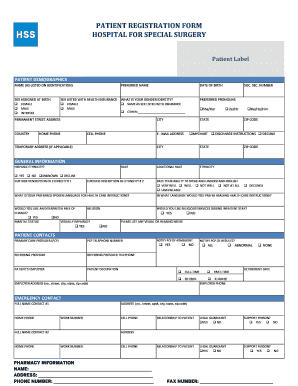
Completing the Hospital For Special Surgery Patient Registration Form online is an essential step in ensuring your medical information is accurate and up to date. This guide provides clear, step-by-step instructions to help you navigate the form with ease.

Follow the steps to complete your registration form online.

  1. Use the ‘Get Form’ button to access the registration form and open it in your preferred editor.
  2. Begin by entering your full name as listed on your identification document. Include any preferred name if applicable.
  3. Fill in your date of birth and specify your sex assigned at birth as well as the sex listed with your health insurance.
  4. Indicate your gender identity and preferred pronouns. Options include 'female', 'male', 'intersex', or 'other'.
  5. Provide your permanent street address, including city, state, and zip code. If you have a temporary address, fill that out as well.
  6. Enter your home and cell phone numbers, as well as your email address for communication purposes.
  7. Complete the demographic information section including your social security number, race, and ethnicity.
  8. Rate your ability to speak and understand English and indicate your preferred spoken language for health care instructions.
  9. List your primary care provider's information including their name, phone number, and whether you want them notified about your admission.
  10. Fill in the emergency contact details and indicate their relationship to you. You may also specify if they are a legal guardian or support person.
  11. Provide pharmacy information, including the name, address, and phone number.
  12. Complete the guarantor section by providing information about the person responsible for the bill.
  13. Answer questions related to your visit, including if it is related to an accident or injury.
  14. Enter your primary insurance details, including subscriber information and insurance company details.
  15. If applicable, fill out information for any secondary or tertiary insurance policies, as well as worker's compensation or no-fault insurance.
  16. Review the completed form thoroughly to ensure all information is accurate. Save your changes, and you will have options to download, print, or share the form.

Start completing your Hospital For Special Surgery Patient Registration Form online today for a seamless registration experience.

Get form

Experience a faster way to fill out and sign forms on the web. Access the most extensive library of templates available.
Get form

Related content

CMS Forms List
CMS Forms List ; Form # CMS 2728. Form Title ESRD MEDICAL EVIDENCE REPORT MEDICARE...
Learn more
PATIENT REGISTRATION FORM HOSPITAL FOR ...
PATIENT REGISTRATION FORM. HOSPITAL FOR SPECIAL SURGERY. MEDICAL RECORD NUMBER...
Learn more
SYSTEM IMPLANT MANUAL
This manual also explains how to register your patient's medical devices. Sterile Package...
Learn more

Related links form

Disciple Maker Index Survey 2017 Archdiocese Of Chicago OneSecure Managed Security Services Addendum And Service Level Agreement HoLA PTO Debit Card Record Form.doc AA Group History Questionnaire - Neflaa.org

Questions & Answers

Get answers to your most pressing questions about US Legal Forms API.

Contact support

The patient's name, address, phone number, date of birth, Social Security number, occupation, place of employment, emergency contact info, health insurance info, etc...

Informing the patient about any items to bring to the appointment. Obtaining accurate and complete demographic, insurance and medical information. Checking patient insurance eligibility and informing the patient of any co-pay amounts that will be due at the time of service.

A hospital patient registration form is used by medical practitioners to collect patient details before their stay in the hospital. This can include an overview of medical history, health insurance information, as well as a list of medications and allergies.

This is one of the main intentions of a patient registration form. With the patient's medical information, the doctors and medical personnel will be able to determine the specific medical practice and actions to be provided for the patient.

Patient Pre-Registration Tips for a Quality Consumer Experience Collection of patient demographic information, including personal and contact information. Patient referral or appointment scheduling. Collection of patient health history. Checking of health payer coverage. Patient orientation.

Patient registration software programs make it easier for you to share information between systems and staff members. Patient information entered into these systems can be made available to anyone in the practice or group.

A patient registration form is used to register patients at a medical facility. It enables medical professionals to gather essential patient information, such as name, address, and existing medical conditions.

The goal of the forms is to make for a seamless billing process. Over two thirds of the information submitted on a claim form is given by the patient or guardian during the registration process. If information is left out or illegible, a breakdown in the system occurs.

Get This Form Now!

Use professional pre-built templates to fill in and sign documents online faster. Get access to thousands of forms.
Get form
If you believe that this page should be taken down, please follow our DMCA take down processhere.
Get Hospital For Special Surgery Patient Registration Form
Get form
  • Adoption
  • Bankruptcy
  • Contractors
  • Divorce
  • Home Sales
  • Employment
  • Identity Theft
  • Incorporation
  • Landlord Tenant
  • Living Trust
  • Name Change
  • Personal Planning
  • Small Business
  • Wills & Estates
  • Packages A-Z
  • Affidavits
  • Bankruptcy
  • Bill of Sale
  • Corporate - LLC
  • Divorce
  • Employment
  • Identity Theft
  • Internet Technology
  • Landlord Tenant
  • Living Wills
  • Name Change
  • Power of Attorney
  • Real Estate
  • Small Estates
  • Wills
  • All Forms
  • Forms A-Z
  • Other Templates
  • Legal Hub
  • About Us
  • Help Portal
  • Legal Resources
  • Blog
  • Affiliates
  • Contact Us
  • Delete My Account
  • Site Map
  • Industries
  • Forms in Spanish
  • Localized Forms
  • State-specific Forms
  • Forms Kit
  • Real Estate Handbook
  • All Guides
  • Notarize
  • Incorporation services
  • For Consumers
  • For Small Business
  • For Attorneys
  • USLegal
  • FormsPass
  • pdfFiller
  • signNow
  • altaFlow
  • DocHub
  • Instapage
Form Packages
  • Adoption
  • Bankruptcy
  • Contractors
  • Divorce
  • Home Sales
  • Employment
  • Identity Theft
  • Incorporation
  • Landlord Tenant
  • Living Trust
  • Name Change
  • Personal Planning
  • Small Business
  • Wills & Estates
  • Packages A-Z
Form Categories
  • Affidavits
  • Bankruptcy
  • Bill of Sale
  • Corporate - LLC
  • Divorce
  • Employment
  • Identity Theft
  • Internet Technology
  • Landlord Tenant
  • Living Wills
  • Name Change
  • Power of Attorney
  • Real Estate
  • Small Estates
  • Wills
  • All Forms
  • Forms A-Z
  • Other Templates
Customer Service
  • Legal Hub
  • About Us
  • Help Portal
  • Legal Resources
  • Blog
  • Affiliates
  • Contact Us
  • Delete My Account
  • Site Map
  • Industries
  • Forms in Spanish
  • Localized Forms
  • State-specific Forms
  • Forms Kit
Legal Guides
  • Real Estate Handbook
  • All Guides
Prepared for you
  • Notarize
  • Incorporation services
Our Customers
  • For Consumers
  • For Small Business
  • For Attorneys
Our Sites
  • USLegal
  • FormsPass
  • pdfFiller
  • signNow
  • altaFlow
  • DocHub
  • Instapage
Social Media
Call us now toll free:
+1 833 426 79 33
As seen in:
© Copyright 1999-2026 airSlate Legal Forms, Inc. 17 Station Street, Ste. 203, Brookline, MA 02445
  • Your Privacy Choices
  • Terms of Service
  • Privacy Notice
  • Content Takedown Policy
  • Bug Bounty Program