Loading
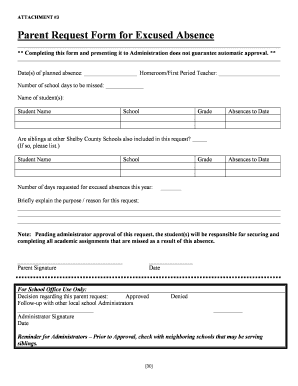
Get Shelby County Schools Parent Request Form For Excused Absence
How it works
-

Open form follow the instructions
-

Easily sign the form with your finger
-

Send filled & signed form or save
How to fill out the Shelby County Schools Parent Request Form For Excused Absence online
This guide provides detailed instructions on how to complete the Shelby County Schools Parent Request Form For Excused Absence online. With clear steps and helpful information tailored to your needs, you can efficiently manage your child's absence requests.
Follow the steps to successfully complete the form online.
- Click the ‘Get Form’ button to access the form and open it in your preferred document editor.
- Enter the date(s) of the planned absence in the designated field.
- Identify and input the name of your child's homeroom or first-period teacher in the appropriate section.
- Specify the number of school days your child will be absent.
- Fill in the name, school, grade, and current absences to date for each child who will be absent.
- If applicable, indicate whether siblings at other Shelby County Schools are included in this request and list their details.
- Provide a brief explanation for the reason behind the request for excused absence.
- Sign the form as the parent or guardian and add the current date.
- Review the completed form for accuracy and make any necessary revisions.
- Once finalized, save your changes, and download, print, or share the form as needed.
Complete the Shelby County Schools Parent Request Form For Excused Absence online today!
Emails to Memphis-Shelby County Schools typically follow a standard format, often comprising the employee's first initial and last name followed by the district's domain. This consistent format facilitates communication with staff members. For inquiries related to student absences, consider referring to the Shelby County Schools Parent Request Form For Excused Absence for accurate procedures.