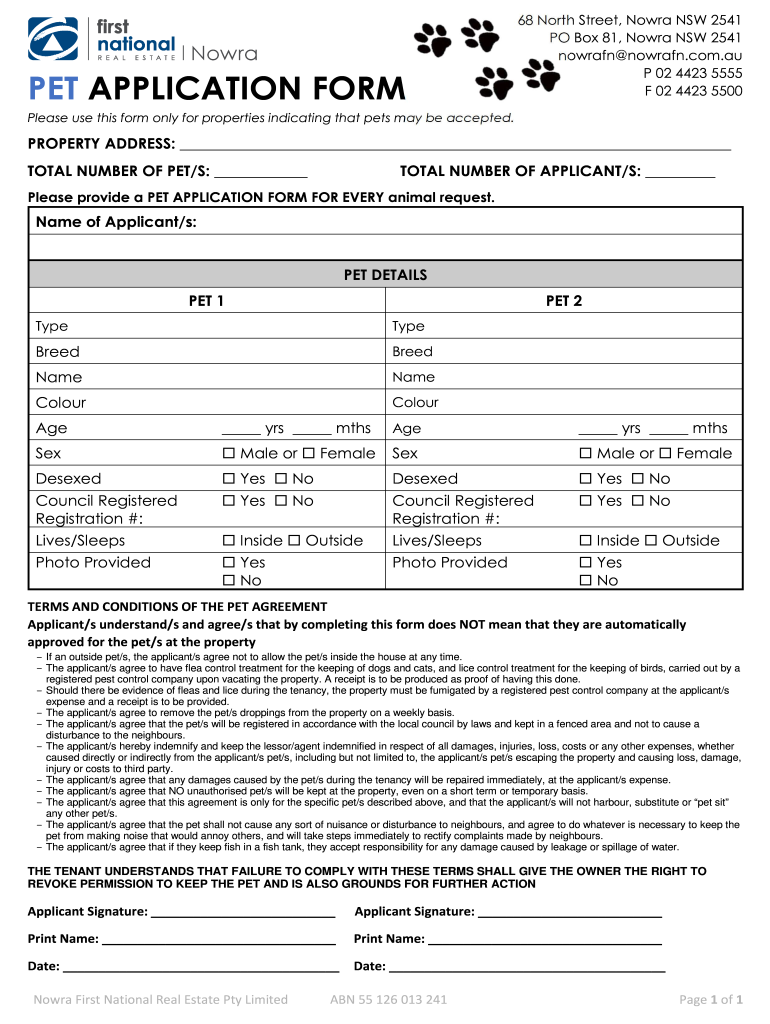
May be accepted. PROPERTY ADDRESS: TOTAL NUMBER OF PET/S: TOTAL NUMBER OF APPLICANT/S: Please provide a PET APPLICATION FORM FOR EVERY animal request. Name of Applicant/s: PET DETAILS PET 1 PET 2 Type Type Breed Breed Name Name Colour Colour Age yrs mths Sex Male or Desexed Yes Council Registered Registration #: Lives/Sleeps Photo Provided Yes Inside Yes No Female A.
Loading

Open form follow the instructions

Easily sign the form with your finger

Send filled & signed form or save
How to fill out the AU Nowra Pet Application Form online
Completing the AU Nowra Pet Application Form online is a straightforward process designed to help applicants provide necessary information about their pet(s) and secure approval for them at designated properties. This guide will walk you through each section of the form to ensure that you submit a complete and accurate application.
Follow the steps to complete your application effortlessly.
- Press the ‘Get Form’ button to obtain the AU Nowra Pet Application Form and open it for editing.
- Begin by filling out the property address where you wish to keep your pet(s). Provide details of the total number of pets you will be applying for, as well as the total number of applicants submitting the form.
- For each pet you plan to request, fill out the specific sections designated for pet details. This includes the type of pet, breed, name, color, age (in years and months), and whether they are desexed. Ensure that you accurately complete this information for each pet by utilizing separate sections for multiple pets.
- Indicate whether the pet is council registered and provide the registration number, if applicable. Additionally, specify where the pet will live or sleep, and whether you have provided a photo of the pet.
- Review the terms and conditions of the pet agreement carefully. Acknowledge that completing the form does not guarantee approval and ensure you understand your responsibilities regarding pet care and property maintenance.
- Sign and print your name on the application form along with the date of completion. If there are multiple applicants, ensure all signatures and printed names are collected.
- Once you have completed all fields and reviewed your application to ensure accuracy, proceed to save your changes. You may also have the option to download, print, or share the completed form as directed in the online interface.
Submit your pet application online today to secure a comfortable home for your furry companions.
Experience a faster way to fill out and sign forms on the web. Access the most extensive library of templates available.
Related content
Each participant must sign a consent form prior to enrollment in the trial to document...
Sep 24, 2025 — January Term at Saint Mary's College offers a curriculum of rigorous...
Forms and Form Letters. A fairly typical set of forms and form letters are described...
Get answers to your most pressing questions about US Legal Forms API.
What are the new dog laws in NSW?
Recent changes to dog laws in NSW focus on responsible pet ownership and public safety. These laws may include regulations on leash requirements and increased penalties for neglect. Staying informed is crucial, and using the AU Nowra Pet Application Form can help you navigate any registration changes related to these new laws.
What do you need to register a dog in NSW?
To register a dog in NSW, you need to provide personal details, your dog's microchip information, and proof of sterilization if your pet is desexed. This information helps local councils keep accurate records of pets in the community. The AU Nowra Pet Application Form can guide you through collecting all necessary details for registration.
How do I register my companion animal in NSW?
Registering your companion animal in NSW involves filling out the required forms and submitting them to your local council. You'll need to provide specific details about your animal and proof of desexing if applicable. The AU Nowra Pet Application Form simplifies this process, allowing you to register with ease.
What documents do I need to register my dog in NSW?
To register your dog in NSW, you typically need proof of identity, such as your driver's license, and information about your dog, including microchip details. If your dog is desexed, provide relevant certificates as well. Completing the AU Nowra Pet Application Form can help ensure you gather all necessary documents efficiently.
How do I contact the NSW pet registry?
You can contact the NSW pet registry via their official website or through local council offices. They often provide phone and email support for inquiries. For a seamless experience, consider using the AU Nowra Pet Application Form to handle registration and subsequent communications.
What happens if you don't register your dog in NSW?
If you don't register your dog in NSW, you may face penalties, including fines. Additionally, unregistered dogs can pose challenges if they stray or need medical attention. It's essential to fill out the AU Nowra Pet Application Form to secure your pet's registration and avoid these issues.
How do I register my pet with Hume Council?
To register your pet with Hume Council, complete the AU Nowra Pet Application Form found on their official website. You’ll need to provide relevant information such as your pet's details, your contact information, and any necessary documents. After submitting your application, Hume Council will review it and issue a registration confirmation once approved.
What is the pet limit in Hume City Council?
In Hume City Council, the pet limit typically allows you to have up to two dogs and two cats per household. However, exceptions may apply based on property size or special permits. It’s important to check with your local council for specific regulations. The AU Nowra Pet Application Form can help register your animals within these guidelines.
Why should I register my pet with the local council?
Registering your pet with the local council helps keep your animal safe and secure. It allows councils to track pet ownership and assists in reuniting lost pets with their owners. Moreover, registration may be required by law in your area, making it an essential step for responsible pet ownership. Use the AU Nowra Pet Application Form to start the process.
How do I change the owner of my companion animal register in NSW?
To change the owner of your companion animal in NSW, you must submit a request to your local council along with details of the current and new owners. This process includes completing specific forms, which may be available online. The AU Nowra Pet Application Form can assist you in this transition, making it straightforward and compliant with regulations.
Use professional pre-built templates to fill in and sign documents online faster. Get access to thousands of forms.
If you believe that this page should be taken down, please follow our DMCA take down process here.