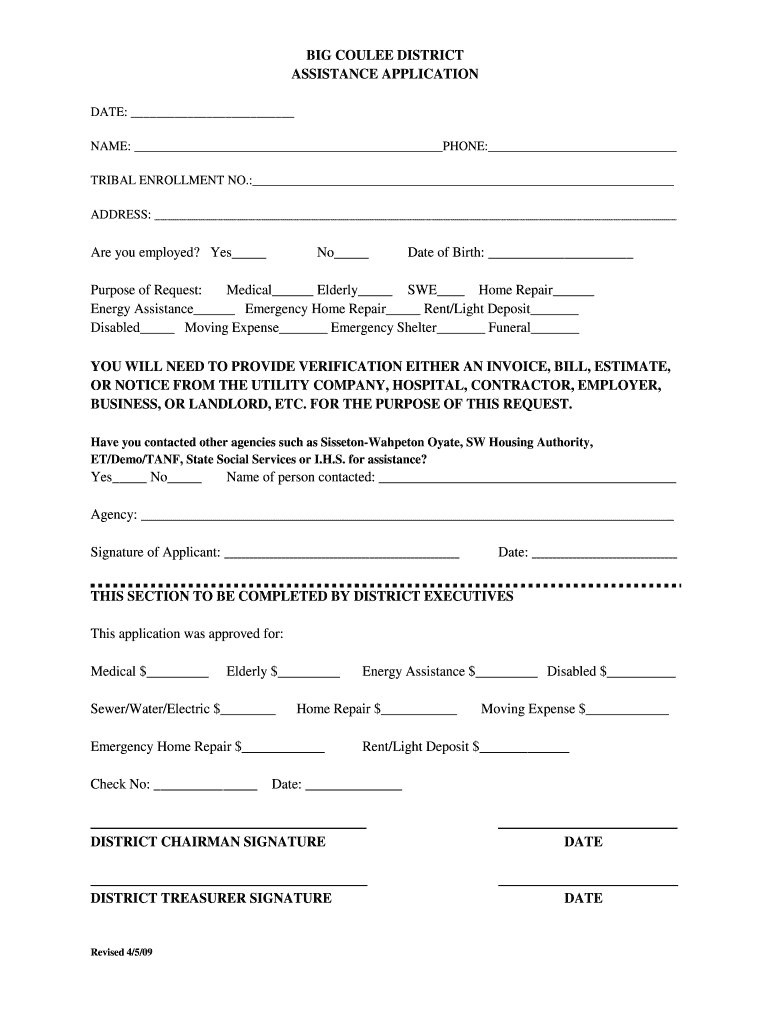
ADDRESS: Are you employed? Yes No Date of Birth: Purpose of Request: Medical Elderly SWE Home Repair Energy Assistance Emergency Home Repair Rent/Light Deposit Disabled Moving Expense Emergency Shelter Funeral YOU WILL NEED TO PROVIDE VERIFICATION EITHER AN IN.
Loading

Open form follow the instructions

Easily sign the form with your finger

Send filled & signed form or save
How to fill out the SD Big Coulee District Assistance Application online
Filling out the SD Big Coulee District Assistance Application online can be a straightforward process when approached step by step. This guide will ensure that you provide all necessary information accurately and efficiently to facilitate your application.
Follow the steps to successfully complete your application.
- Click ‘Get Form’ button to access the form and open it for editing.
- Enter the date at the top of the form in the specified section.
- Provide your name, ensuring it is complete and accurate.
- Fill in your phone number in the designated field.
- If applicable, include your tribal enrollment number.
- Complete your address in the provided space.
- Indicate your employment status by checking either 'Yes' or 'No.'
- Enter your date of birth in the appropriate space.
- Select the purpose of your request by checking the relevant boxes.
- Ensure to gather any necessary verification documents, such as invoices or bills, to support your application.
- Indicate whether you have contacted other agencies for assistance by checking 'Yes' or 'No.'
- If you answered 'Yes,' provide the name of the person you contacted and the agency’s name.
- Sign the application in the required section to confirm the information is accurate.
- Fill in the date next to your signature.
- Once completed, save your changes, and you can choose to download, print, or share the application as needed.
Complete your SD Big Coulee District Assistance Application online for timely assistance.
Experience a faster way to fill out and sign forms on the web. Access the most extensive library of templates available.
Related content
Contact Info: Phone: 605-938-4475. Fax: 605-938-5475. Email: bcdcoordinator79@gmail.com...
The SWC shall exist for the charitable purposes of providing and maintaining a high...
by S Links — Coulee Dam, which remains the Nation's largest hydro- electric facility. A...
Use professional pre-built templates to fill in and sign documents online faster. Get access to thousands of forms.
If you believe that this page should be taken down, please follow our DMCA take down process here.