Loading
Get Uhm Uhm-1 2013
How it works
-

Open form follow the instructions
-

Easily sign the form with your finger
-

Send filled & signed form or save
How to fill out the UHM UHM-1 online
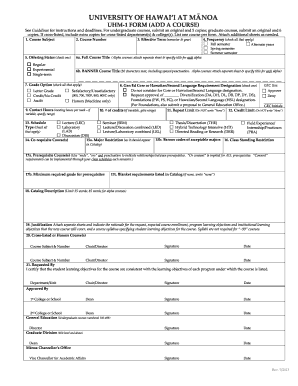
The UHM UHM-1 form is utilized for adding a course at the University of Hawai‘i at Mānoa. This guide will walk you through each section of the form, providing clear instructions to ensure a smooth and efficient submission process.
Follow the steps to successfully complete the UHM UHM-1 form.
- Click the ‘Get Form’ button to access the UHM UHM-1 form online and begin filling it out.
- Enter the course subject in the designated field at the top of the form. Ensure it accurately reflects the subject area of the course you are proposing.
- Input the course number in the appropriate section. This should be unique to the course and align with the departmental numbering system.
- Select the offering status by checking one of the boxes: Regular, Experimental, or Single-term.
- Specify the effective term by indicating the semester and year you intend for the course to begin.
- Check the frequency of the course. You may select multiple options, including Fall semester, Spring semester, Summer semester, or Alternate years.
- Provide the full course title and the BANNER course title, ensuring that it adheres to the character limits specified.
- Indicate if the course fulfills any General Education Core or Hawaiian/Second Language requirement designations by checking the appropriate box.
- Select the grade option that applies to the course, indicating whether it is a Letter Grade, Satisfactory/Unsatisfactory, Credit/No Credit, Audit, or Honors.
- Input the contact hours, detailing the number of meeting hours per week expected for this course.
- Identify the schedule type by checking all relevant types of instruction: Lecture, Laboratory, Discussion, and any combinations.
- Complete the sections on co-requisites, major restrictions, class standing restrictions, prerequisite courses, and the minimum required grade for prerequisites as applicable.
- Draft the catalog description of the course, ensuring it remains within the word limits provided.
- Attach separate sheets to explain the justification for adding this course, including expected enrollment, learning objectives, and a course syllabus if needed.
- If the course is cross-listed or for honors, provide the additional requisite information in the corresponding fields.
- Finally, gather the necessary approvals from required individuals and ensure signatures are included where indicated.
- Once all sections are completed, save your changes to retain all entered information. You may then download, print, or share the form as needed.
Complete your documents online to ensure an efficient process.
Get form
Experience a faster way to fill out and sign forms on the web. Access the most extensive library of templates available.
Get This Form Now!
Use professional pre-built templates to fill in and sign documents online faster. Get access to thousands of forms.