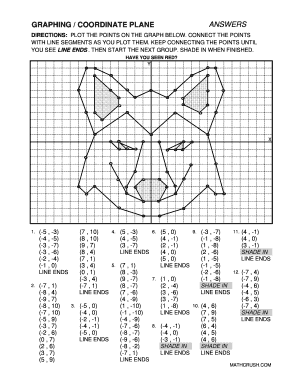
ANSWERSGRAPHING / COORDINATE PLANEDIRECTIONS: PLOT THE POINTS ON THE GRAPH BELOW. CONNECT THE POINTS WITH LINE SEGMENTS AS YOU PLOT THEM. KEEP CONNECTING THE POINTS UNTIL YOU SEE LINE ENDS . THEN.
Open form follow the instructions
Easily sign the form with your finger
Send filled & signed form or save
How to fill out the Graphing Coordinate Plane online
The Graphing Coordinate Plane is a tool designed to assist users in plotting points on a coordinate grid to visualize data. This guide provides comprehensive steps to effectively complete the form online, ensuring clarity and ease of use.
Follow the steps to fill out the Graphing Coordinate Plane form successfully.
- Press the ‘Get Form’ button to access the Graphing Coordinate Plane form and launch it in your preferred editor.
- Familiarize yourself with the coordinate grid provided. Notice the axes labeled 'X' for horizontal and 'Y' for vertical, which will guide you in plotting your points.
- Begin plotting the points as indicated in the provided list. For each set of coordinates, locate the correct position on the graph by finding the intersection of the X and Y values.
- Once you have plotted the points, connect them using line segments. Continue connecting points until you reach the designated line ends, which will signal a completion of that grouping.
- After finishing the line segments, review any additional instructions related to shading areas as specified in the directions.
- If prompted, shade in the regions as indicated throughout the instructions to visually differentiate them on the graph.
- Check your work for accuracy. Ensure all points are plotted correctly, connections made smoothly, and shading completed as per the guidance.
- When you are satisfied with your completed graphing, use the provided options to save your changes, download a copy, print the document, or share it with others.
Complete your Graphing Coordinate Plane form online now for a seamless experience!
Experience a faster way to fill out and sign forms on the web. Access the most extensive library of templates available.
Related content
Desmos Graph Desmos Explore math with our beautiful free online graphing calculator. Graph...
The coordinate plane is formed by a horizontal axis (x-axis) and a vertical axis (y-axis)...
Sep 29, 2025 — A coordinate system is a method of expressing positions using numbers or...
Get answers to your most pressing questions about US Legal Forms API.
How do you graph a coordinate plane?
To graph a coordinate plane, start with a blank grid and draw horizontal and vertical lines to create x and y axes. Mark units along both axes for clarity. Place points according to their coordinates, linking them as needed to visualize functions and relationships effectively. This structured approach enhances your skills in using the graphing coordinate plane.
What are quadrants 1, 2, 3, and 4 called?
Quadrant 1 is known as the positive quadrant, where both x and y values are positive. Quadrant 2 contains negative x-values and positive y-values. In Quadrant 3, both coordinates are negative, and Quadrant 4 has positive x-values and negative y-values. Each quadrant plays a vital role in understanding the overall layout of the graphing coordinate plane.
How to graph on a coordinate plane?
To graph on a coordinate plane, begin by drawing two intersecting lines that represent the x and y axes. Next, identify your points using their coordinates, marking each point accurately based on its x and y values. Practice plotting multiple points, as this helps you visualize relationships between them on the graphing coordinate plane.
What are the 4 types of coordinate systems?
The four types of coordinate systems include Cartesian, polar, cylindrical, and spherical. The Cartesian system uses perpendicular axes for positioning points, while polar coordinates rely on angles and distances. Each system has its own applications and advantages on a graphing coordinate plane. Understanding these systems enriches your graphing skills.
How to find xy and z coordinates?
To find xy and z coordinates, start with your x and y values as in a two-dimensional plane. For three-dimensional space, add the z-coordinate, which represents depth. This trio of coordinates effectively describes a position in 3D on a graphing coordinate plane.
How to write coordinates in a graph?
Coordinates are written as pairs of numbers, showing the x and y values in parentheses, like this: (x, y). Begin with the x-coordinate followed by a comma, then include the y-coordinate. Properly writing your coordinates simplifies locating points on the graphing coordinate plane.
When graphing, do you go up or down first?
When graphing coordinates, you always start by moving left or right based on the x-coordinate. After positioning yourself horizontally, you then look at the y-coordinate to determine whether to move up or down. This approach helps you accurately place points on the graphing coordinate plane.
How do you plot the point (-6, 2) on a graph?
To plot the point (-6, 2) on a graph, start by locating the x-coordinate, which is -6. Move six units left from the origin along the x-axis. Next, find the y-coordinate, which is 2, and move up two units from that new position. The intersection of these movements marks the point on the graphing coordinate plane.
How to find coordinates for a graph?
Finding coordinates for a graph involves identifying key points you wish to represent. You can determine coordinates from existing data or create them based on function values. By choosing appropriate x-values, calculate the corresponding y-values to outline points on your graphing coordinate plane effectively.
How to graph on an xyz plane?
Graphing on an xyz plane involves plotting three dimensions: x, y, and z. First, identify your x, y, and z coordinates. Visualize the graph with the x and y axes in a flat surface, while the z-axis extends vertically above or below. This method allows for a comprehensive representation of points in three-dimensional space.
Use professional pre-built templates to fill in and sign documents online faster. Get access to thousands of forms.
If you believe that this page should be taken down, please follow our DMCA take down process here.