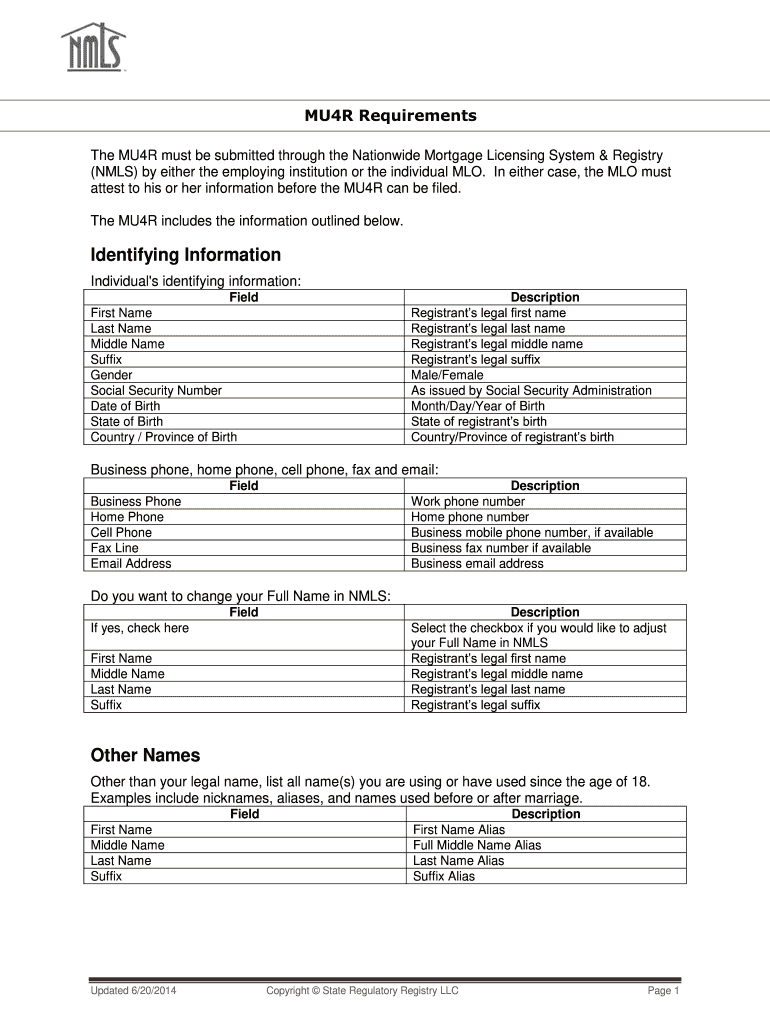
NATIONWIDE MORTGAGE LICENSING SYSTEM & REGISTRY MU4R Requirements The MU4R must be submitted through the Nationwide Mortgage Licensing System & Registry (NMLS) by either the employing institution.
Loading

Open form follow the instructions

Easily sign the form with your finger

Send filled & signed form or save
How to fill out the Mu4r online
The Mu4r form is an essential document that must be submitted through the Nationwide Mortgage Licensing System & Registry (NMLS) by mortgage loan originators or their employing institutions. This guide provides clear, step-by-step instructions on how to efficiently complete the Mu4r online.
Follow the steps to complete your Mu4r form online.
- Press the ‘Get Form’ button to access the Mu4r document and open it in your online editor.
- Begin by filling in the identifying information section. Provide your first name, last name, middle name, suffix, gender, social security number, date of birth, state of birth, and country or province of birth as prompted.
- Next, enter your contact information. Fill out your business phone number, home phone number, cell phone number, fax number, and your business email address in the corresponding fields.
- If you wish to change your full name in the NMLS, check the indicated option and provide your new first name, middle name, last name, and suffix.
- In the 'Other Names' section, list any aliases, nicknames, or names you have used since the age of 18, filling out the fields for first name, middle name, last name, and suffix as necessary.
- Input your current residence details by entering your current street address, city, state, country or province, and postal code.
- For your employment history, provide the name of your current employer, their NMLS ID, start date, work location address, and indicate whether your employment is finance-related.
- If applicable, list your prior financial services-related employment, including employer name, start and end dates, work location, and specify if this was finance-related.
- Answer the disclosure questions truthfully. Indicate 'Yes' or 'No' as appropriate for each disclosure question regarding any criminal, civil, or regulatory actions.
- If you have answered 'Yes' to any disclosures, provide details in the 'Description of Disciplinary Action' section and upload any supporting documents as required.
- Fill out the demographic information for the criminal background check, including eye color, hair color, height, weight, and race.
- Review all completed sections for accuracy before proceeding to the final submission.
- Finally, once your Mu4r form is accurately filled out, save your changes, and then download, print, or share the form as needed.
Complete your Mu4r submission online today to ensure your compliance and timely processing.
Experience a faster way to fill out and sign forms on the web. Access the most extensive library of templates available.
Related content
NATIONWIDE MORTGAGE LICENSING SYSTEM & REGISTRY MU4R Requirements The MU4R must be...
... MU4R questions and registration required for employment in this position. Individuals...
Get answers to your most pressing questions about US Legal Forms API.
What is a MU2 filing?
A MU2 filing is a specific submission made to document the roles and information of individuals involved in the mortgage transaction, particularly those with significant influence over the process. This filing plays a crucial role in maintaining compliance with regulatory requirements. With the Mu4r platform, you can streamline your MU2 filings, making the process simpler and more efficient, reducing the chances of errors or omissions.
What is MU4?
MU4 is a specific form used in the mortgage lending industry designed to collect essential information from borrowers. This form is critical for helping lenders assess a borrower's financial situation and eligibility for loans. Utilizing Mu4r can simplify the collection and submission of this data, ensuring you meet compliance requirements while providing a seamless experience for your clients.
What does MU4 mean?
MU4 refers to the Uniform Mortgage Data Program, which standardizes the data that lenders submit to the Consumer Financial Protection Bureau. This ensures consistency, reliability, and compliance in mortgage applications. Having a clear understanding of MU4 enhances your ability to navigate the mortgage landscape effectively. By using the Mu4r platform, you gain access to streamlined processes that reduce confusion and increase accuracy.
How to fill out a mortgage form?
Filling out a mortgage form can feel daunting, but with Mu4r, the process becomes smooth and straightforward. Start by gathering essential documents, such as your income statements, credit history, and property details. Next, carefully enter your information in the designated fields, ensuring accuracy to avoid delays. If you encounter any challenges, the U.S. Legal Forms platform provides helpful resources and guidance, making it easy for you to complete your mortgage form effectively.
What is the difference between MU4 and MU4R?
Every mortgage loan originator (whether state-licensed or federally registered) is required to complete a CBC in NMLS. The Criminal Background Check Authorization Request is required for submission of the application form (Form MU4 for state licensing, Form MU4R for federal registration).
Use professional pre-built templates to fill in and sign documents online faster. Get access to thousands of forms.
If you believe that this page should be taken down, please follow our DMCA take down process here.