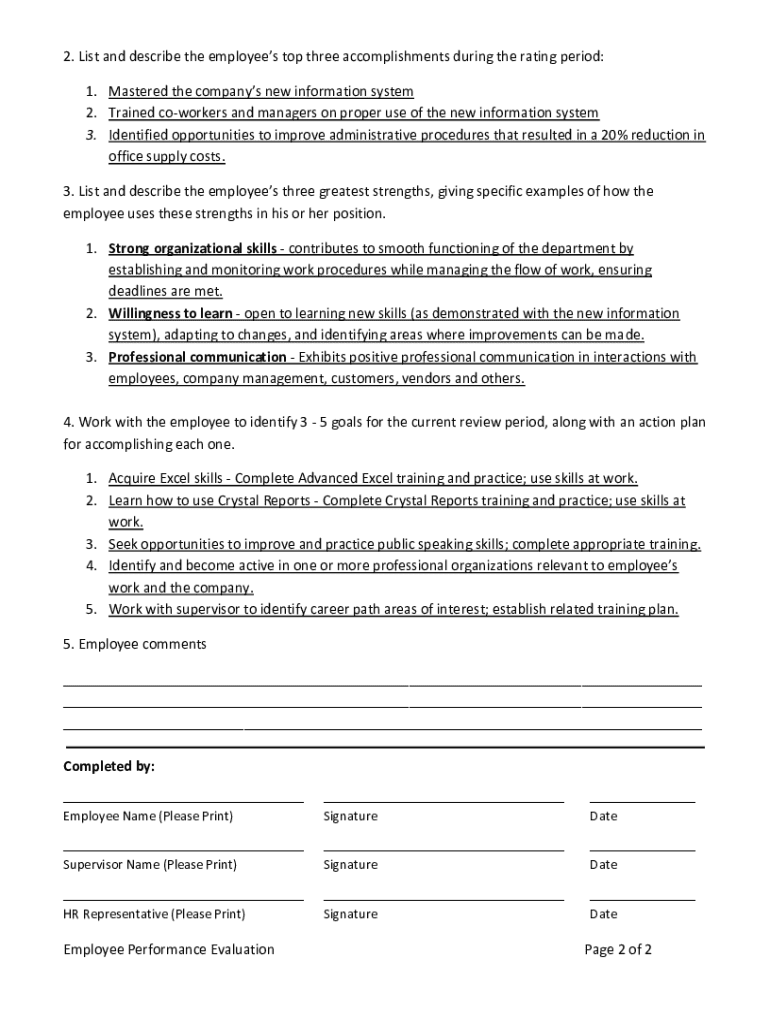
Employee Performance Evaluation Employee Name First Name Last Name Position Administrative Assistant Review Period 7/15/2011 7/15/2012 Department Operations Employee Number 0347 Prepared by Supervisor.

Open form follow the instructions

Easily sign the form with your finger

Send filled & signed form or save
How to fill out the Sample Completed Employee Performance Evaluation online
Filling out the Sample Completed Employee Performance Evaluation online can streamline the performance review process and ensure clarity in assessing employee contributions. This guide will walk you through each section of the evaluation form, providing detailed instructions tailored to your needs.
Follow the steps to effectively complete the employee performance evaluation form.
- Press the ‘Get Form’ button to access the evaluation form and open it in the editor.
- Begin by entering the employee's name in the designated field for 'Employee Name,' ensuring you include their first and last name.
- Then, specify the employee's position by filling in the 'Position' field accordingly, such as 'Administrative Assistant.'
- Next, indicate the review period by entering the start and end dates in the 'Review Period' section.
- In the 'Department' field, specify the department to which the employee belongs, for instance, 'Operations.'
- Fill out the 'Employee Number' section with the respective identification number assigned to the employee.
- In the 'Prepared by' section, enter the name of the supervisor who is completing the evaluation and the corresponding date.
- Proceed to evaluate the employee's performance in various areas, commenting on strengths and suggestions for improvement within the listed categories: Computer Skills, Customer Service, Initiative, Problem Solving, Teamwork, Co-worker Relations, Work Ethic, Adaptability, Commitment to Company Mission, and Professional Growth.
- List the employee's top three accomplishments during the review period in the designated section, ensuring you provide a clear description for each.
- Identify and describe the employee's three greatest strengths, providing specific examples of how they utilize these strengths in their current role.
- Work collaboratively with the employee to set 3 - 5 goals for the upcoming review period and develop an actionable plan for achieving each goal.
- In the 'Employee comments' section, allow the employee to provide feedback, expressing any thoughts or reflections regarding their evaluation.
- Finally, ensure that the document is signed by both the employee and the supervisor, as well as an HR representative if necessary, and add the date for each signatory.
Complete your employee performance evaluations online today for a more efficient review process.
Experience a faster way to fill out and sign forms on the web. Access the most extensive library of templates available.
Related content
WORK PRODUCT - The quality and quantity of work produced by the employee. · Does not...
I acknowledge that I have had the opportunity to discuss this performance evaluation with...
Get answers to your most pressing questions about US Legal Forms API.
What are the 5 most meaningful questions to ask in a performance review as a leader?
The five meaningful questions a leader should ask in a performance review include: What accomplishments are you most proud of? What challenges hinder your performance? How do you envision your role evolving? What support do you need for our goals? How can I assist you in achieving your objectives? These questions encourage dialogue and reflection, aligning well with the Sample Completed Employee Performance Evaluation framework.
How to write an employee evaluation example?
Writing an employee evaluation example typically starts with a clear structure outlining objectives, achievements, and recommended improvements. Consider the Sample Completed Employee Performance Evaluation as a guide to ensure your evaluation is comprehensive and meaningful. Include specific instances that illustrate the employee’s performance and contributions. This specificity enriches the evaluation experience.
How to acknowledge a performance evaluation sample?
Acknowledging a performance evaluation sample requires an open mindset and professional attitude. It's essential to review the feedback meticulously and identify key takeaways. Use a format akin to the Sample Completed Employee Performance Evaluation to express gratitude, ask clarifying questions, and discuss improvement strategies. This fosters continuous development and shows commitment.
How to fill an annual performance evaluation report?
To complete an annual performance evaluation report, start by reviewing the employee's yearly performance, including contributions and setbacks. Reference the Sample Completed Employee Performance Evaluation for a suitable format, ensuring it encapsulates growth areas and future goals. This organized approach helps articulate a comprehensive evaluation that can guide both the employee’s and the organization's future.
How to fill out an employee evaluation sample?
Filling out an employee evaluation sample involves collecting relevant information and feedback specific to the employee's performance. Use a structured approach similar to a Sample Completed Employee Performance Evaluation by breaking down areas such as competencies, objectives, and comments. Offer detailed insights and cite examples where possible. This enhances the feedback’s effectiveness.
How to document a performance review?
Documenting a performance review is crucial for future reference and accountability. Begin by outlining key points such as goals, performance metrics, and any challenges faced by the employee. Ensure that your documentation aligns with the Sample Completed Employee Performance Evaluation structure. This consistency aids in clarity and reinforces the significance of the feedback provided.
How to fill out an employee performance evaluation?
To fill out an employee performance evaluation effectively, start by gathering necessary performance data. Focus on specific achievements, challenges, and areas for growth while referencing the Sample Completed Employee Performance Evaluation. Structure your evaluation clearly, using established metrics and providing constructive feedback. This will help in creating a meaningful and fair assessment.
What are the 5 words performance review sample?
A useful performance review sample often includes five key words: objectives, feedback, evaluation, improvement, and goals. These words highlight the essential elements of the review process. Utilizing these terms in a Sample Completed Employee Performance Evaluation can enhance clarity and focus. This structured approach allows both the reviewer and the employee to align on performance outcomes.
How do I ask for a review without sounding desperate?
To ask for a review without sounding desperate, frame your request around your professional development and growth. Emphasize your commitment to improvement by saying something like, 'I would value your constructive feedback on my performance.' Referencing a sample completed employee performance evaluation can demonstrate your seriousness and provide context for your request.
How to politely ask for a performance review?
Start by expressing gratitude for the opportunity to receive feedback. You can then kindly ask for a performance review by saying something like, 'I would appreciate your thoughts on my performance, as it is important for my professional growth.' A well-structured approach, perhaps using a sample completed employee performance evaluation as a reference, can make this request clearer.
Use professional pre-built templates to fill in and sign documents online faster. Get access to thousands of forms.
If you believe that this page should be taken down, please follow our DMCA take down process here.