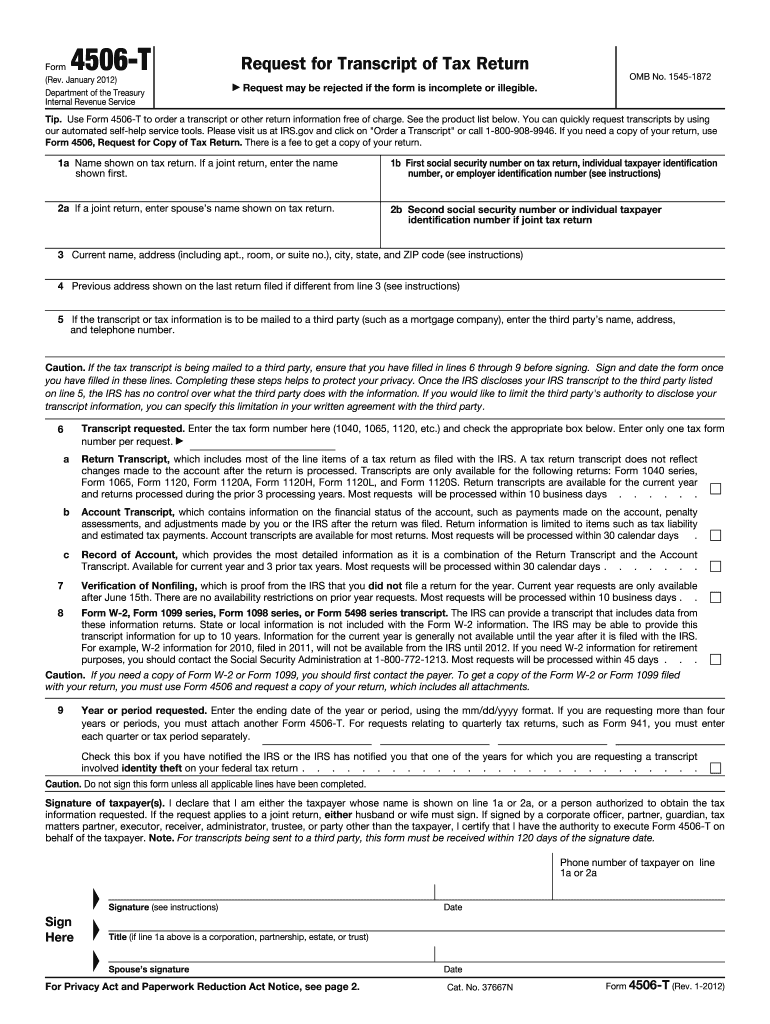
545-1872 Tip. Use Form 4506-T to order a transcript or other return information free of charge. See the product list below. You can quickly request transcripts by using our automated self-help service tools. Please visit us at IRS.gov and click on "Order a Transcript" or call 1-800-908-9946. If you need a copy of your return, use Form 4506, Request for Copy of Tax Return. There is a fee to get a copy of your return. 1a Name shown on tax return. If a joint return, enter the name shown first. 1.
Loading

Open form follow the instructions

Easily sign the form with your finger

Send filled & signed form or save
How to fill out the 4506 T Form Printable online
Filling out the 4506 T Form Printable is essential for requesting a transcript of your tax return. This guide will provide you with a clear and straightforward approach to completing the form effectively.
Follow the steps to fill out the 4506 T Form Printable online
- Click ‘Get Form’ button to obtain the form and open it in the editor for filling out.
- In line 1a, enter the name as shown on your tax return. If it is a joint return, include the name that appears first.
- On line 1b, provide the first Social Security number, Individual Taxpayer Identification Number (ITIN), or Employer Identification Number (EIN) displayed on the tax return.
- If applicable, fill in line 2a with your spouse’s name as shown on the tax return for a joint return. Enter the second Social Security number or ITIN in line 2b.
- In line 3, specify your current address, including any apartment, room, or suite number. Ensure accuracy for correspondence.
- For line 4, input the previous address as shown on your last return filed if it differs from line 3.
- If the transcript is to be sent to a third party, enter their name, address, and telephone number in line 5.
- Indicate the type of transcript you require on line 6 by entering the tax form number (1040, 1065, etc.) and checking the appropriate box.
- Complete line 9 with the ending date of the tax year or period you are requesting, using the mm/dd/yyyy format.
- Sign and date the form as a declaration that you are either the taxpayer or an authorized individual. Ensure all applicable lines are filled before signing.
- After completing the form, you can save changes, download it, print, or share as necessary.
Complete your documents online confidently and ensure all information is accurate!
Experience a faster way to fill out and sign forms on the web. Access the most extensive library of templates available.
Related content
A representative can sign. Form 4506-T for a taxpayer only if the taxpayer has...
A representative can sign. Form 4506-T for a taxpayer only if the taxpayer has...
Jan 23, 2018 — Mail Form 4506-T or Form 4506T-EZ (both available on IRS.gov). Using...
Get answers to your most pressing questions about US Legal Forms API.
How to fill out 4506-T for verification of non-filing?
To complete Form 4506-T for verification of non-filing, begin by entering your personal information and the years for which you need the verification. Be sure to check the box for verification of non-filing to ensure the IRS processes your request correctly. Use the 4506 T Form Printable as your guide, and consider seeking assistance from USLegalForms if you need help navigating the form. This will provide clarity and make the submission process smoother.
How do I get a non-filing verification form from the IRS?
To receive a non-filing verification form from the IRS, you should complete Form 4506-T. This form will allow you to request verification for the years you did not file taxes. You can download the 4506 T Form Printable online, fill it out, and submit it via mail or fax. By using USLegalForms, you can simplify the process and gain access to necessary forms and guidance.
Can form 4506-T be signed electronically?
Yes, Form 4506-T can be signed electronically when you use certain IRS online services. This feature streamlines the process, allowing you to submit your request quickly without printing and mailing a physical copy. However, make sure the service you are using complies with IRS regulations. Platforms like USLegalForms can assist you in ensuring compliance while utilizing the 4506 T Form Printable.
What is the fastest way to get an IRS transcript?
The fastest way to obtain an IRS transcript is by using the IRS online tool, which allows you to request your transcript in real-time. You can also use Form 4506-T if you prefer submitting by mail, but this takes longer. The 4506 T Form Printable can help you request a transcript for past tax years and get your financial information quickly. For immediate access, try the online option.
How do you submit form 4506-T?
To submit Form 4506-T, you can send the completed form to the IRS by mail or fax, depending on your preference and circumstances. Simply fill out the 4506 T Form Printable with the necessary details, sign it, and choose the appropriate submission method. Ensure you keep a copy for your records. For a more user-friendly experience, consider using USLegalForms to simplify the process.
Can form 4506 T be signed electronically?
Yes, Form 4506-T can be signed electronically, provided that you are using specific IRS-approved methods for e-filing. These electronic signatures help streamline the submission process and are widely accepted by the IRS. If you are preparing the 4506 T Form Printable, ensure that you follow the guidelines for electronic submission to avoid any issues.
What is the fastest way to get my tax return back?
To get your tax return processed and the refund issued as quickly as possible, e-filing remains the optimal option. The IRS generally processes e-filed returns faster than paper returns. If you expect a refund, choosing direct deposit speeds up the delivery. Always remember that if you need records, using the 4506 T Form Printable can be helpful to ensure you have the necessary information.
What is the fastest way to get documents to the IRS?
The fastest way to send documents to the IRS is by using electronic submission methods, including e-filing and online services. For paper submissions, using express delivery services can help speed up the process. If you are submitting Form 4506-T or other documents, make sure to double-check the address before sending. Utilizing the 4506 T Form Printable can help ensure that your request is clear and accurate.
What is the easiest way to get copies of tax returns?
The easiest method to obtain copies of your tax returns is by using the IRS's online tools. However, if you prefer a more traditional route, you can complete Form 4506 and send it to the IRS. This request is straightforward, especially if you have the 4506 T Form Printable handy. You'll need to provide your personal details to facilitate the request.
What is the fastest way to get a copy of your tax return?
The fastest way to retrieve a copy of your tax return is by using the IRS online services. By accessing the IRS website, you can use the Online Account feature, which allows you to view and download your tax documents. Alternatively, submitting Form 4506 can help you request a copy. Using the 4506 T Form Printable streamlines the process and ensures you receive the necessary paperwork quickly.
Use professional pre-built templates to fill in and sign documents online faster. Get access to thousands of forms.
If you believe that this page should be taken down, please follow our DMCA take down process here.