Loading
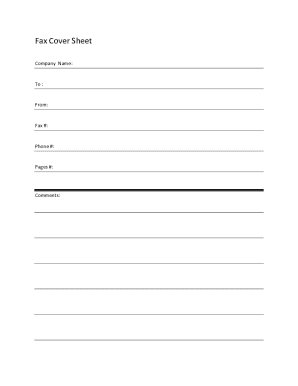
Get Fillable Fax Cover Sheet
How it works
-

Open form follow the instructions
-

Easily sign the form with your finger
-

Send filled & signed form or save
How to fill out the Fillable Fax Cover Sheet online
Filling out a fax cover sheet is an essential step to ensure your communication is clear and professional. This guide will provide you with step-by-step instructions on how to effectively complete the Fillable Fax Cover Sheet online.
Follow the steps to complete the Fillable Fax Cover Sheet.
- Press the ‘Get Form’ button to access the Fillable Fax Cover Sheet and open it in your online editor.
- In the 'Company Name' field, enter the name of your organization or the company sending the fax. This helps the recipient understand who the communication is from.
- Fill in the 'To' field with the name or title of the person receiving the fax. Ensure this is accurate to avoid miscommunication.
- Provide your name in the 'From' section. This identifies you as the sender of the fax.
- Enter the 'Fax #' of the recipient. Double-check this to confirm it is the correct fax number.
- Input your 'Phone #' in case the recipient needs to reach you for clarification or follow-up.
- Indicate the total number of pages being sent in the 'Pages #' field. This helps the recipient ensure they have received the complete fax.
- Use the 'Comments' section to include any additional information or instructions relevant to the fax. This can help clarify the purpose or urgency of the fax.
- Once all fields are filled in accurately, you can save changes, download the completed form, print it if necessary, or share it electronically.
Start filling out your documents online today for a seamless communication experience.
Yes, adding a cover page to a fax is often recommended. A cover page, or fillable fax cover sheet, introduces the contents of your fax and provides essential information about both the sender and the recipient. This practice ensures clarity and professionalism in communication.