We use cookies to improve security, personalize the user experience, enhance our marketing activities (including cooperating with our marketing partners) and for other business use.
Click "here" to read our Cookie Policy. By clicking "Accept" you agree to the use of cookies. Read less
Read more
Accept
Loading
Form preview
  • US Legal Forms
  • Form Library
  • More Forms
  • More Uncategorized Forms
  • Ohio Bureau Of Workers Compensation Form Ic 2

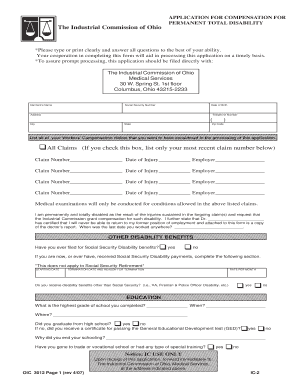
Get Ohio Bureau Of Workers Compensation Form Ic 2

5432109876543212109876543210987654321098765432121098765432109876543210987654321 5432109876543212109876543210987654321098765432121098765432109876543210987654321 5432109876543212109876543210987654321098765432121098765432109876543210987654321 5432109876543212109876543210987654321098765432121098765432109876543210987654321 5432109876543212109876543210987654321098765432121098765432109876543210987654321 5432109876543212109876543210987654321098765432121098765432109876543210987654321 5432109876543212109.

How it works

  1. Open form

    Open form follow the instructions

  2. Easily sign form

    Easily sign the form with your finger

  3. Share form

    Send filled & signed form or save

How to fill out and sign Ohio Bureau Of Workers Compensation Form Ic 2 online?

Get your online template and fill it in using progressive features. Enjoy smart fillable fields and interactivity.Follow the simple instructions below:

The preparation of legal documents can be expensive and time-intensive. Nevertheless, with our ready-made web templates, the process becomes easier.

Now, generating an Ohio Bureau of Workers Compensation Form Ic 2 takes no more than 5 minutes. Our state-specific online forms and straightforward instructions eliminate human errors.

Utilize the quick search and robust cloud editor to create an accurate Ohio Bureau of Workers Compensation Form Ic 2. Eliminate the monotony and produce documents online!

  1. Locate the template in the directory.
  2. Fill in all required details in the relevant fields.
  3. The user-friendly drag-and-drop interface simplifies adding or rearranging fields.
  4. Verify that all information is accurate, without errors or missing elements.
  5. Affix your electronic signature to the PDF document.
  6. Click Done to finalize the changes.
  7. Save the document or print your copy.
  8. Dispatch immediately to the recipient.

Tips on how to fill out, edit and sign Ohio Bureau Of Workers Compensation Form Ic 2 online

How to fill out and sign Ohio Bureau Of Workers Compensation Form Ic 2 online?

Get your online template and fill it in using progressive features. Enjoy smart fillable fields and interactivity.Follow the simple instructions below:

The preparation of legal documents can be expensive and time-intensive. Nevertheless, with our ready-made web templates, the process becomes easier.

Now, generating an Ohio Bureau of Workers Compensation Form Ic 2 takes no more than 5 minutes. Our state-specific online forms and straightforward instructions eliminate human errors.

Utilize the quick search and robust cloud editor to create an accurate Ohio Bureau of Workers Compensation Form Ic 2. Eliminate the monotony and produce documents online!

  1. Locate the template in the directory.
  2. Fill in all required details in the relevant fields.
  3. The user-friendly drag-and-drop interface simplifies adding or rearranging fields.
  4. Verify that all information is accurate, without errors or missing elements.
  5. Affix your electronic signature to the PDF document.
  6. Click Done to finalize the changes.
  7. Save the document or print your copy.
  8. Dispatch immediately to the recipient.

How to modify Get Ohio Bureau Of Workers Compensation Form Ic 2: personalize forms online

Streamline your document creation process and tailor it to your specifications within moments. Complete and endorse Get Ohio Bureau Of Workers Compensation Form Ic 2 with a powerful yet user-friendly online editing platform.

Completing paperwork is frequently challenging, particularly when you manage it sporadically. It requires you to diligently adhere to all formality and accurately fill every field with complete and correct information. However, it often occurs that you need to alter the document or add additional fields to complete. If you need to fine-tune Get Ohio Bureau Of Workers Compensation Form Ic 2 before submission, the simplest method is by utilizing our robust yet straightforward online editing tools.

This all-inclusive PDF editing application enables you to quickly and effortlessly finalize legal documents from any device with internet access, perform essential modifications to the form, and insert extra fillable sections. The service lets you choose a specific area for each type of information, such as Name, Signature, Currency, and SSN, etc. You can make them mandatory or conditional and determine who should fill out each field by assigning them to a particular recipient.

Follow the steps below to enhance your Get Ohio Bureau Of Workers Compensation Form Ic 2 online:

Our editor is a versatile and multifaceted online tool that can assist you in swiftly and effortlessly refining Get Ohio Bureau Of Workers Compensation Form Ic 2, alongside other forms as per your requirements. Reduce document preparation and submission time and ensure your paperwork appears professional without any hassle.

  1. Access the necessary file from the catalog.
  2. Complete the fields with Text and utilize Check and Cross tools on the checkboxes.
  3. Utilize the right-hand toolbar to modify the form with new fillable sections.
  4. Select the areas based on the kind of information you wish to gather.
  5. Designate these fields as mandatory, optional, or conditional and arrange their order.
  6. Assign each section to a particular individual using the Add Signer feature.
  7. Verify that you’ve made all requisite alterations and click Done.

Get form

Experience a faster way to fill out and sign forms on the web. Access the most extensive library of templates available.
Get form

Related content

Industrial Commission -- Forms - Ic.Ohio.Gov
Bureau of Workers' Compensation Forms. R-1 Employer Authorized Representative · R-2...
Learn more
Workers' Compensation FAQ - OSU HR - The Ohio...
2. Do I still have to complete an Employee Accident Report Form when I've ... Time claims...
Learn more
Dayton, Ohio - Wikipedia
Dayton is the sixth-largest city in the state of Ohio and the county seat of Montgomery...
Learn more

Related links form

Rachunek Za Wykonanie Umowy - Zlecenia - Edrukipl Soft Tissue Surgical Modular Laser System - Alta Modular Laser LESSON THREE Facilitation Certification I PreCourse Conference/Win Win Notes Before The Start Of A Online Dynamix Form

Questions & Answers

Get answers to your most pressing questions about US Legal Forms API.

Contact support

An Ohio BWC certificate proves that your business is compliant with workers' compensation coverage requirements. This certificate is essential for employers to verify their insurance status. If you need to obtain or renew this certificate, completing the Ohio Bureau Of Workers Compensation Form Ic 2 through a reliable platform like uslegalforms can simplify the process. Having a valid BWC certificate protects your business and employees.

The 90-day rule in Ohio workers' compensation refers to the requirement that claims must be filed within 90 days of the initial report of an injury or onset of an occupational disease. This timeline is crucial for ensuring your claim is valid and can be processed effectively. Timely filing helps you secure benefits without unnecessary complications.

To file a workers' comp claim in Ohio, start by reporting your injury to your employer as soon as possible. Next, complete the required claim form, including the Ohio Bureau Of Workers Compensation Form Ic 2. Submit this form to your employer or the BWC, ensuring you keep copies for your records.

In Ohio, workers' compensation claims qualify if the injury or illness occurs on the job and arises out of employment. This includes both traumatic injuries, like falls or accidents, as well as occupational diseases caused by workplace conditions. Employees must file the claim using the necessary forms, such as the Ohio Bureau Of Workers Compensation Form Ic 2, to receive benefits.

Yes, Ohio's Bureau of Workers Compensation (BWC) coverage is mandatory for most employers who have one or more employees. This requirement helps to ensure that workers receive necessary medical and wage-loss benefits in case of an injury. However, some exceptions exist, such as certain sole proprietorships or family members of business owners.

Obtaining workers' compensation insurance online in Ohio is straightforward. You can visit the Ohio Bureau of Workers' Compensation website to find authorized insurance providers and complete necessary applications. Additionally, many insurers allow you to apply and receive quotes online, saving you time and effort. The Ohio Bureau Of Workers Compensation Form Ic 2 can guide you through securing coverage efficiently.

You can verify workers' compensation coverage in Ohio by using the online tools provided by the Ohio Bureau of Workers' Compensation. By entering specific details, such as the business name or policy number, you can confirm whether an employer holds valid coverage. This verification helps ensure that you receive necessary benefits, especially in the case of a workplace injury. The Ohio Bureau Of Workers Compensation Form Ic 2 can also lead you to useful resources.

Yes, businesses in Ohio can self-insure their workers' compensation liabilities, but they must meet specific criteria established by the Ohio Bureau of Workers' Compensation. This process involves showing financial stability and a thorough understanding of workers' compensation laws. If you consider self-insurance, it's wise to consult the Ohio Bureau Of Workers Compensation Form Ic 2 for guidance and compliance requirements.

The time it takes to receive workers' compensation benefits in Ohio often depends on the complexity of the claim and the accuracy of the documents submitted. Generally, once your claim is approved, you can expect benefits to start within a few weeks. However, if there are disputes or delays in documentation, it may take longer. Utilizing resources like the Ohio Bureau Of Workers Compensation Form Ic 2 can streamline your claim process.

You can contact the Ohio Bureau of Workers' Compensation via their official website or by calling their customer service line. They provide various contact methods, including email and online chat, making it easy to get the assistance you need. Their representatives can help with questions regarding your claims, coverage, and the Ohio Bureau Of Workers Compensation Form Ic 2 process.

Get This Form Now!

Use professional pre-built templates to fill in and sign documents online faster. Get access to thousands of forms.
Get form
If you believe that this page should be taken down, please follow our DMCA take down processhere.

Industry-leading security and compliance

US Legal Forms protects your data by complying with industry-specific security standards.
  • In businnes since 1997
    25+ years providing professional legal documents.
  • Accredited business
    Guarantees that a business meets BBB accreditation standards in the US and Canada.
  • Secured by Braintree
    Validated Level 1 PCI DSS compliant payment gateway that accepts most major credit and debit card brands from across the globe.
Get Ohio Bureau Of Workers Compensation Form Ic 2
Get form
Form Packages
Adoption
Bankruptcy
Contractors
Divorce
Home Sales
Employment
Identity Theft
Incorporation
Landlord Tenant
Living Trust
Name Change
Personal Planning
Small Business
Wills & Estates
Packages A-Z
Form Categories
Affidavits
Bankruptcy
Bill of Sale
Corporate - LLC
Divorce
Employment
Identity Theft
Internet Technology
Landlord Tenant
Living Wills
Name Change
Power of Attorney
Real Estate
Small Estates
Wills
All Forms
Forms A-Z
Form Library
Customer Service
Terms of Service
Privacy Notice
Legal Hub
Content Takedown Policy
Bug Bounty Program
About Us
Help Portal
Legal Resources
Blog
Affiliates
Contact Us
Delete My Account
Site Map
Industries
Forms in Spanish
Localized Forms
State-specific Forms
Forms Kit
Legal Guides
Real Estate Handbook
All Guides
Prepared for You
Notarize
Incorporation services
Our Customers
For Consumers
For Small Business
For Attorneys
Our Sites
US Legal Forms
USLegal
FormsPass
pdfFiller
signNow
airSlate WorkFlow
DocHub
Instapage
Social Media
Call us now toll free:
+1 833 426 79 33
As seen in:
  • USA Today logo picture
  • CBC News logo picture
  • LA Times logo picture
  • The Washington Post logo picture
  • AP logo picture
  • Forbes logo picture
© Copyright 1997-2025
airSlate Legal Forms, Inc.
3720 Flowood Dr, Flowood, Mississippi 39232
Form Packages
Adoption
Bankruptcy
Contractors
Divorce
Home Sales
Employment
Identity Theft
Incorporation
Landlord Tenant
Living Trust
Name Change
Personal Planning
Small Business
Wills & Estates
Packages A-Z
Form Categories
Affidavits
Bankruptcy
Bill of Sale
Corporate - LLC
Divorce
Employment
Identity Theft
Internet Technology
Landlord Tenant
Living Wills
Name Change
Power of Attorney
Real Estate
Small Estates
Wills
All Forms
Forms A-Z
Form Library
Customer Service
Terms of Service
Privacy Notice
Legal Hub
Content Takedown Policy
Bug Bounty Program
About Us
Help Portal
Legal Resources
Blog
Affiliates
Contact Us
Delete My Account
Site Map
Industries
Forms in Spanish
Localized Forms
State-specific Forms
Forms Kit
Legal Guides
Real Estate Handbook
All Guides
Prepared for You
Notarize
Incorporation services
Our Customers
For Consumers
For Small Business
For Attorneys
Our Sites
US Legal Forms
USLegal
FormsPass
pdfFiller
signNow
airSlate WorkFlow
DocHub
Instapage
Social Media
Call us now toll free:
+1 833 426 79 33
As seen in:
  • USA Today logo picture
  • CBC News logo picture
  • LA Times logo picture
  • The Washington Post logo picture
  • AP logo picture
  • Forbes logo picture
© Copyright 1997-2025
airSlate Legal Forms, Inc.
3720 Flowood Dr, Flowood, Mississippi 39232