We use cookies to improve security, personalize the user experience, enhance our marketing activities (including cooperating with our marketing partners) and for other business use.
Click "here" to read our Cookie Policy. By clicking "Accept" you agree to the use of cookies. Read less
Read more
Accept
Loading
Form preview
  • US Legal Forms
  • Form Library
  • More Forms
  • More Uncategorized Forms
  • Form Ia 1

Get Form Ia 1

5 Feb 2016 ... Since Medicare's inception in 1966, private health care insurers have processedmedical claims for Medicare beneficiaries. Originally these entities were knownas Part A Fiscal Intermediaries.

How it works

  1. Open form

    Open form follow the instructions

  2. Easily sign form

    Easily sign the form with your finger

  3. Share form

    Send filled & signed form or save

How to fill out the Form Ia 1 online

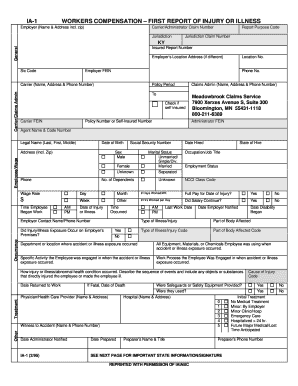
Filling out the Form Ia 1 online may seem challenging, but this guide is here to help you navigate each section confidently. This form is crucial for reporting injuries or illnesses in the workplace, ensuring that all necessary details are captured accurately.

Follow the steps to complete the Form Ia 1 accurately.

  1. Click ‘Get Form’ button to obtain the form and open it in the editor.
  2. Begin with filling in the 'Carrier/Administrator Claim Number' and 'Report Purpose Code.' Make sure to enter the correct jurisdiction and claim number details.
  3. Provide the 'Insured Report Number' and the employer's full name and address, including zip code. Ensure to list the 'Location No.' and 'General SIC Code' accurately.
  4. Fill in the employer’s Federal Employer Identification Number (FEIN), and their location address if it differs from the main address. Also, include a contact phone number.
  5. Input policy period dates, along with the name, address, and phone number of the claims carrier or administrator. Check the box if self-insured.
  6. Complete the employee's legal name (last, first, middle), date of birth, social security number, date hired, and state of hire. Add gender and marital status options.
  7. Fill in the employee's occupation/job title, address, employment status, number of dependents, and NCCI class code.
  8. Record the employee's wage rate and detail their work schedule, including hours worked per day. Indicate if full pay continued for the injury date.
  9. Document the date of injury or illness, time occurred, last work date, and dates when the employer was notified and disability began.
  10. Provide details about the employer's contact, nature of the injury, affected body part, and whether the injury occurred on the employer's premises.
  11. Describe the incident, including any objects or substances involved, and note whether safety equipment was provided and used.
  12. Indicate the type of initial treatment received, and detail the care provider's information along with any witnesses to the accident.
  13. Finalize by entering the date the administrator was notified, the date the form was prepared, and the preparer's contact details.
  14. Review the form for accuracy, then save your changes. Depending on your needs, you can download, print, or share the completed form.

Complete your documents online to ensure a streamlined process.

Get form

Experience a faster way to fill out and sign forms on the web. Access the most extensive library of templates available.
Get form

Related content

workers compensation - Green60
If the accident or illness exposure did not occur on the employer's premises, enter...
Learn more
Form TWCC-1 - Texas Department of Insurance
The employer is required to file an Employer's First Report of Injury or Illness. [DWC...
Learn more
Wavefront .obj file - Wikipedia
OBJ (or .OBJ) is a geometry definition file format first developed by Wavefront...
Learn more

Related links form

ASSESSMENT OF COMPUTER TASK PERFORMANCE -Child Version 30 60 90 Day Plan Template Excel IFLY Utah RELEASE AND WAIVER OF LIABILITY - Astro Camp - Astrocamputah Form NO DIR-3 Application For Allotment Of Director

Questions & Answers

Get answers to your most pressing questions about US Legal Forms API.

Contact support

The primary difference between a CA-1 and a CA-2 form lies in the nature of the injury. A CA-1 is used for traumatic injuries that occur suddenly, while a CA-2 is for occupational diseases or injuries that develop over time. Understanding this distinction is vital for filing the correct claims and receiving benefits. US Legal Forms offers resources to help clarify these differences and assist you with Form IA 1.

The CA-1 form is filled out by federal employees who have sustained a traumatic injury while performing their work tasks. It is important that the affected employee accurately provides details about the injury, circumstances, and any witnesses involved. This clarity helps facilitate the claims process and ensures that employees receive any necessary compensation. You can easily find and complete the CA-1 form on US Legal Forms.

To upload form 10 IA, first, gather all necessary documentation required by your workplace or the governing authority. Next, access the designated upload portal provided by your employer or the relevant agency. Follow the instructions to attach and submit your completed form securely. US Legal Forms supports users by providing templates and guidance for forms like Form IA 1 to streamline this process.

1 form is a document that federal employees complete to report a traumatic injury that occurred while performing jobrelated duties. This form is crucial for processing workers' compensation claims and accessing medical benefits. By filling it out accurately and promptly, employees can ensure they receive proper support during recovery. For ease in obtaining this form, check out US Legal Forms.

You should fill out a CA-1 when you experience an on-the-job injury or illness that requires immediate reporting. It is essential to complete this form as soon as possible to ensure your benefits and rights are protected. Delaying the submission may complicate your claim process. Using our platform, US Legal Forms, can simplify acquiring and submitting the CA-1 form.

When filling out a declaration form, you should begin by entering your full name, address, and contact information. Follow this by providing specific details that are relevant to the declaration, including dates, amounts, or any facts that support your claim. Finally, ensure you read through the entire form before submission for any potential mistakes. US Legal Forms can assist you in crafting a precise and professional form Ia 1.

To fill out a name declaration form, start with your current name and provide the name you wish to declare. Clearly outline the reason for the name change, such as marriage or personal choice. Double-check all the information for accuracy and completeness. For ease, you can leverage US Legal Forms to ensure your form Ia 1 is both compliant and straightforward.

The first report of injury in Louisiana refers to the initial documentation that an employee submits after experiencing a workplace injury. It serves as a formal notification to employers and helps initiate the workers' compensation process. This report typically includes the employee's details, the nature of the injury, and any witnesses present. If filling out this report feels overwhelming, consider using US Legal Forms for a clear template regarding form Ia 1.

To complete declaration form 1, begin by entering all required personal information in the designated fields. Ensure each section is filled out precisely and is easy to read, which minimizes errors during processing. Include any additional information or documents if instructed. For guidance on form Ia 1, US Legal Forms offers excellent templates and examples.

Filling a self-declaration requires you to state your identity, the purpose of declaration, and any relevant facts. You should ensure that the information is truthful and complete to avoid legal issues. Clearly outline the details that support your declaration for clarity. Using resources from US Legal Forms can simplify your work with form Ia 1.

Get This Form Now!

Use professional pre-built templates to fill in and sign documents online faster. Get access to thousands of forms.
Get form
If you believe that this page should be taken down, please follow our DMCA take down processhere.

Industry-leading security and compliance

US Legal Forms protects your data by complying with industry-specific security standards.
  • In businnes since 1997
    25+ years providing professional legal documents.
  • Accredited business
    Guarantees that a business meets BBB accreditation standards in the US and Canada.
  • Secured by Braintree
    Validated Level 1 PCI DSS compliant payment gateway that accepts most major credit and debit card brands from across the globe.
Get Form Ia 1
Get form
Form Packages
Adoption
Bankruptcy
Contractors
Divorce
Home Sales
Employment
Identity Theft
Incorporation
Landlord Tenant
Living Trust
Name Change
Personal Planning
Small Business
Wills & Estates
Packages A-Z
Form Categories
Affidavits
Bankruptcy
Bill of Sale
Corporate - LLC
Divorce
Employment
Identity Theft
Internet Technology
Landlord Tenant
Living Wills
Name Change
Power of Attorney
Real Estate
Small Estates
Wills
All Forms
Forms A-Z
Form Library
Customer Service
Terms of Service
Privacy Notice
Legal Hub
Content Takedown Policy
Bug Bounty Program
About Us
Help Portal
Legal Resources
Blog
Affiliates
Contact Us
Delete My Account
Site Map
Industries
Forms in Spanish
Localized Forms
State-specific Forms
Forms Kit
Legal Guides
Real Estate Handbook
All Guides
Prepared for You
Notarize
Incorporation services
Our Customers
For Consumers
For Small Business
For Attorneys
Our Sites
US Legal Forms
USLegal
FormsPass
pdfFiller
signNow
airSlate WorkFlow
DocHub
Instapage
Social Media
Call us now toll free:
+1 833 426 79 33
As seen in:
  • USA Today logo picture
  • CBC News logo picture
  • LA Times logo picture
  • The Washington Post logo picture
  • AP logo picture
  • Forbes logo picture
© Copyright 1997-2025
airSlate Legal Forms, Inc.
3720 Flowood Dr, Flowood, Mississippi 39232
Form Packages
Adoption
Bankruptcy
Contractors
Divorce
Home Sales
Employment
Identity Theft
Incorporation
Landlord Tenant
Living Trust
Name Change
Personal Planning
Small Business
Wills & Estates
Packages A-Z
Form Categories
Affidavits
Bankruptcy
Bill of Sale
Corporate - LLC
Divorce
Employment
Identity Theft
Internet Technology
Landlord Tenant
Living Wills
Name Change
Power of Attorney
Real Estate
Small Estates
Wills
All Forms
Forms A-Z
Form Library
Customer Service
Terms of Service
Privacy Notice
Legal Hub
Content Takedown Policy
Bug Bounty Program
About Us
Help Portal
Legal Resources
Blog
Affiliates
Contact Us
Delete My Account
Site Map
Industries
Forms in Spanish
Localized Forms
State-specific Forms
Forms Kit
Legal Guides
Real Estate Handbook
All Guides
Prepared for You
Notarize
Incorporation services
Our Customers
For Consumers
For Small Business
For Attorneys
Our Sites
US Legal Forms
USLegal
FormsPass
pdfFiller
signNow
airSlate WorkFlow
DocHub
Instapage
Social Media
Call us now toll free:
+1 833 426 79 33
As seen in:
  • USA Today logo picture
  • CBC News logo picture
  • LA Times logo picture
  • The Washington Post logo picture
  • AP logo picture
  • Forbes logo picture
© Copyright 1997-2025
airSlate Legal Forms, Inc.
3720 Flowood Dr, Flowood, Mississippi 39232