Loading
Get Ct Form Au 766
How it works
-

Open form follow the instructions
-

Easily sign the form with your finger
-

Send filled & signed form or save
How to fill out the Ct Form Au 766 online
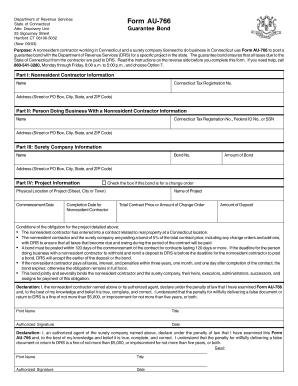
This guide provides a straightforward approach to completing the Ct Form Au 766, a guarantee bond for nonresident contractors in Connecticut. It is designed to support users throughout each step of the online form-filling process, ensuring that all necessary information is accurately provided.
Follow the steps to complete the Ct Form Au 766 with ease.
- Click ‘Get Form’ button to obtain the form and open it in the editor.
- In Part I, provide the name of the nonresident contractor, along with their Connecticut Tax Registration Number and complete address. Ensure that this information matches what is recorded with the Department of Revenue Services.
- Move to Part II and enter the name and complete address of the person doing business with the nonresident contractor. Include their Connecticut Tax Registration Number or, if unavailable, their Federal ID Number or Social Security Number.
- In Part III, fill out the surety company information, including the name, bond number, amount of the bond, and address.
- Proceed to Part IV. Check the box if this bond is related to a change order. Then, detail the name and physical location of the project, along with its commencement and expected completion dates.
- State the total contract price or the amount of the change order, ensuring to indicate if this is an estimate. Calculate 5% of this amount and enter the result for the bond.
- Both the nonresident contractor and the authorized agent of the surety company must sign and date the declaration section, ensuring their names are consistent with those on the bond. The surety company's corporate seal must be affixed.
- Once all sections are completed, save changes, download the form, print it, or share it as needed.
Complete your documents online today for a smoother filing experience.
The online tax portal for Connecticut allows residents to manage their tax obligations easily. This platform provides access to various resources, including filing tax returns and paying taxes. You can also use this portal to handle forms like CT Form Au 766 efficiently and effectively.