Loading
Get Tcrs 1992-2026
How it works
-

Open form follow the instructions
-

Easily sign the form with your finger
-

Send filled & signed form or save
How to fill out the Tcrs online
Filling out the Tcrs form online is a straightforward process that can lead to additional retirement credits. This guide will walk you through each section of the form to ensure accurate completion and submission.
Follow the steps to successfully complete the Tcrs form online.
- Click the ‘Get Form’ button to access the Tcrs form and open it in your preferred editing tool.
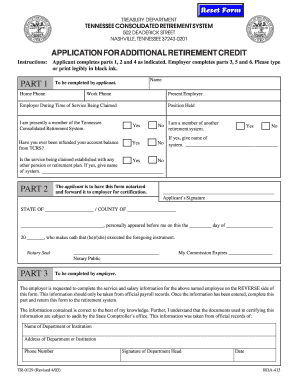
- Begin with Part 1 by entering your full name, home phone, work phone, and the name of your current employer. Indicate if you are a current member of the Tennessee Consolidated Retirement System. Respond to the questions regarding previous account refunds and membership in other retirement systems by checking 'Yes' or 'No' as applicable.
- Proceed to fill in your position held and your employer during the time of service being claimed. Provide additional information about any other pensions or retirement plans associated with your service.
- In Part 2, ensure you sign the form where indicated and have your signature notarized by a notary public. Make sure the details of the notary, including their commission expiration date, are complete.
- Part 3 is to be completed by your employer. Ensure they fill out service and salary information based on official payroll records from the reverse side of the form and return it to the retirement system.
- In Part 4, check your address, date of birth, and social security number for accuracy before certification of service. It’s crucial to ensure all information is complete and correct, as it affects retirement benefits.
- Then, move to Part 5, where your employer certifies the position you held during service. They should indicate any capacities you worked in and the reasons why service was not reported initially. This section requires careful handling to avoid discrepancies.
- Finally, the employer should provide the service and salary information categorized by fiscal year. Ensure all data is entered correctly, following the specified formats for each column.
- Save your completed form, ensuring no errors remain. You can then download, print, or share the form as needed.
Start filling out your Tcrs form online today to secure your retirement credits.
The Tennessee Consolidated Retirement System eligibility extends to full-time employees of state and local government entities who have made contributions. This includes teachers, state employees, and many local government workers. If you feel you might qualify, checking with your employer about your eligibility can be a great first step. It's essential to be informed and proactive about your retirement benefits under TCRS.