Loading
Form preview
  • US Legal Forms
  • Other Templates
  • More Forms
  • More Uncategorized Forms
  • Chase Homeowner Information Packet 2015

Get Chase Homeowner Information Packet 2015-2026

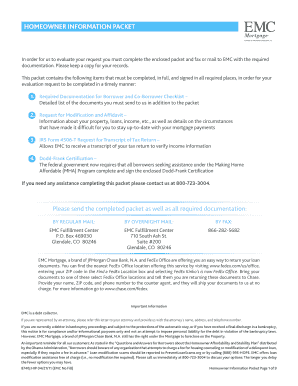
8740J HIP 04/21/11 EMC No Fill Homeowner Information Packet Page 1 of 9 Loan Number Borrower Name s Property Address 1.

How it works

  1. Open form

    Open form follow the instructions

  2. Easily sign form

    Easily sign the form with your finger

  3. Share form

    Send filled & signed form or save

How to fill out the Chase Homeowner Information Packet online

Completing the Chase Homeowner Information Packet online is a crucial step in the evaluation process for mortgage assistance. This guide provides clear instructions on how to effectively fill out each section of the packet to ensure your submission is complete and timely.

Follow the steps to complete your homeowner information packet:

  1. Click ‘Get Form’ button to access the homeowner information packet and open it in your preferred online editor.
  2. Begin with the required documentation checklist. Carefully review the items you need to include, such as pay stubs, tax transcripts, and certification forms.
  3. Fill out the Request for Modification and Affidavit section, providing accurate information regarding your property, loans, and financial circumstances.
  4. Complete IRS Form 4506-T, which allows the servicer to obtain your tax return transcript for income verification. Make sure to sign and date this form.
  5. Sign the Dodd-Frank Certification form verifying your eligibility for the Making Home Affordable program, ensuring you certify your criminal history as related to the mortgage.
  6. Double-check that all fields are filled out, with signatures where required. Ensure all documentation is included as outlined in the checklist.
  7. Once completed, you can save your changes, download, print, or share the form as necessary before sending it to the designated EMC Fulfillment Center.

Start filling out your homeowner information packet online today to take the first step in securing mortgage assistance.

Get form

Experience a faster way to fill out and sign forms on the web. Access the most extensive library of templates available.
Get form

Related content

Homeowner Association Lookup
The Lookup feature displays the boundaries of Homeowner Associations (HOA) in Henrico...
Learn more
A HOME OF YOUR OWN GUIDE
The National Home of Your Own Alliance, established in 1993 at the University of New...
Learn more
Owner's Manual
Please retain this owner's manual for future reference. Homeowner Reference Information...
Learn more

Related links form

Health Education Service Subscription Form Hta Application Form Diabetes Education Program OTN Patient Referral Form - Lmc Hta

Questions & Answers

Get answers to your most pressing questions about US Legal Forms API.

Contact support

Finding your Chase bank account details is easy. Log into your online account or the mobile app, where your account balances and transaction history are visible. If you're looking for more in-depth information, the Chase Homeowner Information Packet can guide you through the process of accessing your account details smoothly.

To access Chase cardholder presales, you should subscribe to notifications from Chase or check the offers section in your account. Cardholder presales often provide exclusive access to tickets before they become available to the general public. For detailed instructions on how to maximize your cardholder benefits, refer to the Chase Homeowner Information Packet.

To obtain a bank verification letter from Chase, you can either visit a local branch or contact customer service. They can provide the necessary letter, often requiring your identification and account information. The Chase Homeowner Information Packet contains helpful steps to expedite this process, ensuring you receive the document quickly.

To find your Chase information, simply log into your Chase account. Your dashboard should display all pertinent information, including account balances and transaction history. If you need assistance and additional resources, the Chase Homeowner Information Packet can serve as a practical tool to guide you through finding specific details.

You can view your Chase card details online by logging into your account and selecting the specific card you wish to review. This section provides information about your card number, expiration date, and recent transactions. If you would like more insights on managing your card, the Chase Homeowner Information Packet offers helpful tips.

Yes, you can access your Chase mortgage online by logging into your Chase account on their website or mobile app. Once logged in, you can view your mortgage details, make payments, and manage your account. For comprehensive guidance, refer to the Chase Homeowner Information Packet, which can help you navigate the online platform effectively.

To find your Chase account address, log into your online account and navigate to the account settings section. There, you should see your registered address displayed clearly. If you cannot access your account online, the Chase Homeowner Information Packet can provide additional information on how to retrieve it through customer service.

You can locate your Chase user ID by visiting the Chase website and clicking on the 'Forgot User ID?' link on the login page. This prompt will guide you through a straightforward recovery process. After entering your account details, you will likely receive your user ID via email or SMS. If you’re unsure or need further help, consider checking the Chase Homeowner Information Packet for more specific instructions.

PO Box 78420 is a mailing address used by Chase Bank for specific correspondence. It is essential for sending documents, payments, or requests securely. If you have questions related to your Chase Homeowner Information Packet, consider referencing this address for direct communication with Chase.

Uploading documents to Chase Mortgage is a straightforward process. You can do this via the Chase secure website or mobile app. For detailed instructions, refer to the information provided in your Chase Homeowner Information Packet, which guides you through each step.

Get This Form Now!

Use professional pre-built templates to fill in and sign documents online faster. Get access to thousands of forms.
Get form
If you believe that this page should be taken down, please follow our DMCA take down processhere.
Get Chase Homeowner Information Packet
Get form
  • Adoption
  • Bankruptcy
  • Contractors
  • Divorce
  • Home Sales
  • Employment
  • Identity Theft
  • Incorporation
  • Landlord Tenant
  • Living Trust
  • Name Change
  • Personal Planning
  • Small Business
  • Wills & Estates
  • Packages A-Z
  • Affidavits
  • Bankruptcy
  • Bill of Sale
  • Corporate - LLC
  • Divorce
  • Employment
  • Identity Theft
  • Internet Technology
  • Landlord Tenant
  • Living Wills
  • Name Change
  • Power of Attorney
  • Real Estate
  • Small Estates
  • Wills
  • All Forms
  • Forms A-Z
  • Other Templates
  • Legal Hub
  • About Us
  • Help Portal
  • Legal Resources
  • Blog
  • Affiliates
  • Contact Us
  • Delete My Account
  • Site Map
  • Industries
  • Forms in Spanish
  • Localized Forms
  • State-specific Forms
  • Forms Kit
  • Real Estate Handbook
  • All Guides
  • Notarize
  • Incorporation services
  • For Consumers
  • For Small Business
  • For Attorneys
  • USLegal
  • FormsPass
  • pdfFiller
  • signNow
  • altaFlow
  • DocHub
  • Instapage
Form Packages
  • Adoption
  • Bankruptcy
  • Contractors
  • Divorce
  • Home Sales
  • Employment
  • Identity Theft
  • Incorporation
  • Landlord Tenant
  • Living Trust
  • Name Change
  • Personal Planning
  • Small Business
  • Wills & Estates
  • Packages A-Z
Form Categories
  • Affidavits
  • Bankruptcy
  • Bill of Sale
  • Corporate - LLC
  • Divorce
  • Employment
  • Identity Theft
  • Internet Technology
  • Landlord Tenant
  • Living Wills
  • Name Change
  • Power of Attorney
  • Real Estate
  • Small Estates
  • Wills
  • All Forms
  • Forms A-Z
  • Other Templates
Customer Service
  • Legal Hub
  • About Us
  • Help Portal
  • Legal Resources
  • Blog
  • Affiliates
  • Contact Us
  • Delete My Account
  • Site Map
  • Industries
  • Forms in Spanish
  • Localized Forms
  • State-specific Forms
  • Forms Kit
Legal Guides
  • Real Estate Handbook
  • All Guides
Prepared for you
  • Notarize
  • Incorporation services
Our Customers
  • For Consumers
  • For Small Business
  • For Attorneys
Our Sites
  • USLegal
  • FormsPass
  • pdfFiller
  • signNow
  • altaFlow
  • DocHub
  • Instapage
Social Media
Call us now toll free:
+1 833 426 79 33
As seen in:
© Copyright 1999-2026 airSlate Legal Forms, Inc. 17 Station Street, Suite 303, Brookline, MA 02445
  • Your Privacy Choices
  • Terms of Service
  • Privacy Notice
  • Content Takedown Policy
  • Bug Bounty Program