Loading
Get Phs 398
How it works
-

Open form follow the instructions
-

Easily sign the form with your finger
-

Send filled & signed form or save
How to fill out the PHS 398 online
Filling out the PHS 398 is a crucial step in the grant application process. This guide will walk you through each section of the form to ensure that you provide all necessary information accurately and efficiently.
Follow the steps to successfully complete the form.
- Click ‘Get Form’ button to obtain the form and open it in your editor.
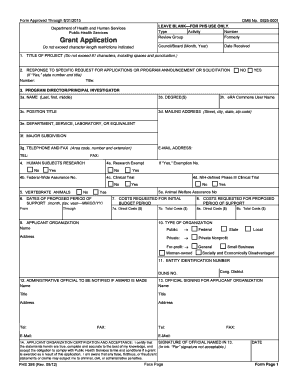
- Fill in the title of your project. Ensure that you do not exceed 81 characters, including spaces and punctuation.
- Indicate if this application is a response to a specific request for applications or program announcements by selecting 'Yes' or 'No.' If 'Yes', provide the number and title.
- Enter the details of the program director or principal investigator. Include their name, degrees, eRA Commons user name, position title, mailing address, department, major subdivision, and telephone/fax details.
- Determine whether your research involves human subjects and answer the corresponding questions regarding exemptions and clinical trials.
- Complete the section regarding vertebrate animals if applicable, and provide the animal welfare assurance number as required.
- Specify the proposed dates for the support period in MM/DD/YY format.
- List the costs requested for the initial budget period and for the proposed period of support. Include both direct and total costs.
- Provide the name of the applicant organization and select the correct type of organization as per the available options, including necessary identification numbers.
- Fill in the details of the administrative official to be notified if the award is made.
- Identify the official signing for the applicant organization. Include their name, title, address, and contact information.
- Include the signature of the official named in the previous step, along with the date of signing.
- Complete the applicant organization certification section acknowledging the accuracy of your statements and acceptance of grant conditions.
- After entering all required information, you can save changes, download, print, or share the completed form as needed.
Complete your PHS 398 online today to move forward with your grant application.
Filling out forms B4 and B4A necessitates careful attention to the specific information required for each section. Referencing the PHS 398 will provide clarity regarding the necessary data for these forms. If you encounter difficulty, consider using resources from US Legal Forms, which can help simplify the process.